
Inspiring
February 18, 2022
Question

how to export to PDF by reducing file size

  • February 18, 2022
  • 3 replies
  • 264 views

Hello,

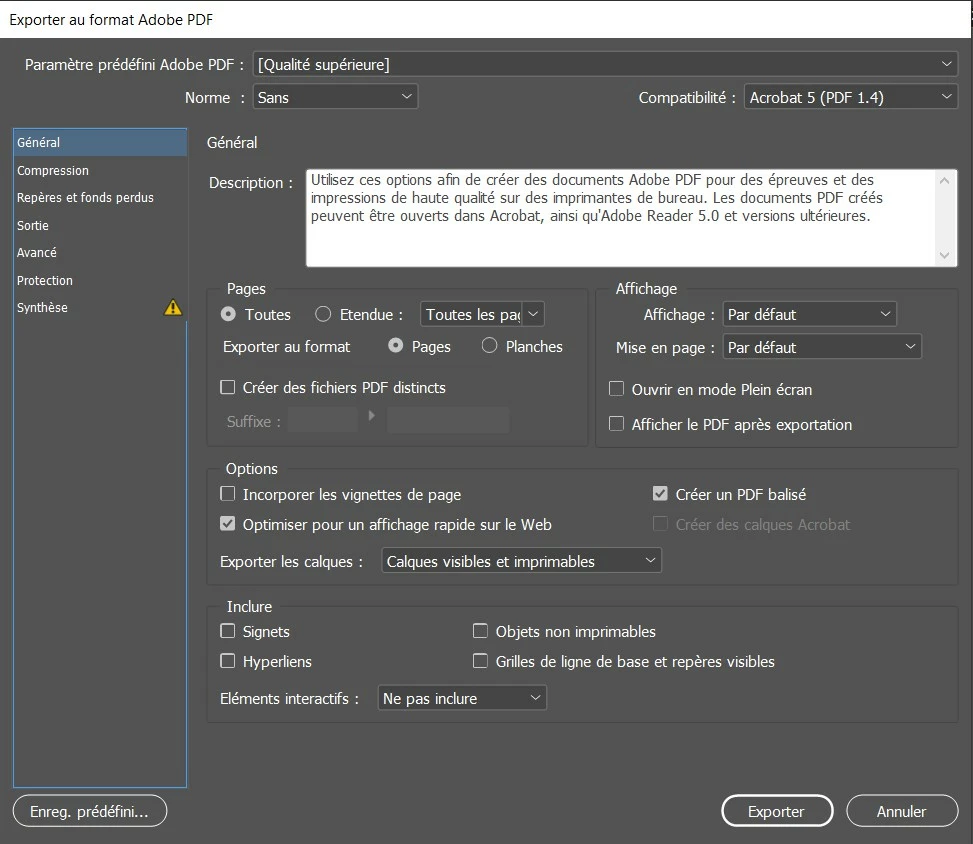
Always about my 4 pages PDF in InDesign, I would like to export it in PDF but by reducing the file size while preserving quality. How to do this ? I would like to keep "superior quality" but by reducing the most possible the file size.

I see in this export to PDF settings, that I cannot remove layers at export to PDF. Do you think layers are making the PDF more heavy ?
 

This topic has been closed for replies.

3 replies

Brainiac
February 18, 2022

Layers in Photoshop use space, but layers in PDF use almost no space. To get a smaller file you must decide what to leave out, or how much to reduce quality. There isn't just a lot of space put in , waiting to be saved....

Inspiring
February 18, 2022

Under that export window, go in to compression on the left side. You can tweak what kind of compression to use to get the desired effects, but there is always drawbacks when reducing the filesize.

Steve Werner
Community Expert
February 18, 2022

There is no single answer to that problem. It's definitely not layers, that cause size, it's the content of the InDesign file, including both raster and vector art. Here's a thread which provides some answers:


https://community.adobe.com/t5/indesign-discussions/reduce-pdf-file-size-when-exporting-from-indesign/td-p/11272241