
Participant
April 18, 2017
Answered

How to export with new page numers

  • April 18, 2017
  • 2 replies
  • 3279 views

Hi,

I need to export a selection of my file and want this export to have new digital page numers. E.g. my document contains 100 pages, I want to export page 80-82 and want these pages to have new digital page numers 1-3.

My document does not conain any page numer boxes, so the page numer is not displayed on the page. When I make an export, the digital page number still shows 80-82 (when viewing it with for example Adobe Acrobat), although it also shows page (1 of 3), see picture.

So to be clear, I want the box where 80 is displayed to show page number 1  and when looking at the second page page number 2 etc.

Does anyone know how to accomplish this?
    This topic has been closed for replies.
    Correct answer Barb Binder

    So you need the numbers to remain 80-82 in the InDesign doc, but renumber 1-3 in the PDF?

    Open the 3-page PDF in Adobe Acrobat DC

    View > Show/Hide > Navigation Panes > Thumbnails

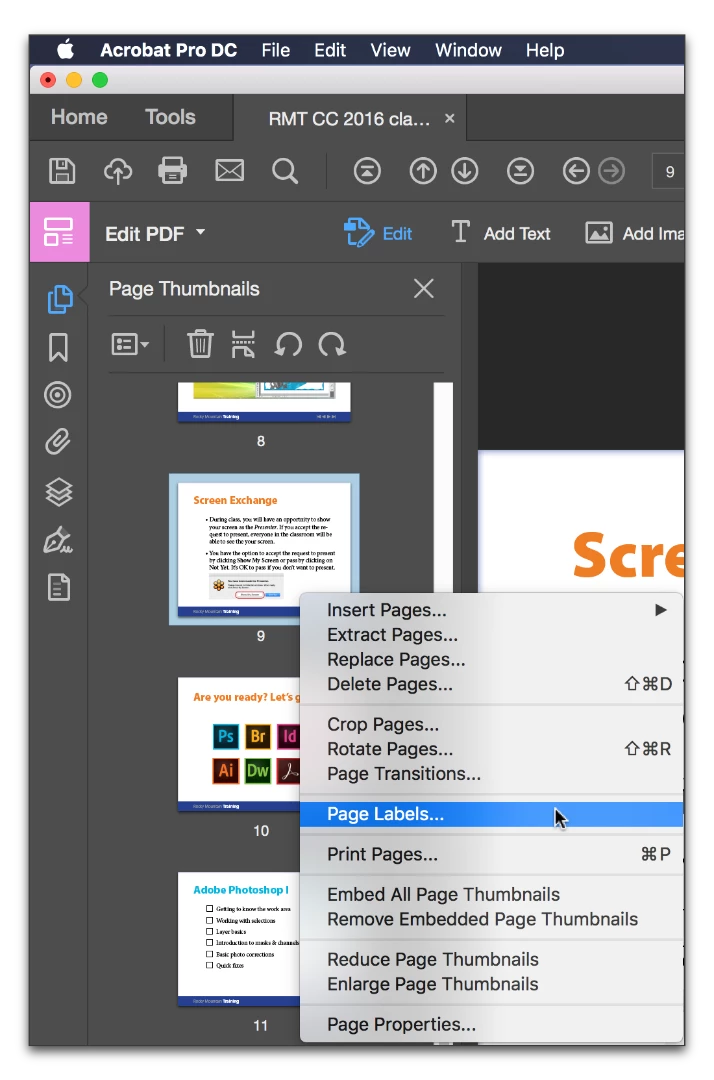
    Right click page 80 > Page Labels

    Choose begin new section, Style 1,2,3, Start at 1.

    If you don't have Acrobat (only Reader) you might save the InDesign document as a new file. Delete the pages before and after pages 80-82, and allow InDesign to renumber the pages in the Pages panel. Then export the 3 pages.

    2 replies

    Barb Binder
    Community Expert
    Barb BinderCommunity ExpertCorrect answer
    Community Expert
    April 18, 2017

    So you need the numbers to remain 80-82 in the InDesign doc, but renumber 1-3 in the PDF?

    Open the 3-page PDF in Adobe Acrobat DC

    View > Show/Hide > Navigation Panes > Thumbnails

    Right click page 80 > Page Labels

    Choose begin new section, Style 1,2,3, Start at 1.

    If you don't have Acrobat (only Reader) you might save the InDesign document as a new file. Delete the pages before and after pages 80-82, and allow InDesign to renumber the pages in the Pages panel. Then export the 3 pages.

    ~Barb at Rocky Mountain Training
    amaarora
    Inspiring
    April 18, 2017

    Hi,

    Adding to Barbara, PDF preserves the same numbering scheme as it was created  from Indesign.

    Creating sections to show desired page numbering in PDF(not a good solution) is one of the workaround that you can use. Otherwise, following what Barbara showed is a good solution

    -Aman

    Steve Werner
    Community Expert
    Community Expert
    April 18, 2017

    Are you doing this in InDesign? If so, what version? The screen capture you provided is in either Adobe Acrobat or Adobe Reader.

    Participant
    April 18, 2017

    The screen shot is made from Adobe Acrobat, where I want it to display the new digital page numbering.

    The document is made in InDesign CC.

    These are my export settings:

    Barb Binder
    Community Expert
    Community Expert
    April 18, 2017

    So unless you want to make a new 3-page pdf out of your file, open Acrobat and renumber there, as per my instructions above.

    ~Barb at Rocky Mountain Training