Exit
  • Global community
    • Language:
      • Deutsch
      • English
      • Español
      • Français
      • Português
  • 日本語コミュニティ
  • 한국 커뮤니티
4

How to export workspace settings

Explorer ,
Jul 12, 2017 Jul 12, 2017

How do I export Workspace settings in Mac InDesign 2017.1 so I can make them the same on laptop/desktop?


49.0K
Translate
Report
Community guidelines
Be kind and respectful, give credit to the original source of content, and search for duplicates before posting. Learn more
community guidelines

correct answers 2 Correct answers

Adobe Employee , Jul 12, 2017 Jul 12, 2017

Hi,

You need to migrate your preferences.

1. Go to: ~/Library/Preferences/Adobe/Adobe InDesign

2. Navigate to Version X.0/en_us/Workspaces and you'll find your workspace files

Copy and place the workspace files in the exact same location on the new Macintosh and launch InDesign -- you should see them in the menu.

Let us know if the issue was resolved.

-Aman

Translate
Explorer , Apr 29, 2024 Apr 29, 2024

In 2024/04: Go to FileUser Settings > Export User Settings.

"Export and Import User Settings" a new InDesign feature (already in version 19.4) that was introduced a few days ago.

You can now export or import these user settings: Preferences, Workspaces, Menu Sets, Keyboard Shortcuts, Glyph Sets


More info (source): https://helpx.adobe.com/in/indesign/using/export-import-user-settings-indesign.html


Screenshot 2024-04-29 134714.png


Translate
Adobe Employee ,
Jul 12, 2017 Jul 12, 2017

Hi,

You need to migrate your preferences.

1. Go to: ~/Library/Preferences/Adobe/Adobe InDesign

2. Navigate to Version X.0/en_us/Workspaces and you'll find your workspace files

Copy and place the workspace files in the exact same location on the new Macintosh and launch InDesign -- you should see them in the menu.

Let us know if the issue was resolved.

-Aman

Translate
Report
Community guidelines
Be kind and respectful, give credit to the original source of content, and search for duplicates before posting. Learn more
community guidelines
Community Beginner ,
Feb 19, 2018 Feb 19, 2018

Could anyone tell me how to do this on a PC running windows 10?

Translate
Report
Community guidelines
Be kind and respectful, give credit to the original source of content, and search for duplicates before posting. Learn more
community guidelines
Community Expert ,
Feb 19, 2018 Feb 19, 2018

You can find them here:

drive:\Users\username\AppData\Roaming\Adobe\InDesign\Version 13.0\language\Workspaces

Translate
Report
Community guidelines
Be kind and respectful, give credit to the original source of content, and search for duplicates before posting. Learn more
community guidelines
Community Beginner ,
Feb 19, 2018 Feb 19, 2018

Awesome, Thanks

Translate
Report
Community guidelines
Be kind and respectful, give credit to the original source of content, and search for duplicates before posting. Learn more
community guidelines
New Here ,
Oct 17, 2023 Oct 17, 2023

Great! thanx! :sun_with_face:🙏👍

Translate
Report
Community guidelines
Be kind and respectful, give credit to the original source of content, and search for duplicates before posting. Learn more
community guidelines
New Here ,
Nov 22, 2022 Nov 22, 2022

My computer (Mac, updated to the latest OS) does not have a folder within ~/Library/Preferences/ called Adobe or Adobe Indesign so these steps were not helpful. Why isn't there a way to export your settings and save them where you want? It is so much simpler than running around looking for a folder especially when apparently it's not always organized the same way. Not to mention each app works a little differently to access these setting so it is an absolute nightmare every time I realize I have to share my setttings from device to device because I know it will not be straight-forward. In this case for InDesign, I'm absolutely stuck because that folder you mentioned isn't there.

Translate
Report
Community guidelines
Be kind and respectful, give credit to the original source of content, and search for duplicates before posting. Learn more
community guidelines
Explorer ,
Nov 22, 2022 Nov 22, 2022

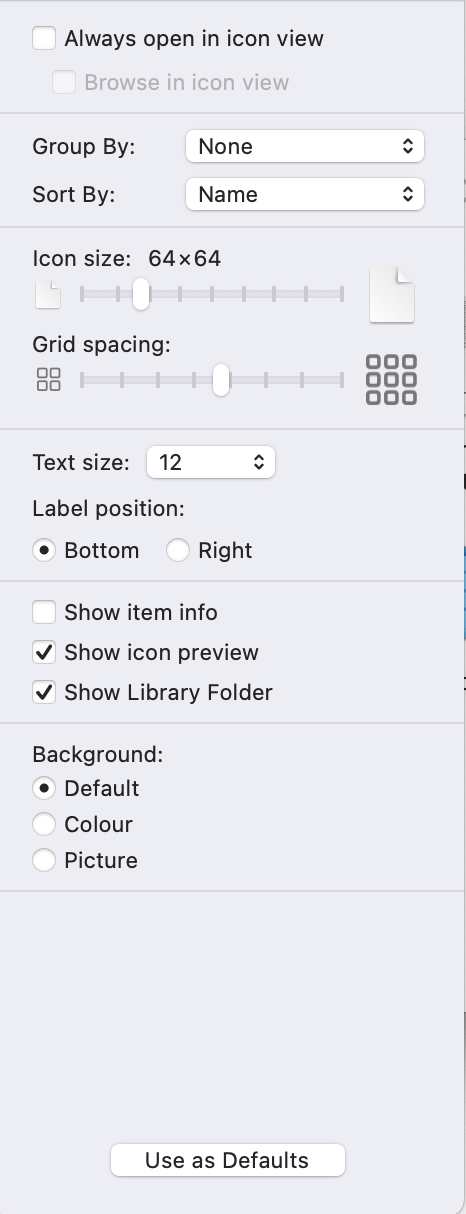
 I assume you haven't turned your Library Folder visible. So go to your User Folder, hit "Command J" and make the Library folder visible. And yes, all Mac OS Folders are organized and distributed the same way, there is no point distributing random OS just for fun.


Hope it helps.


Translate
Report
Community guidelines
Be kind and respectful, give credit to the original source of content, and search for duplicates before posting. Learn more
community guidelines
New Here ,
Dec 12, 2022 Dec 12, 2022

Same for me. You're not mistaken. Latest Indesign and MacOS here.

Translate
Report
Community guidelines
Be kind and respectful, give credit to the original source of content, and search for duplicates before posting. Learn more
community guidelines
New Here ,
Feb 24, 2023 Feb 24, 2023

I've found my worskspaces here:

Applications/Adobe InDesign 2023/Presets/InDesign_Workspaces/en_GB (language) > list of them was in the folder.

running InDesgin 2023 on MacOS

Translate
Report
Community guidelines
Be kind and respectful, give credit to the original source of content, and search for duplicates before posting. Learn more
community guidelines
Community Beginner ,
Sep 05, 2023 Sep 05, 2023

Me too but only see the Adobe pre-made workspaces and not any of my custom workspaces.

Translate
Report
Community guidelines
Be kind and respectful, give credit to the original source of content, and search for duplicates before posting. Learn more
community guidelines
Community Beginner ,
Sep 06, 2023 Sep 06, 2023

Same.

Translate
Report
Community guidelines
Be kind and respectful, give credit to the original source of content, and search for duplicates before posting. Learn more
community guidelines
New Here ,
Aug 27, 2023 Aug 27, 2023

Thanks @amaarora!
This helped me easily locate my personalized workspace files. I've followed your steps and copyed the .xml files to the same folder on my new machine, but with no luck. Not showing up as drop-down options when I open InDesign. What did I miss?

Translate
Report
Community guidelines
Be kind and respectful, give credit to the original source of content, and search for duplicates before posting. Learn more
community guidelines
Explorer ,
Jul 13, 2017 Jul 13, 2017

Excellent! Thank you.  I was looking in the right place almost...

Translate
Report
Community guidelines
Be kind and respectful, give credit to the original source of content, and search for duplicates before posting. Learn more
community guidelines
Explorer ,
Apr 29, 2024 Apr 29, 2024

In 2024/04: Go to FileUser Settings > Export User Settings.

"Export and Import User Settings" a new InDesign feature (already in version 19.4) that was introduced a few days ago.

You can now export or import these user settings: Preferences, Workspaces, Menu Sets, Keyboard Shortcuts, Glyph Sets


More info (source): https://helpx.adobe.com/in/indesign/using/export-import-user-settings-indesign.html
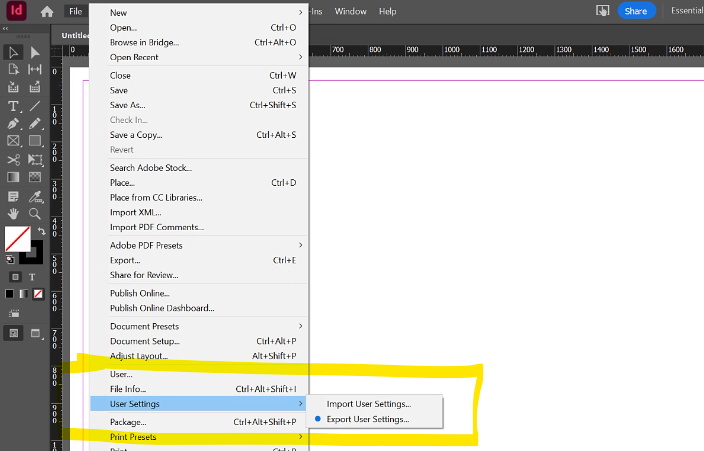
 

Screenshot 2024-04-29 134714.png


Translate
Report
Community guidelines
Be kind and respectful, give credit to the original source of content, and search for duplicates before posting. Learn more
community guidelines
New Here ,
Jun 25, 2025 Jun 25, 2025

Great! Thank you 🙂

Translate
Report
Community guidelines
Be kind and respectful, give credit to the original source of content, and search for duplicates before posting. Learn more
community guidelines
Community Beginner ,
Oct 30, 2025 Oct 30, 2025

@MatejKriz I have just tried this with the latest update to Indesign 2026 and I get the following error message when I try to import the saved settings:

Screenshot 2025-10-30 at 14.32.10.png

Any ideas?

Translate
Report
Community guidelines
Be kind and respectful, give credit to the original source of content, and search for duplicates before posting. Learn more
community guidelines
Adobe Employee ,
Oct 30, 2025 Oct 30, 2025

Hi @Feelgood56,


Thanks for sharing this, and sorry to hear about the error while importing your saved settings. Could you please confirm your macOS version and if the exported settings were created using the same language version of InDesign? This error appear if the locale (language or regional setting) of the source and target installations doesn't match.

Please go through these similar community posts to see if any of the solutions mentioned there help resolve the issue:
https://adobe.ly/4oGbcAt
https://adobe.ly/4qCe3MO
https://adobe.ly/4oGbd7v

Additionally, you can refer to this HelpX article for detailed steps on using the Export/Import User Settings feature:
https://adobe.ly/4oDA8sy


let me know how it goes. 

Abhishek

Translate
Report
Community guidelines
Be kind and respectful, give credit to the original source of content, and search for duplicates before posting. Learn more
community guidelines
Community Beginner ,
Oct 30, 2025 Oct 30, 2025

Hi @Abhishek Rao,

Thanks for your reply.

I am running the English/Arabic version of Indesign on macOS 15.5 and I have just updated from Indesign 2025 (20.5) to Indesign 2026 (21.0).

Your comment regarding checking what language version of Indesign I am exporting from and to prompted me to check the 2026 version and this is also the English/Arabic version.

The exported settings generate a file called IDSettings_20_5_enGB_Mac_2025_10_30.

If I export settings from the newer version of Indesign the file generated is called IDSettings_21_0_enAE_Mac_2025_10_30 so it looks to me like the older version is not registering that it is the English/Arabic version?

Translate
Report
Community guidelines
Be kind and respectful, give credit to the original source of content, and search for duplicates before posting. Learn more
community guidelines
Adobe Employee ,
Nov 04, 2025 Nov 04, 2025
LATEST

Hi @Feelgood56,


Thanks for checking and sharing those details. Based on what you mentioned, it seems the import issue is happening because of a mismatch between the enGB and enAE language versions. The Import User Settings feature requires both versions to match exactly for the import to work properly.

Please try exporting the settings again from the same English/Arabic (enAE) version of InDesign and then import them into the InDesign 2026 English/Arabic version. This should align the locale tags and allow the import to complete successfully.


Let me know how it goes once you try this.

Abhishek

Translate
Report
Community guidelines
Be kind and respectful, give credit to the original source of content, and search for duplicates before posting. Learn more
community guidelines