

Answered
how to find and delete "~l"
I've come across a few blue dots in my file that I fail to interpret. Maybe it's not crucial to delete them but I'd like to get rid of them anyway, just to make sure they do not do something I'm not aware of.
If I select the last few characters of this story (with the blue dots are included) and copy and paste them, this is what the Find/Change dialog looks like:
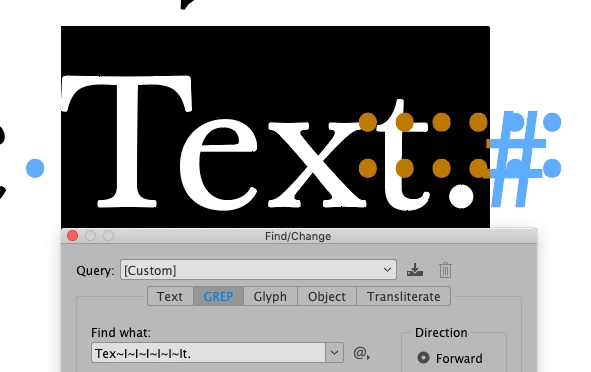
So there are six occurrences of "~l" between the "x" and the "t" here. The problem is if I search for "~l" (without quotes), InDesign tells me "Cannot find match" although they are right there.
What is "~l", and how do I find and delete it from the files?
 AdChoices