
haim6130
Inspiring
August 2, 2017
Answered

How to Find\Change 2 things into 1, in one action

  • August 2, 2017
  • 2 replies
  • 1906 views

Hi,

I want to change any multiple spaces and any tabs, to a single space.

the GREP code for multiple spaces is "  +" and for tab is "^t", there is any way to combine these in a single GREP line, or I need to do 2 separate actions?

To make the question simple: How can I find and change the letters "A" and "B", to "C" in one action?

There is a code that combine characters? Something like this?
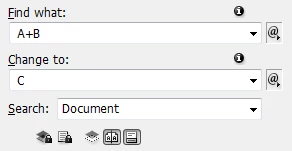
Thanks a lot!

Haim
    This topic has been closed for replies.
    Correct answer haim6130

    ^\h+

    (^/)


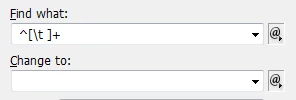
    Okay, I found it - thanks to your help:

    ^[\t ]+

    Thanks again guys!

    2 replies

    Jongware
    Community Expert
    Community Expert
    August 2, 2017

    The code for a single tab is not ^t -- that is the code for a tab in the regular Find/Change, not in GREP. The proper code for a tab is \t.

    To combine several possible characters into one 'find' code, use a Character Set: [xyz] will look for one of 'x', 'y', or 'z'. You can also include predefined sets into this, so [\u1] will look for any single uppercase character OR the digit '1'. Your example for 'A' and 'B' would be

    [AB]

    and for 'any space OR any tab' you'd use

    [\t ]

    (where there is a space before the end ]).

    See the online help for more about the supported GREP codes: Find/Change text in InDesign

    haim6130
    haim6130Author
    Inspiring
    August 6, 2017

    Thanks a lot guys,

    winterm - it didn't work for me. I'm working on CS5, if it matters.

    Jongware - I need to replace all the spaces and tabs that founds at the beginning of a paragraph, with nothing (delete them).

    Obi-wan Kenobi
    Legend
    August 6, 2017

    ^\h+

    (^/)

    winterm
    Legend
    August 2, 2017

    In F/C dialog GREP tab:

    Find what:

    \h+

    Change to:

    \s

    This will change any combination of horizontal space(s) (incl. tabs) into one single space.