Inspiring
March 13, 2023
Answered

How to fix facing pages/Wire-O bleed lines overlapping issue?

  • March 13, 2023
  • 4 replies
  • 3387 views

I'm designing my ID document with facing pages. Because it's going to be bound with Wire-O, I followed the good advice here and unchecked Facing Pages and moved the pages apart. The red boundary lines should show the bleed.


In most cases the system seems fine, but there are some pairs of pages that have uneven or overlapping red lines. Overlapping ones are shown in the screenshot. If they are overlapping, what should I do? Why are some uneven? Is this because ID thinks they are for a traditionally bound book and is making some kind of binding choice?

Another question and I don't think I need a screenshot, is that sometimes there is white behind the pages, as shown here but in other cases there isn't--is that something I need to worry abnout?


{Renamed By MOD}
This topic has been closed for replies.
Correct answer vixler

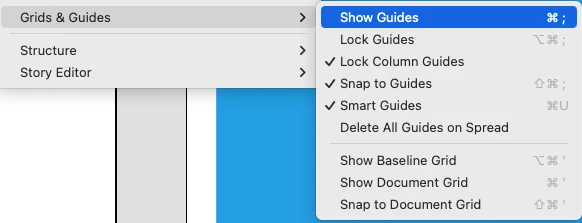
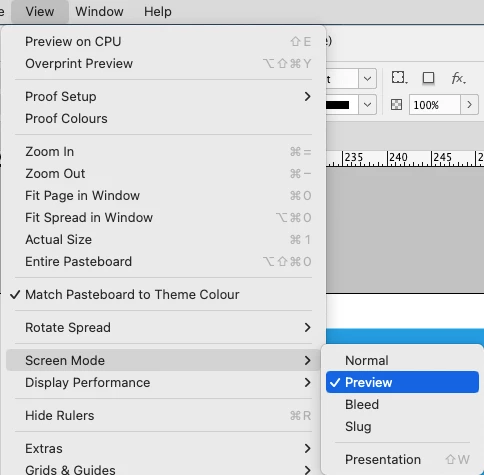
Are you maybe in Preview Mode?

or did you hide your guides? – also to find in the View Menu …


I saw those screen modes today, but the problem was solved after I deleted the cache. Thanks!

4 replies

rob day
Community Expert
Community Expert
March 14, 2023

Hi @vixler , You can avoid misaligned spreads by setting up two page, parent page spreads


Then use the Transform panel to move the righthand page of the spread.


Here I have the right page selected with the Pages tool, and with the Transform panel’s anchor position set to upperleft, I’m adding 3/8" to the X value, which puts 1/8" space between my 1/8" bleeds:


Also, if your page items crossover the spread, you don’t need the split pages because the bleed will be picked up from the opposite page, which is what you want in that case. So here I’ve made a crossover parent with no gap:


An Export to PDF/X-4 with printer marks and document bleeds:


vixlerAuthor
Inspiring
March 15, 2023

Thanks I do have facing Parent Pages but that one got wonky for some reason--I think it is fixed since I pulled down one side. Though I no longer see my bleed lines.

Rene Andritsch
Community Expert
Community Expert
March 16, 2023

Are you maybe in Preview Mode?

or did you hide your guides? – also to find in the View Menu …

Legend
March 14, 2023

If you want to retain separate Parent Pages for left and right, and make use of the Align Toward (or away from) Spine, this method allows full bleed on a facing-pages setup.

Community Expert
March 14, 2023

"Another question and I don't think I need a screenshot, is that sometimes there is white behind the pages, as shown here but in other cases there isn't--is that something I need to worry abnout?"


Hi @vixler ,

yes, that is something to worry about.

Could be that the document is corrupt. Every page should show "white" behind its area when no object is on the page.

( Unless the standard swatch [Paper] is not defined with 0,0,0,0 for CMYK or 255, 255, 255 for RGB; something you should never change! )


Regards,
Uwe Laubender
( Adobe Community Expert )

Rene Andritsch
Community Expert
Community Expert
March 14, 2023

@vixler please show us a screenshot of an instance where the background is not white.

vixlerAuthor
Inspiring
March 15, 2023

Here it is attached. This kind of things happens several times in the document, not at a regular interval.

Rene Andritsch
Community Expert
Community Expert
March 14, 2023

Your screenshot shows that the bleed from both pages is overlapping because the pages are to close together. Select the Page Tool and then the right page. In the Control Panel click into the x-value and enter a higher value as you currently have. This should solve it.

The white background is the blank page. Make sure that your frame in which your illustrations are places reach to the red bleed lines all around if the the color should be printed to the edge of the page.

vixlerAuthor
Inspiring
March 15, 2023

Thanks that did help, I pulled the right page down to match. But, I no longer see my bleed lines on any pages--don't know why--not sure if that's what caused it. I clicked away from Page Tool. ID is acting weird--like I used a layer mask, then merged a layer and it shows that image with a big weird white space! I quite out of ID then opened it again, still no bleed lines. Oh well, as long as my page-color squares cover the white I guess it's OK.

rob day
Community Expert
Community Expert
March 15, 2023

I quit out of ID then opened it again, still no bleed lines.


Try clearing your Caches folder—interface glitches are often cache related. If that doesn’t work reset your prefeences.


Also you can use the Align panel to align pages. Select the spread pages with the Pages tool: