
Known Participant
July 18, 2023
Question

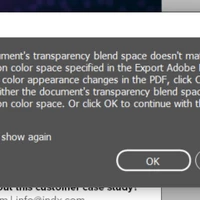
How to fix "document's transparency blend space or destination color space" adobe PDF export

  • July 18, 2023
  • 1 reply
  • 14121 views

Hello, I am having the following issue and my background is not seeing on my mobile phone. I am having the same issue with InDesign and Illustrator. Does anyone know how to fix this? Thanks!


The document should look like this and get this:



Getting this on mobile:



Thanks!

1 reply

Community Expert
July 18, 2023

Try going to Edit>Transparency Blend Space and set it to RGB


rvargasffAuthor
Known Participant
July 18, 2023

I already did, and still not working.

Community Expert
July 18, 2023

I still get the same message. I am trying to see this on my mobile phone. Using Outlook and the company's website to review.


That is just a warning - it means that your document export options is either RGB or CMYk and the Transparency Blend space doens't match.


For your PDF export options you could choose 'Interactive' and set the PDF to version 4.0 (to flatten transparency)


That should help I would imagine. 


For Outlook - only JPEGS will probably work. 


You can export directly to JPEG and resize it in photoshop.