
Exit
  • Global community
    • Language:
      • Deutsch
      • English
      • Español
      • Français
      • Português
  • 日本語コミュニティ
  • 한국 커뮤니티
0

How to Flow XML Data into 4 Independent Text Frames Across Pages

Explorer ,
Dec 15, 2024 Dec 15, 2024

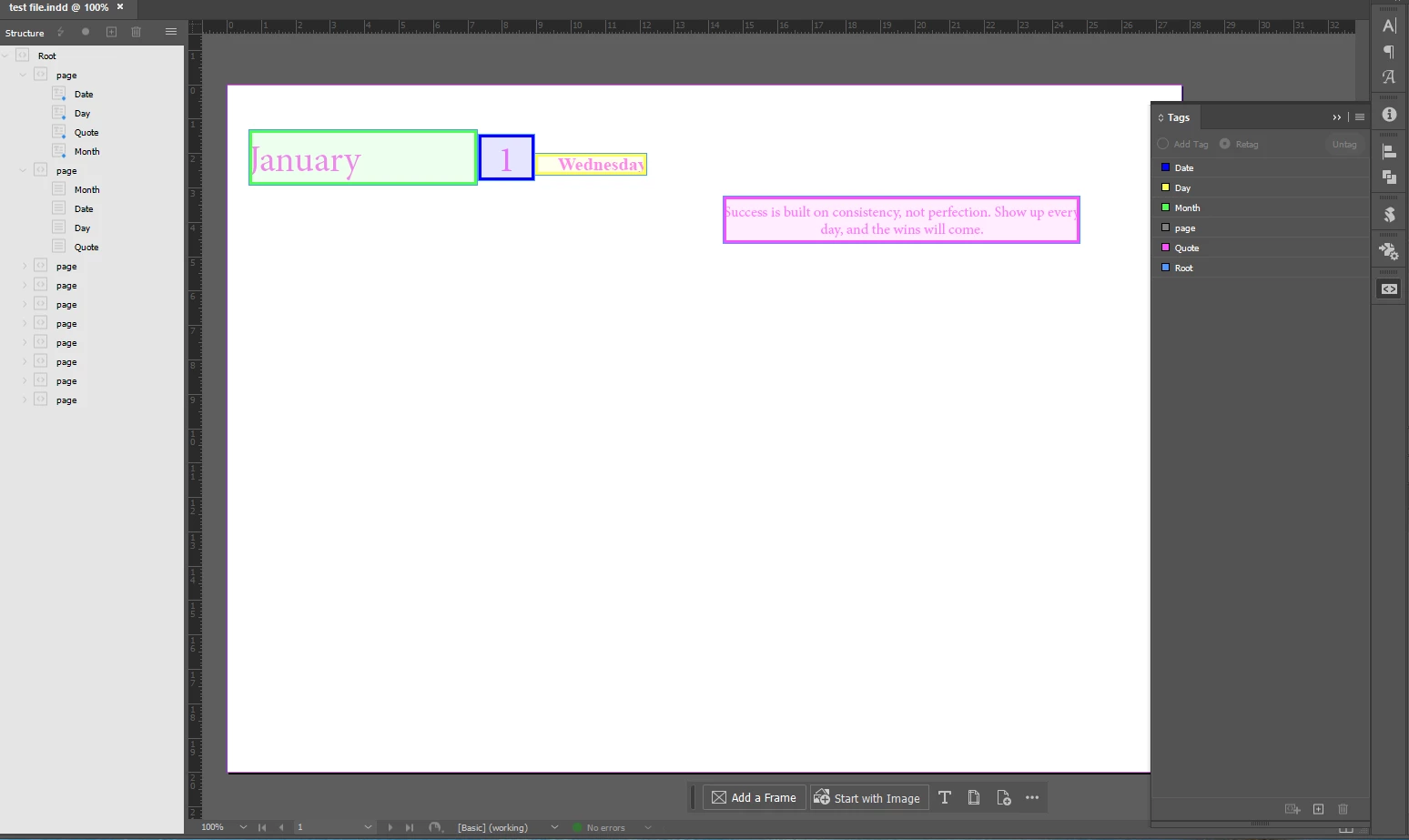
I’m trying to use dynamic XML data in Adobe InDesign to populate a template, but I’m struggling with setting it up correctly. My goal is to have 4 independent text frames on each page, filled with XML data, and for this to repeat across 365 pages.Later, the rest of the design I want to use will come from the master page. I want the XML to ignore all the empty space on the page and only flow into those 4 independent text frames.

Here’s where I’m running into problems:

  1. I can only make the 4 independent text frames work if I place them directly under the root in the Structure Panel.

    • However, if I place the frames inside a folder in the Structure Panel, it only populates the first page, and the data stops flowing to the following pages.
  2. If I drag the root folder into the first page, InDesign ignores my independent text frames altogether. Instead of flowing the data into the 4 separate frames, it combines all the data into one column or stacks it beside each other.

To summarize: I want InDesign to flow the XML data into 4 independent text frames on each page, completely ignoring the empty space outside of those frames, and repeat this process for 365 pages. I’m stuck and can’t figure out how to set up the template or structure panel properly to achieve this.

Any help or guidance would be greatly appreciated! 
ScreenShot_20241215195115.png


TOPICS
How to
909
Translate
Report
Community guidelines
Be kind and respectful, give credit to the original source of content, and search for duplicates before posting. Learn more
community guidelines
Explorer ,
Dec 15, 2024 Dec 15, 2024

Hi everyone,

I’ve made some progress and managed to connect my text frames using anchors. However, I’m now stuck. I can’t figure out how to force the XML data to populate across multiple pages instead of placing everything on the same page.

Any guidance on how to make the data flow automatically onto the rest of the pages would be greatly appreciated!

Thanks in advance!

Translate
Report
Community guidelines
Be kind and respectful, give credit to the original source of content, and search for duplicates before posting. Learn more
community guidelines
LEGEND ,
Dec 16, 2024 Dec 16, 2024

Do it have to be XML?


Try DataMerge instead.


Translate
Report
Community guidelines
Be kind and respectful, give credit to the original source of content, and search for duplicates before posting. Learn more
community guidelines
Explorer ,
Dec 16, 2024 Dec 16, 2024

Yes it should be XML. After DataMerge the data is not updateable anymore.

Translate
Report
Community guidelines
Be kind and respectful, give credit to the original source of content, and search for duplicates before posting. Learn more
community guidelines
LEGEND ,
Dec 16, 2024 Dec 16, 2024

How do you plan on updating source XML? 


And why? 


Translate
Report
Community guidelines
Be kind and respectful, give credit to the original source of content, and search for duplicates before posting. Learn more
community guidelines
Explorer ,
Dec 16, 2024 Dec 16, 2024

I prefer using XML over Data Merge because XML allows me to import the content as a linked file. This means that if I need to update or change the data—like a 365-day calendar, for example—I can simply modify the external XML file. InDesign will automatically reflect those changes throughout the entire document.

With Data Merge, once the data is imported, it becomes static, and I would have to re-import or manually adjust the content if any updates are needed. XML offers a far more dynamic, flexible, and efficient workflow for projects where the content might change frequently or require quick global updates.

Translate
Report
Community guidelines
Be kind and respectful, give credit to the original source of content, and search for duplicates before posting. Learn more
community guidelines
LEGEND ,
Dec 16, 2024 Dec 16, 2024

There is always more than one way to skin the cat.


Not sure why, but I've thought that you are looking for both ways update, sorry.


If you want to be able to just re-import data - update your document - try InDesign Tagged Text. 


But if your change would be limited to a design - different layout - then DataMerge still fits the bill. 


Translate
Report
Community guidelines
Be kind and respectful, give credit to the original source of content, and search for duplicates before posting. Learn more
community guidelines
Explorer ,
Dec 17, 2024 Dec 17, 2024
LATEST

Thanks for the tip

Translate
Report
Community guidelines
Be kind and respectful, give credit to the original source of content, and search for duplicates before posting. Learn more
community guidelines