Participant
November 21, 2011
Answered

how to get character count

  • November 21, 2011
  • 2 replies
  • 22151 views

Hi All,

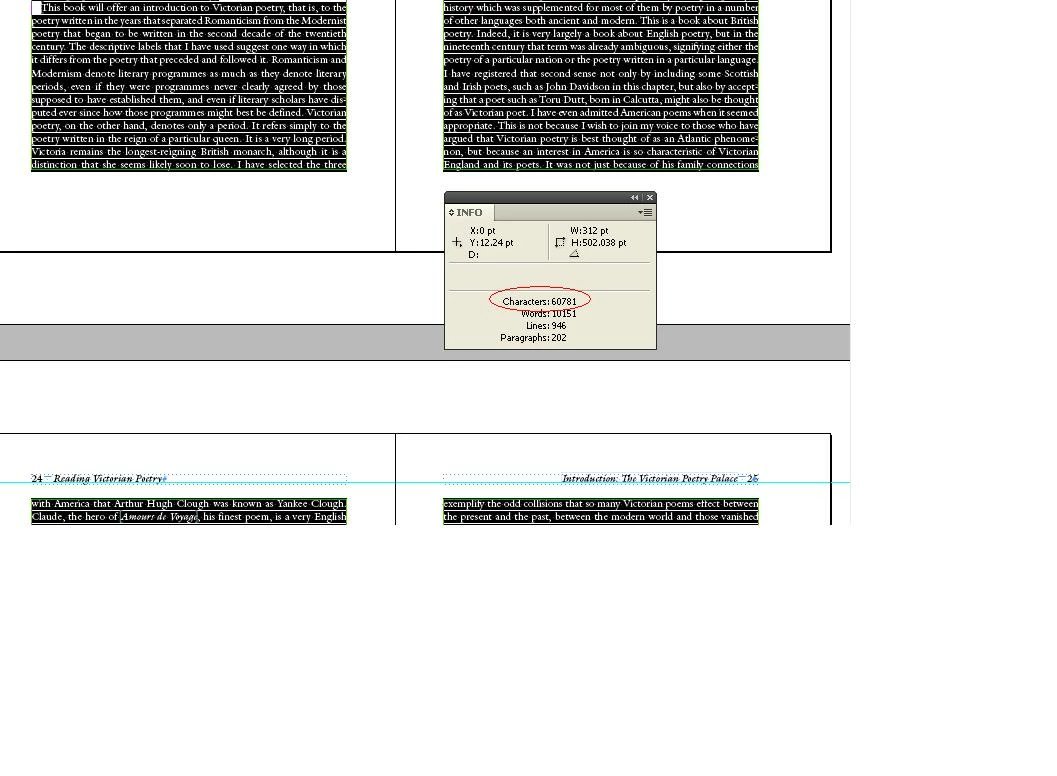
How to read the below highlighted value in script. Pl help me.

Regards,

RockSel

Correct answer csm_phil

Ok Thank you so much.

How to select whole document with out master pages.


Hi Rock Sel,

Try the below js code.

var myDoc = app.activeDocument.pages.everyItem().textFrames.everyItem();

try{

    var myCharlength = myDoc.characters.length;

    }catch(e){}

if(myCharlength<=0){

    alert("Characters count is 0 in this document!");

    }

else{

    alert("Characters count : "+myCharlength);   

    }

thx

csm_phil

2 replies

thkr_techcollege
Participant
February 18, 2025

AI generated Javascript that counts only visible text elements. It counts both characters and empty space, but not line breaks. Put the needed elements into one layer and hide the others, before making a count. Hope its relevant


<code>
(function ()

{ if (app.documents.length === 0) {

alert("No open documents");

return;

}

var doc = app.activeDocument;

var visibleText = "";


// Check all layers are visible

for (var i = 0; i < doc.layers.length; i++){

var layer = doc.layers[i];


if (layer.visible) { // Only visible layers

var textFrames = layer.textFrames;


for (var j = 0; j < textFrames.length; j++) {

visibleText += textFrames[j].contents; // Only add tet from visible layers


}

}

}


var cleanedText = visibleText.replace(/[\r\n]/g, ""); // Remove line break

var charCount = cleanedText.length; // Characters incl. word space


alert("Number of characters (incl. word space, ex. line break, only visible layers): " + charCount); })();
</code>


Robert at ID-Tasker
Legend
February 18, 2025

@thkr_techcollege


Not really.


You don't have to put "needed elements into one layer and hide the others" - as this script will count elements from all visible layers anyway.


This comment is misleading: 

// Check all layers are visible

It's not what this loop is doing.


And overall - it's not optimal - instead of building bigger and bigger string - it could count number of characters for each element and increase total counter. 


Also, it doesn't count texts in Tables. 


And the thread is 13 years old... 


csm_phil
Legend
November 21, 2011

Hi RockSel,

Please try the below JS script is alert the character count. Please before select the text after run the script.

try{

    var mySel = app.selection[0].characters.length;

    alert("Characters count : "+mySel);   

    }

catch(e){

    alert("Please select the texts!");

    }

thx

csm_phil

கற_பன___Imagine_
Inspiring
November 21, 2011

try{
    var mySel = app.selection[0].characters.length-1;
    alert("Characters count : "+mySel);   
    }
catch(e){
    alert("Please select the texts!");
    }

length -1 will shown the exact UI values, because js index starts from zero.

Community Expert
January 25, 2012

Hi Laubender,

Can you give us the character counter code who include table and footnotes for all stories ?

Does it include white spaces ?

I won't be able to find it elsewhere.

Thanks a lot,

Anthony


@Anthony – for "white space": yes, every character or special character is included in the count. Not only "white space", but returns, soft returns, brakes, special table, special note or footnote characters etc.pp.

Example:
You have a document with 20 empty tables. No contents but the tables, every one in it its own text frame. Your [Total] and [Stories] character count will be 20.

If you want to count thiese as characters in favour of your author you have to decide yourself.

Same goes for "Notes" (in this case I do NOT mean "footnotes" but "notes"). Are there notes included? You have to decide if you want to count the notes special character or even the contents of notes.

Or if you decide: hm, let's do not count empty paragraphs or empty lines, you have to add a lot more functionality to an otherwise simple script.

@Marijan – your script is working  well. Thank you for the effort.

In case there are no tables present it will brake.

Maybe you could add a try/catch statement in the var section of your two table related variables like that:

var

    myDocument = app.activeDocument,

    docStories = myDocument.stories.everyItem(),

    docCharacters = docStories.characters.length,

    docWords = docStories.words.length,

    docFootnotesCharacters = docStories.footnotes.everyItem().characters.length,

    docFootnotesWords = docStories.footnotes.everyItem().words.length,

    statReport = [];


try{

var   

    docTablesCharacters = docStories.tables.everyItem().cells.everyItem().characters.length,

    docTablesWords = docStories.tables.everyItem().cells.everyItem().words.length;

}catch(e){

     docTablesCharacters = 0;

     docTablesWords = 0;

     };

Uwe