
Kasyan Servetsky
Legend
January 4, 2017
Answered

How to get reference to the first body row on page in a long table?

  • January 4, 2017
  • 2 replies
  • 18559 views

Dear forum,

I have a long table which is threaded among several text frames (pages). I want to get the reference to the first body row in each frame so that to check if it contains a product name. (I can do this by checking if all the cells in the row have been merged.)
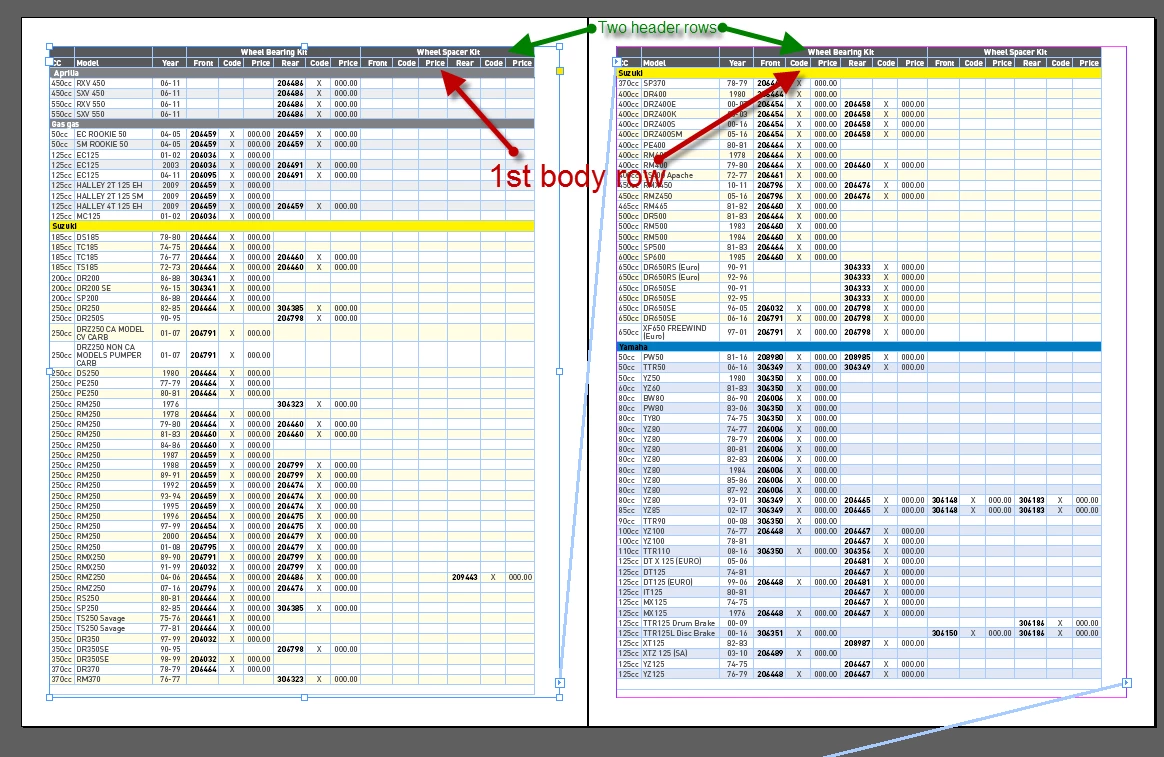
Since a table looks like a single character for script, I don’t see a straightforward way to achieve my goal.

So far, I solved it in a sloppy way: I check the baseline of the 1st insertion point of the 1st cell in the row.

else if (RoundString(row.cells[0].insertionPoints[0].baseline, 1) == firstRowBaseline && mainRow != null) {

Is there a more elegant solution?

Thank you in advance!

Regards,
Kasyan

This topic has been closed for replies.

2 replies

Liphou
Inspiring
December 13, 2017

Merci

I'm on Mac, I do not know the command in Termibal.

For the error, it signals me that 'r' is 'undefined'.

I am especially curious to be able to use the 'Compare Functions.jsx' script

//---------------------------

Je suis sur Mac, je ne connais pas la commande en Termibal.

Pour l'erreur, il me signal que 'r' est 'undefined'.

Je suis surtout curieux de pouvoir réutilisé le script 'Compare Functions.jsx'

Trevor:
Trevor:Correct answer
Legend
January 4, 2017
Kasyan Servetsky
Legend
January 6, 2017

Hi Trevor,

Thank you very much for pointing me in the right direction!

I used the approach you used in your second script.

Here's the code in case someone is interested:

main();

function main() {

    var doc = app.activeDocument,

    table = doc.stories[1].tables[0];

    tableTest(table);

}

function tableTest(table) {

    var textFrame, previousTextFrame, currentTextFrame,

    rows = table.rows;


    previousTextFrame = rows[0].cells[0].insertionPoints[0].parentTextFrames[0];

    for (var i = 0; i < rows.length; i++) {

        row = rows;

        if (row.rowType != RowTypes.BODY_ROW) continue; // skip headers & footers


        currentTextFrame = row.cells[0].insertionPoints[0].parentTextFrames[0];

        // the first body row in the first frame, or text frame has changed

        if ((i - table.headerRowCount == 0 && currentTextFrame == previousTextFrame) || currentTextFrame != previousTextFrame) {

            row.fillColor = "Yellow";

        }

        else {

            row.fillColor = "Magenta";

        }


        previousTextFrame = currentTextFrame;

    }

}

Regards,
Kasyan

Kasyan Servetsky
Legend
January 8, 2017

Hi Kasyan,

go ahead and publish my tips.

Now it's clear to me what you like to achieve.

Glad, it's working now…

Hm. Did not test your code yet. So I'm not sure why the doScript() approach does not work in this case.
Maybe you should wrap all your code into one function and call that function with doScript()?

I think you could make your code a bit faster by using the approach with getElements(). Less access to actual unresolved DOM objects after writing all relevant first cells of all rows to an array.

You also could avoid the test for rowType if you change the for loop a bit. Now that we know that index numbers for header rows are always at the start of the index of rows (that's obvious) and the index numbers of footer rows are always at the end of the index of rows (not so obvious; see my answer 13).

Regards,
Uwe


Hi Uwe,

Hm. Did not test your code yet. So I'm not sure why the doScript() approach does not work in this case.

Maybe you should wrap all your code into one function and call that function with doScript()?

Wrapping the whole code into one function or calling a chain of functions work exactly in the same way with doScript() method. I tested this before and re-tested it now. The latter is more convenient for me from the standpoint of readability.

Here's a brief description of what goes wrong:

  1. I select the table: e.g. by selecting a text frame
  2. Run the script for the first time -- everything goes as expected
  3. Then I Undo the whole script (Ctrl + Z). The frame is still selected.
  4. Finally I run the script for the 2nd time and it throws the 'Object is invalid' error while trying to get reference to the table's rows

In 'Call stack' I switch to the PreCheck function where the table variable is defined -- it's invalid.

In the FindTable function the obj variable is also invalid.

If I close and reopen the document, the above-mentioned variables become valid again. I don't know why this happens: haven't dug into this issue too deep so far.

I think you could make your code a bit faster by using the approach with getElements(). Less access to actual unresolved DOM objects after writing all relevant first cells of all rows to an array.

I tried this approach thinking it would make the script run faster, but it didn't work for me.

Namely I changed a couple of lines:

var rows = table.rows;

to

var rows = table.rows.everyItem().getElements();

and

newRow = rows.add(LocationOptions.BEFORE, row);

to

newRow = table.rows.add(LocationOptions.BEFORE, row);

which resulted in a mess

As I already said in my previous post, I think this happened because I used static array instead of live collection. I have to use the latter because the script is constantly adding new rows during execution and the rows collection is changing for that reason.

You also could avoid the test for rowType if you change the for loop a bit. Now that we know that index numbers for header rows are always at the start of the index of rows (that's obvious) and the index numbers of footer rows are always at the end of the index of rows (not so obvious; see my answer 13).

I understand your idea. But do you think it would make the script to run faster?

Timing in ESTK shows me it doesn't take long to check if the row isn't body row. A few nano-secs doesn't matter, I think; anyway, it is not a bottleneck in the script.

Regards,
Kasyan