sarai53562771
Known Participant
November 9, 2017
Question

How to get rid of extra space beneath a text box caption?

  • November 9, 2017
  • 3 replies
  • 8237 views

I have 2 columns on a page and too much space below my text box. Help!
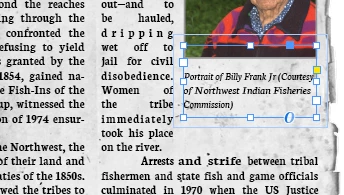
This topic has been closed for replies.

3 replies

Community Expert
November 10, 2017

Hi sarai,

I would do it the following way:

1. Do not apply text wrap to your image frame

2. Do not apply text wrap to your caption frame

3. Set the caption frame to ignore text wrap

4. Use another graphic frame for your text wrap.

I think, you are more flexible with that approach.

Regards,
Uwe

sarai53562771
Known Participant
November 10, 2017

Okay, I tried that but now I cannot see the caption. I only see the photo and a big blank space where the caption should be. I tried 'send to back' under arrange but that did not help.

Perhaps I am missing something. I don't see a difference between your 2 and 3.

Community Expert
November 10, 2017

Ignoring text wrap is a text frame option.

On a Mac, select the caption frame and do cmd+b. There you can see the option "Ignore Textwrap". Check it.

On a PC the keyboard shortcut is strg+b, I think.

Regards,
Uwe

jane-e
Community Expert
Community Expert
November 9, 2017

Or instead of ignoring the text wrap completely, try lowering the text wrap on only the bottom of the frame a point at a time until the last line "on the river" pops up to join the previous line.

sarai53562771
Known Participant
November 9, 2017

I do not know how to lower the text wrap a point at a time, but since turning it off did not help, I am guessing it would not improve the situation.

Legend
November 9, 2017

Those are two different functions. Ignore Text Wrap allowed the text within your caption box to ignore the wrap applied to the image frame above it. The text wrap applied to your caption box affects how other text wraps around that box.

To reduce the text wrap on the bottom of your caption box, unlink the values in the text wrap dialog, and set the bottom one to 0 (of whatever smaller value works for you.

Legend
November 9, 2017

It may be because of the text wrap on your photo. Select your caption box, and under text frame options, choose Ignore Text Wrap. 

This will allow you to place your caption as close as you would like to the image.

sarai53562771
Known Participant
November 9, 2017

I selected the caption box, and under text frame options, chose Ignore Text Wrap. That allowed me to move the text closer to the photo (which is good - thanks!) but did not close the big space under the caption.

BTW, I am not using the caption feature of InDesign, but just creating an independent text box below the photo.

Legend
November 9, 2017

The big space under the caption is caused by text wrap applied to the caption box. Follow Jane-e's suggestion to reduce the amount of text wrap applied to the caption box, and reduce the size of the caption box as much as you can without causing your caption to overset.
