
dublove
Legend
January 8, 2025
Answered

How to get those page numbers that contain tables, Collect the results into a notepad.

  • January 8, 2025
  • 1 reply
  • 1402 views

How to get those page numbers that contain tables, Collect the results into a notepad.

I'm trying to quickly find pages that contain tables.

 

Correct answer FRIdNGE

Oh.I see.

That "if condition" only determines that the table only takes up one page
But can't differentiate, that the table only takes up 1 page but spans 2 columns.


4th version:


/*
    _FRIdNGE-0778_TablePageExtraction.jsx
    Script written by FRIdNGE, Michel Allio [08/01/25]
*/

// I suppose an .indd document open with Tables! ...
var myDoc = app.activeDocument;
var myTables = myDoc.stories.everyItem().tables.everyItem().getElements();
var T = myTables.length,  t;
var myTablePages = [];
for ( t = 0; t < T; t++ ) {
    var myTable = myTables[t];
    if ( myTable.storyOffset.parentTextFrames[0].parentPage === myTable.storyOffset.parentStory.insertionPoints[myTable.storyOffset.index+1].parentTextFrames[0].parentPage ) {
        if ( myTable.storyOffset.textColumns[0] === myTable.storyOffset.parentStory.insertionPoints[myTable.storyOffset.index+1].textColumns[0] ) myTablePages.push( myTable.storyOffset.parentTextFrames[0].parentPage.name );
        else myTablePages.push( myTable.storyOffset.parentTextFrames[0].parentPage.name + "*" );
    }
    else myTablePages.push( myTable.storyOffset.parentTextFrames[0].parentPage.name + "-" + myTable.storyOffset.parentStory.insertionPoints[myTable.storyOffset.index+1].parentTextFrames[0].parentPage.name );
}
if ( T === 0 ) alert( "No Table! ..." ) // DEBUGGING - To be removed!
else if ( T === 1 ) alert( "Pre-Control, Table on Page:\r" + myTablePages.sort(function(a,b) {return parseFloat(a)-parseFloat(b)}).join("\r") ) // DEBUGGING - To be removed!
else alert( "Pre-Control, Tables on Pages:\r" + myTablePages.sort(function(a,b) {return parseFloat(a)-parseFloat(b)}).join("\r") ) // DEBUGGING - To be removed!

var myFile = new File(myDoc.fullName.toString().replace(".indd",".txt"));
myFile.open('w');
myFile.write(myTablePages.sort(function(a,b) {return parseFloat(a)-parseFloat(b)}).join("\r"));
myFile.close();
alert( "Done! ..." )
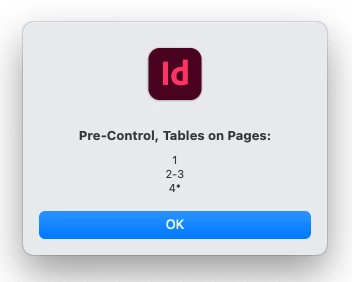


if a table is on a page but on 2 columns, it's identified by a "*" after the page number!


Considering all the scripts you have asked for for some time, it might be a good idea for all to hire a scripter! …

But it's just a comment.


(^/) 

1 reply

Steve Werner
Community Expert
Community Expert
January 8, 2025

There's no built-in way do that in InDesign. You (or someone else) might write a script.

FRIdNGE
January 8, 2025

Steve, Sure! … Quickly and Just For Fun!


/*
    _FRIdNGE-0778_TablePageExtraction.jsx
    Script written by FRIdNGE, Michel Allio [08/01/25]
*/

// I suppose an .indd document open with Tables! ...
var myDoc = app.activeDocument;
var myTables = myDoc.stories.everyItem().tables.everyItem().getElements();
var T = myTables.length,  t;
var myTablePages = [];
for ( t = 0; t < T; t++ ) {
    if ( myTables[t].storyOffset.parentTextFrames[0].parentPage.name === myTables[t].storyOffset.paragraphs[0].insertionPoints[-1].parentTextFrames[0].parentPage.name ) myTablePages.push(myTables[t].storyOffset.parentTextFrames[0].parentPage.name);
    else myTablePages.push(myTables[t].storyOffset.parentTextFrames[0].parentPage.name + "-" + myTables[t].storyOffset.paragraphs[0].insertionPoints[-1].parentTextFrames[0].parentPage.name);
}
var myFile = new File(myDoc.fullName.toString().replace(".indd",".txt"));
myFile.open('w');
myFile.write(myTablePages.sort().join("\r"));
myFile.close();
alert( "Done! ..." )


(^/)  The Jedi

FRIdNGE
FRIdNGECorrect answer
January 10, 2025

Oh.I see.

That "if condition" only determines that the table only takes up one page
But can't differentiate, that the table only takes up 1 page but spans 2 columns.


4th version:


/*
    _FRIdNGE-0778_TablePageExtraction.jsx
    Script written by FRIdNGE, Michel Allio [08/01/25]
*/

// I suppose an .indd document open with Tables! ...
var myDoc = app.activeDocument;
var myTables = myDoc.stories.everyItem().tables.everyItem().getElements();
var T = myTables.length,  t;
var myTablePages = [];
for ( t = 0; t < T; t++ ) {
    var myTable = myTables[t];
    if ( myTable.storyOffset.parentTextFrames[0].parentPage === myTable.storyOffset.parentStory.insertionPoints[myTable.storyOffset.index+1].parentTextFrames[0].parentPage ) {
        if ( myTable.storyOffset.textColumns[0] === myTable.storyOffset.parentStory.insertionPoints[myTable.storyOffset.index+1].textColumns[0] ) myTablePages.push( myTable.storyOffset.parentTextFrames[0].parentPage.name );
        else myTablePages.push( myTable.storyOffset.parentTextFrames[0].parentPage.name + "*" );
    }
    else myTablePages.push( myTable.storyOffset.parentTextFrames[0].parentPage.name + "-" + myTable.storyOffset.parentStory.insertionPoints[myTable.storyOffset.index+1].parentTextFrames[0].parentPage.name );
}
if ( T === 0 ) alert( "No Table! ..." ) // DEBUGGING - To be removed!
else if ( T === 1 ) alert( "Pre-Control, Table on Page:\r" + myTablePages.sort(function(a,b) {return parseFloat(a)-parseFloat(b)}).join("\r") ) // DEBUGGING - To be removed!
else alert( "Pre-Control, Tables on Pages:\r" + myTablePages.sort(function(a,b) {return parseFloat(a)-parseFloat(b)}).join("\r") ) // DEBUGGING - To be removed!

var myFile = new File(myDoc.fullName.toString().replace(".indd",".txt"));
myFile.open('w');
myFile.write(myTablePages.sort(function(a,b) {return parseFloat(a)-parseFloat(b)}).join("\r"));
myFile.close();
alert( "Done! ..." )


if a table is on a page but on 2 columns, it's identified by a "*" after the page number!


Considering all the scripts you have asked for for some time, it might be a good idea for all to hire a scripter! …

But it's just a comment.


(^/)