
Hosun
Inspiring
January 13, 2020
Answered

how to insert a spread

  • January 13, 2020
  • 1 reply
  • 585 views

Hi,


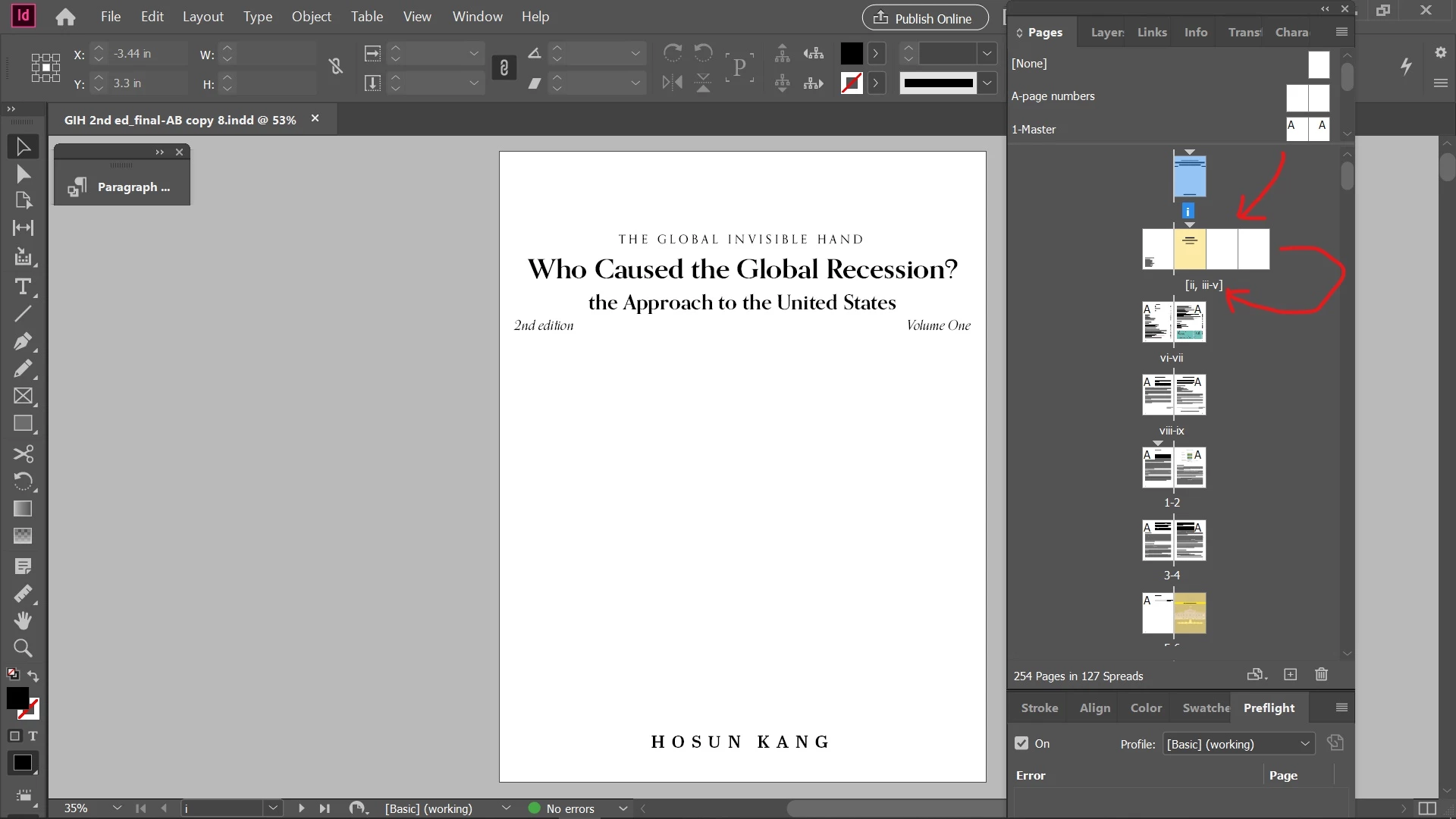
I want to insert a two-page spread before vi-vii.


Could you tell me how to do?


Hosun Kang
 

This topic has been closed for replies.
Correct answer Manan Joshi

The triangle denotes section start as you already have guessed. If you see your original screenshot also then you will see that one section does start at page 3, that means no new section was added due to the page add operation.


-Manan

1 reply

Community Expert
January 13, 2020

Open Pages panel, select the page v and then click the + icon on the bottom of the panel 2 times to add two pages after v


-Manan

-Manan
Hosun
HosunAuthor
Inspiring
January 13, 2020

Hi,


Thank you very much for your reply.


After I inserted the spread, there appears a triangle on page iii.


Is not an issue?

(Everything looks fine to me.)


Hosun Kang


Manan JoshiCommunity ExpertCorrect answer
Community Expert
January 13, 2020

The triangle denotes section start as you already have guessed. If you see your original screenshot also then you will see that one section does start at page 3, that means no new section was added due to the page add operation.


-Manan

-Manan
