
Participant
January 3, 2024
Answered

How to keep InDesign Drop Down Menu from Falling Off Screen

  • January 3, 2024
  • 4 replies
  • 576 views

Heyo! I have a potentially silly question. I have noticed that drop-down menus open off my screen and wonder if there is a way to stop this. This would not be an issue if the drop-down menu opened to the right instead of to the left, but I don't know if it is even possible to change how and where the drop-down menu opens.


Below is a screenshot to show what I am talking about; the swatches drop-down menu is cut off due to its location on the application frame. It seems like InDesign should know not to allow that drop-down menu to open to the left when I have it open in "full screen" (I know InDesign doesn't support full-screen, just the god-awful shift-w presentation mode; I mean the window is filling the screen as much as it can)
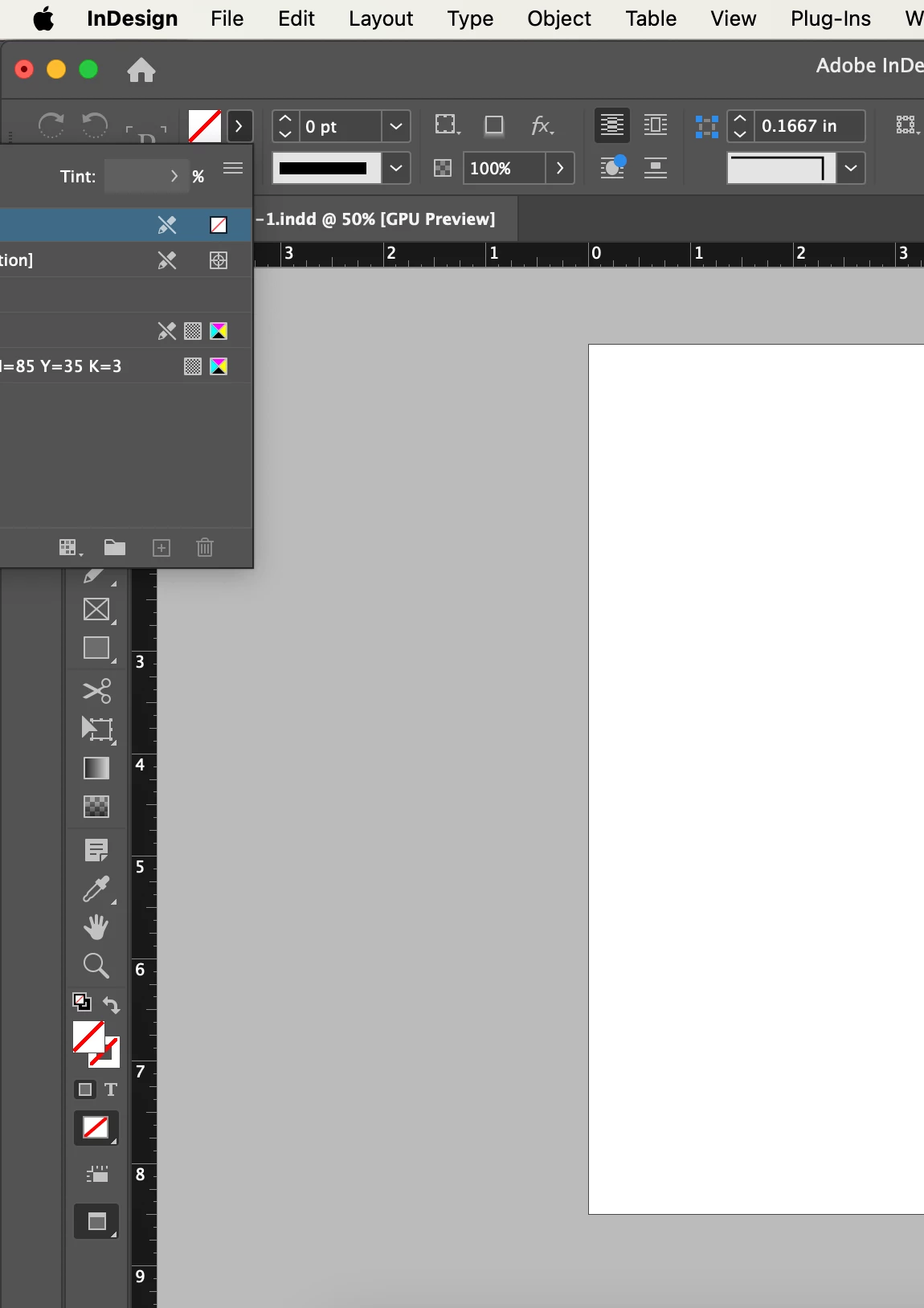


I am also attaching a screenshot of the entire screen to better show what I am trying to say


This topic has been closed for replies.
Correct answer Steve Werner

Try restoring the InDesign preferences and caches:


https://www.rockymountaintraining.com/adobe-indesign-rebuilding-preferences-cache/

4 replies

Barb Binder
Community Expert
Community Expert
January 10, 2024

Great news! I'll mark his answer as correct for you. 


~Barb

~Barb at Rocky Mountain Training
Barb Binder
Community Expert
Community Expert
January 3, 2024

Hi @Lorraine34560820x4dk:


I'm now sitting at a computer and looking at my Swatches panel and there's a gray bar on top that I can use to move the panel that's missing on yours. The other thing is your Control panel starts with the Rotate buttons and not the normal proxy, X,Y position controls, W,H settings, etc.


The second monitor may be a contributing factor but on closer look, I'm thinking that Steve's answer is going to be the right one. Please follow his link and work through that post to the bottom.


~Barb


~Barb at Rocky Mountain Training
Participant
January 10, 2024

Thanks for the response! I think Steve was right, but whatever was wrong was a bigger problem than I was motivated to solve, so I uninstalled InDesign and deleted all user data. Now it is behaving like normal again.

Barb Binder
Community Expert
Community Expert
January 3, 2024

And definitely not a silly question. It's not a workable situation. Are you moving from one screen to another? Maybe the resolution is different and the floating panel was sitting for the to the left on a higher resolution screen?


I would think resetting the workspace would take care of it and/or resetting preferences as per Steve.


~Barb

~Barb at Rocky Mountain Training
Participant
January 3, 2024

At the time of the screenshots, I was not working on two screens, but I sometimes use more than one screen, which may have influenced this issue. I have reset the workspace and am not currently connected to any other screens. The drop-down box is more visible now but still doesn't fully fit. I am working off a MacBook air with a relatively small screen, so I am probably just unlucky and will need to get used to the box not opening like it should.


Steve Werner
Community Expert
Steve WernerCommunity ExpertCorrect answer
Community Expert
January 3, 2024