CyndeeM
Inspiring
December 26, 2017
Answered

How to keep links live when creating PDF from other apps?

  • December 26, 2017
  • 1 reply
  • 15745 views

Note: this a cross post from the Acrobat forum; I rarely get answers there, so I am also posting it here where I always get great solutions. Sorry if this inconveniences anyone.

I deal with an organization who has a print publication that will now also be available on a web page. This publication mainly consists of PDF ads created by outsiders (not me), most of whom are amateurs. Most ads are probably created in Word or Publisher (or other amateur type programs). And the PDFs are not normally created from Acrobat, but either saved directly from those applications or using a freebie program like Cute PDF.

It seems that when put online, some of the URLs in these ads are live and clickable and some are not. I presume that those that are not live exist in copy that has become flattened along the way.

What is the best advice to give to these amateurs as to how to create their PDFs (when not using Acrobat) and still keep the links live? Thanks.
    This topic has been closed for replies.
    Correct answer Steve Werner

    As long as you set no standards about what application your amateur ad creators are using for creating a PDF, there is no general directions you can give them. Some applications may support saving links and some may not.

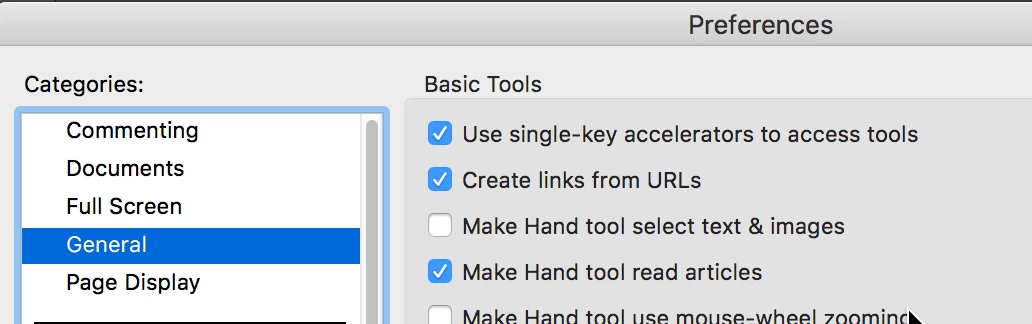
    If it's important that the ads have clickable, you'll have to add them yourself. The reason that some may have links is because Acrobat and Reader have a preferences turned on to try to create links "on the fly." It's called "Create links from URLs". However, they wouldn't be saved in the PDF, they would only work in Reader or Acrobat. It's found in General preferences:

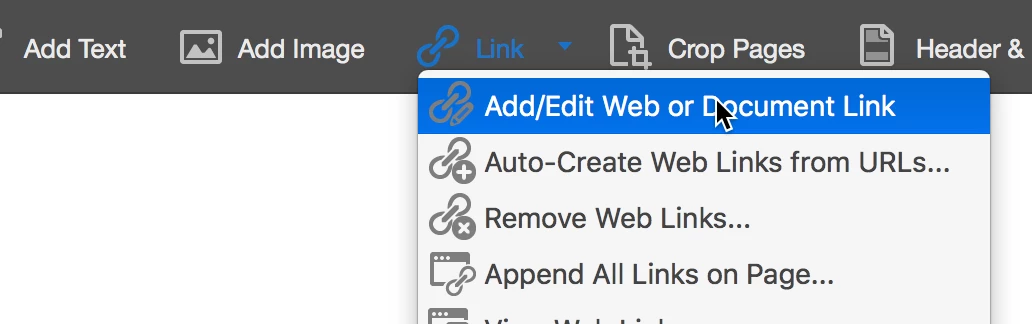
    To reliably create links you would have to use the Edit PDF tool, and select Link on the lower toolbar:

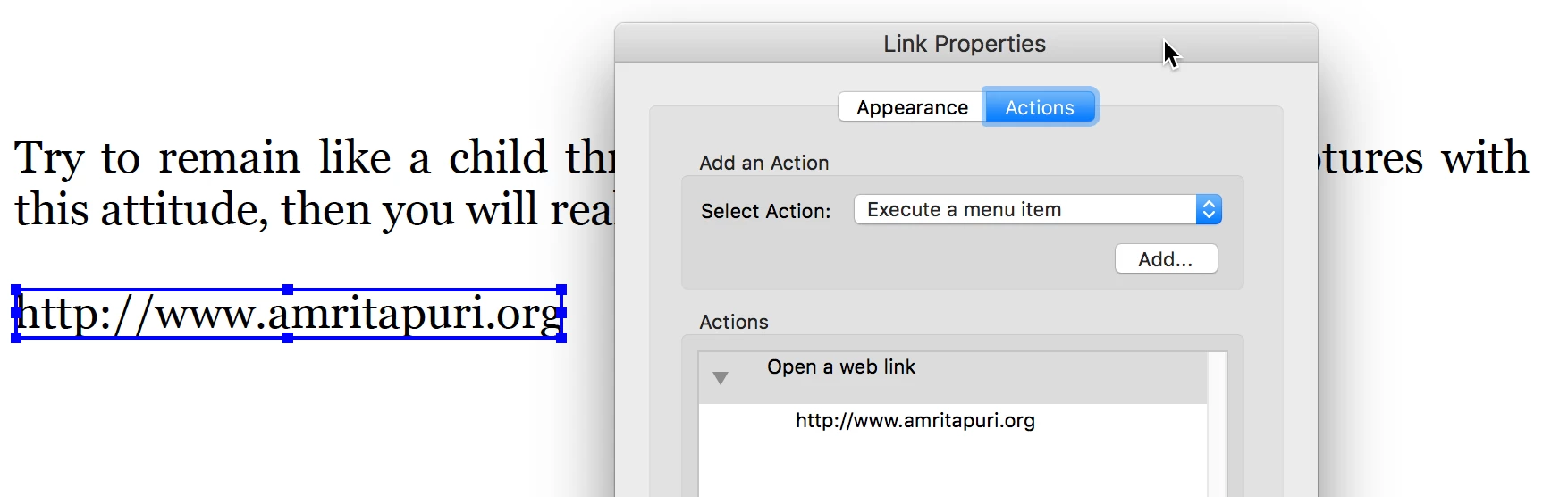
    Then you can choose the URL to be used as a web link action:

    1 reply

    Steve Werner
    Community Expert
    Steve WernerCommunity ExpertCorrect answer
    Community Expert
    December 26, 2017

    As long as you set no standards about what application your amateur ad creators are using for creating a PDF, there is no general directions you can give them. Some applications may support saving links and some may not.

    If it's important that the ads have clickable, you'll have to add them yourself. The reason that some may have links is because Acrobat and Reader have a preferences turned on to try to create links "on the fly." It's called "Create links from URLs". However, they wouldn't be saved in the PDF, they would only work in Reader or Acrobat. It's found in General preferences:

    To reliably create links you would have to use the Edit PDF tool, and select Link on the lower toolbar:

    Then you can choose the URL to be used as a web link action:

    CyndeeM
    CyndeeMAuthor
    Inspiring
    December 26, 2017

    Steve, could you please repost your last paragraph? The Link Properties dialog that you inserted covers some of the text/

    CyndeeM
    CyndeeMAuthor
    Inspiring
    December 31, 2017

    Yes, it it's a scanned PDF you'd need to use Acrobat's Enhance Scan feature to convert to text, then you'd use the Edit PDF tool to create the URL.


    Steve, I've been playing with this and running into an issue -- I hope you can help. I have a PDF, that while not a scan, has no editable text or other items. I used enhance scan on it and did get editable text out of it. Then I used Edit PDF's tool and created a URL. It worked fine in Acrobat.

    However, if I place this new PDF into an InDesign document and then generate a new PDF (which is what I do with my project is in the end all of the ads are put together and saved as one final PDF), then there is no live link the PDF created from InDesign. Have I missed something, or is this not possible?

    Thanks for all of your help.