- Home
- InDesign
- Discussions
- Re: How to load JATS DTD 1.1 in InDesign?
- Re: How to load JATS DTD 1.1 in InDesign?
How to load JATS DTD 1.1 in InDesign?

Copy link to clipboard
Copied
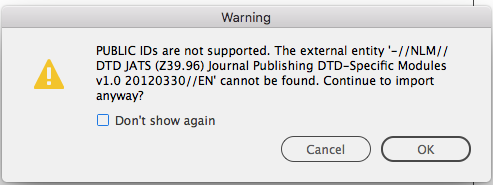
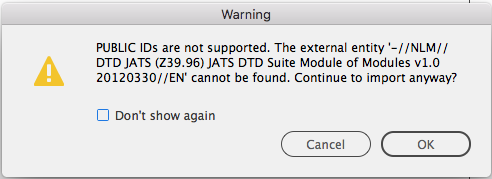
Is there any option to load JATS DTD 1.1 in InDesign. I have downloaded JATS DTD from the link https://jats.nlm.nih.gov/publishing/1.1d1/dtd.html but i cannot load that in InDesign because it throws some error which is attached. Can anyone help me out?


 7
Replies
7
7
Replies
7




Copy link to clipboard
Copied
It appears that DTD file is referencing an external entity. I'm not familiar with this DTD but have you downloaded that external entity as well as the DTD?
Copy link to clipboard
Copied
Dear chad thanks for your suggestion. I have downloaded that external entry too but still it throws error.

Copy link to clipboard
Copied
JATS is the Journal Article Tag Suite, an XML DTD developed by NIH for publications and research articles placed into the world-famous NLM (National Library of Medicine). It's an exceptionally complex DTD developed specificially for STEM publishing in the NLM, and it takes a few years to master its nuances. There are several tag sets within JATS, for journal publishing, article authoring, etc.
Make sure you have the correct DTD for your type of publishing.

Copy link to clipboard
Copied
Hi,
Did you ever solve this issue, I am experiencing the same issue.
Thank you!
Copy link to clipboard
Copied
- Are you using the latest DTD? For example, the original poster referenced verion 1.1.d1 (2013), but the latest is 1.3.d1 (2019).
- Did you download their ZIP file to your computer, and unzip a copy to your hard drive? DTDs work better when they are located on the local hard drive where InDesign is running, rather than from a server or (heavens forbid!) a URL.
I downloaded and installed 3 versions of JATS and was successfully imported. Have not tried to process an xml file in InDesign: I don't have any handy at this time.

Copy link to clipboard
Copied
Hi,
I am experiencing the same with JATS 1.1 DTD.
How did you manage to import them without errors? What version did you finally use?
The sentence quoted from above: "..and it takes a few years to master its nuances..." it makes my hands to shake in terror!
Thanks,
Copy link to clipboard
Copied
I downloaded the .ZIPs from the NLM FTP site for all DTDs I found. I got (once expanded) something like this:
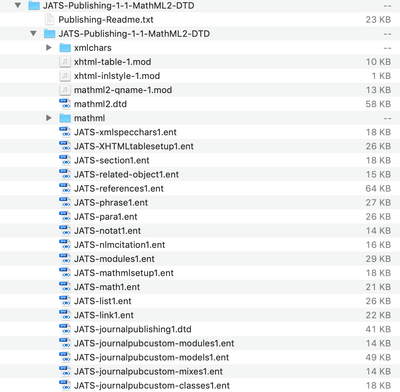
So... may I place these .ENT files in the same folder than the DTD file? Is it the way it worked?
Thanks very much. This is a crucial aspect of editorial design and there is few or no useful help at all about it!


Get ready! An upgraded Adobe Community experience is coming in January.
Learn more
 AdChoices