
Copy link to clipboard
Copied
Not saying that I'm (very) good in JavaScript'ing 😉 but "yes, I can" 😉
app.changeTextPreferences = NothingEnum.nothing;
app.findTextPreferences = NothingEnum.nothing;
app.findTextPreferences.findWhat = "^p";
app.changeTextPreferences.changeTo = "^t";
app.findTextPreferences.appliedParagraphStyle = "TOC Chapter";
app.selection[0].parentStory.changeText();
app.selection[0].parentStory.paragraphs.itemByRange(app.selection[0].parentStory.paragraphs[1],app.selection[0].parentSto...
Copy link to clipboard
Copied
To make it faster, save the table style to reapply it after changes. You have to generate it again and apply these steps after any change.
Copy link to clipboard
Copied
@Willi Adelberger Thanks for the reply. If you notice the TOC entry has following format:
SlNo. Chapter Name Chapter Author Page Number.
Serial number will not be a problem. I have made Numbering para style for TOC entry. How do I include "Chapter Author" in the same line ? Currently I have given a separate style to Chapter Author and changed its leading to 0.
Copy link to clipboard
Copied
@Willi Adelberger I have reached 98% close to the example. I just need a vertical line next to the serial number. This will make this TOC 98% automatic. No need to convert it to table.
After generating the toc, will have to run grep shown in the screenshot.
I have shared the toc idml and current screenshot.
Copy link to clipboard
Copied
Creative 😉
But I think you can make it much simpler:
"Standard" TOC - as mentioned by @Willi Adelberger:
Now, replace "end of paragraph" with a TAB - in only TOC Chapter ParaStyle:
Convert Numbering to Text:
Convert to Table:
Copy link to clipboard
Copied
@Robert at ID-Tasker Thanks for the steps. I will try this method also and update.
Copy link to clipboard
Copied
@Robert at ID-Tasker I tried you method. Its great but the only problem would be when I make any update on the TOC. I will have to do the steps again. Any suggestions using post toc steps using script ? Thanks
Copy link to clipboard
Copied
Yes, it shouldn't be a big deal for someone good in JS to convert those steps into a working script.
Copy link to clipboard
Copied
Not saying that I'm (very) good in JavaScript'ing 😉 but "yes, I can" 😉
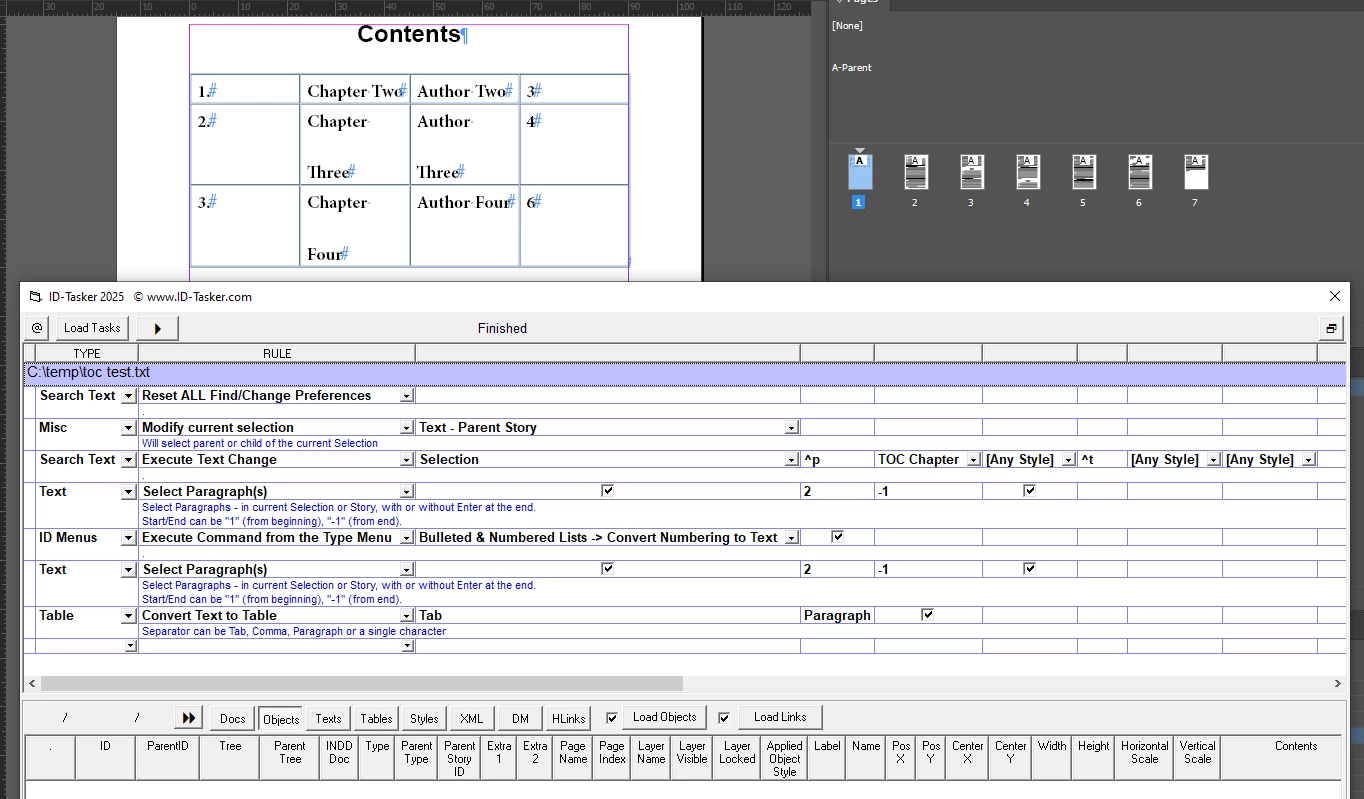
app.changeTextPreferences = NothingEnum.nothing;
app.findTextPreferences = NothingEnum.nothing;
app.findTextPreferences.findWhat = "^p";
app.changeTextPreferences.changeTo = "^t";
app.findTextPreferences.appliedParagraphStyle = "TOC Chapter";
app.selection[0].parentStory.changeText();
app.selection[0].parentStory.paragraphs.itemByRange(app.selection[0].parentStory.paragraphs[1],app.selection[0].parentStory.paragraphs[-1]).convertBulletsAndNumberingToText();
app.selection[0].parentStory.paragraphs.itemByRange(app.selection[0].parentStory.paragraphs[1],app.selection[0].parentStory.paragraphs[-1]).convertToTable();
After you refresh your TOC - you need to select its TextFrame and run the above script. It works on the ParentStory - so you don't have to reflow it in case there is an overset.
There is no error checking - code would be few times longer - but there aren't many trip hazards.
Attached is your INDD file with my modifications - so you can check TOC setting and get ParaStyles.
And here is a sample Task for my ID-Tasker - pretty much the same steps as you would've to do manually and what script above is doing - but you don't have to be a coder:
Copy link to clipboard
Copied
@Robert at ID-Tasker Excellent work Robert. Thank you so much. It really helped a lot. I would also like to thanks @Willi Adelberger for his effort.
Copy link to clipboard
Copied
Copy link to clipboard
Copied
I would take a simplier approach, being simple minded myself...
Just build a regular TOC with paragraph rules and put the verticle rules manually behind it. The verticle rules might have to be adjusted for height, but that wouldn't be hard based on the example.
Copy link to clipboard
Copied
I would take a simplier approach, being simple minded myself...
Just build a regular TOC with paragraph rules and put the verticle rules manually behind it. The verticle rules might have to be adjusted for height, but that wouldn't be hard based on the example.
By @Dave Creamer of IDEAS
Yes, but in this case - TOC is build from two Paragraphs - so some post-processing is needed anyway.
Even if you mean to use the formatting already created by OP - and just add vertical lines to simulate table look - then their height would have to be adjusted every time number of entries change or their length.
Copy link to clipboard
Copied
- then their height would have to be adjusted every time number of entries change or their length.
By @Robert at ID-Tasker
I think that is what I said. 😁
Copy link to clipboard
Copied
Then scripting solution is rather more convenient? Unless I'm missing something?
Copy link to clipboard
Copied
@Dave Creamer of IDEAS After creating the TOC, its better to run the script. I have modified the script a little bit to suit my needs (still under process).
Here is the updated script, just in case if it helps anyone:
function main(){
app.changeTextPreferences = NothingEnum.nothing;
app.findTextPreferences = NothingEnum.nothing;
app.findTextPreferences.findWhat = "^p";
app.changeTextPreferences.changeTo = "^t";
app.findTextPreferences.appliedParagraphStyle = "TOC Heading";
app.selection[0].parentStory.changeText();
app.selection[0].parentStory.paragraphs.itemByRange(app.selection[0].parentStory.paragraphs[1],app.selection[0].parentStory.paragraphs[-1]).convertBulletsAndNumberingToText();
var myTable = app.selection[0].parentStory.paragraphs.itemByRange(app.selection[0].parentStory.paragraphs[1],app.selection[0].parentStory.paragraphs[-1]).convertToTable();
//assign a table style to the table
//myTable[0].appliedTableStyle = "mytab";
//assign same width to all columns
//myTable[0].columns.everyItem().width = "25 mm";
//First column and fourth columns width set to 10mm
myTable[0].columns[0].width="10 mm";
myTable[0].columns[3].width="10 mm";
//get the width of the textframe and deduct 10 + 10 i.e 20mm
//and divide the remaining width to column 2 and 3
var fw = getFrameWidth();
myTable[0].columns[1].width=(fw-20)/2;
myTable[0].columns[2].width=(fw-20)/2;
//alert(fw);
}
function getFrameWidth(){
var tf;
var sel = app.selection[0];
if(sel.hasOwnProperty('baseline')) {
tf = sel.parentTextFrames[0];
} else if (sel instanceof TextFrame) {
tf = sel;
}
var tfWidth = tf.geometricBounds[3] - tf.geometricBounds[1];
return tfWidth;
}
app.doScript(main, ScriptLanguage.JAVASCRIPT, undefined,UndoModes.ENTIRE_SCRIPT,'main');
Get ready! An upgraded Adobe Community experience is coming in January.
Learn more