


- Home
- InDesign
- Discussions
- Re: How to make text-width paragraph rule under Ex...
- Re: How to make text-width paragraph rule under Ex...
How to make text-width paragraph rule under Exhibit Number generated as numbered list

Copy link to clipboard
Copied
I need to achieve the following appearance, with a text-width green line under the exhibit number, but I cannot find any way to achieve it while allowing the exhibit numbers to automatically update if an earlier exhibit is added or removed. Is there any way? InDesign file attached.
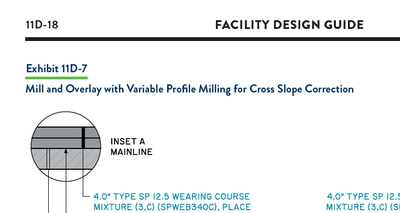
The first thing I tried was to generate the exhibit numbers as a numbered list. However, this made the green paragraph rule disappear for reasons I don't totally understand. I did learn that underlines are not compatible with numbered lists. However, I set up the green line as a paragraph rule generated as a "text-width" Rule Above (even though it is below the top line of the paragraph). The width of the green rule needs to match the width of the text in the top line of the paragraph and there needs to be only one green rule per paragraph. The exhibit title is separated from the exhibit number using a forced line break (rather than a paragraph break) to allow the two line to concatenate in the list of exhibits (table of contents). I thought generating the green line as a paragraph rule instead of underline was supposed to make it compatible with numbered lists, but apparently that is not quite right.
The next idea was to keep the exhibit numbers as regular text, but automatically populate the chapter number and section letter ("11D" in the example above) using a section marker and generate the incrementing number after the hyphen using some kind of cross reference. However, I have never worked with section markers and couldn't figure out how to create an incrementing cross reference that automatically adjusts if a paragraph of that style is added or deleted earlier in the story.
I would appreciate any tips or help. I have proposed just letting the green paragraph rule span the full column width, but that would trigger a series of design committee meetings and approvals and several chapters of the manual have already been published using the original design pictured above.


 37
Replies
37
37
Replies
37



Copy link to clipboard
Copied

(^/)


Copy link to clipboard
Copied
>> The downside is that apparently the contents of the inline frame can't be styled differently when it appears in the table of contents
Of course it can, just as you can style any TOC content differently from the style being picked up.
Copy link to clipboard
Copied
Of course it can …
Not so sure! ...
(^/)

Copy link to clipboard
Copied


Copy link to clipboard
Copied
Could there be any way to use flexible-width columns to achieve a similar effect as the inline text frame?
Copy link to clipboard
Copied
Sorry, I wasn't following closely enough. My method picks up the text in the inline frame, Frindge's method picks up the frame as a character, so no it cannot be altered.
Copy link to clipboard
Copied
This is just a variation on Peter Spier's suggestion.
Automatic paragraph numbers are in nonprinting frames anchored to the beginning of each exhibit paragraph. The exhibit number on the first line of each exhibit paragraph is a cross-reference back to the paragraph number in the corresponding anchored frame. The rest works as you'd expect. Once every exhibit paragraph with it's anchored frame is set up, they should all update when a new one is added.

Otherwise, maybe the Jedi's script would work the best or maybe a solution like making the green underline an anchored object that is adjusted manually. ... Of course, Adobe should fix InDesign so paragraph numbers can be fully styled as expected.
Copy link to clipboard
Copied
This may not work after all. That is, it works when it's set up, but when new exhibit numbers are added, InDesign seems to lose track of the cross-references sources.
Copy link to clipboard
Copied
I tghink Dirk was on the right track with converting the numbers to text, then undoing (though that might be a problem for the TOC), if you can actually set a numbered list that works.
Copy link to clipboard
Copied
While we never found a perfect solution, we ended up accepting the option to use a fixed width for the green line by setting it up as a "column" width paragraph rule with a Right Indent set to make the green line the width of the longest Exhibit Number. This added an intermediate step of first resizing all of the Exhibit Number text frames to be the same width. Some of them now extend off of the artboard, unfortunately, but I think that is acceptable. Nobody directly suggested this approach, so I'm not sure if I can mark anyone's reply as a correct answer.


Copy link to clipboard
Copied
“While we never found a perfect solution ...”
???
(^/)
Copy link to clipboard
Copied
You did not provide documentation of how your script works or the steps necessary to reproduce it. I am not looking to procure a proprietary service.
Copy link to clipboard
Copied
The Script simply adjusts the length of the green para rule basing on the length of its corresponding text line!
You can off course do it manually but the Script plays the game on all the lines with just 1 click.
So really no need documentation and more explanation for such a so simple treatment.
But I note your last sentence.
Best,
(^/)

-
- 1
- 2

Get ready! An upgraded Adobe Community experience is coming in January.
Learn more
 AdChoices