
Participating Frequently
December 11, 2020
Answered

How to match a clever bullet style I saw on Forbes.com

  • December 11, 2020
  • 5 replies
  • 691 views

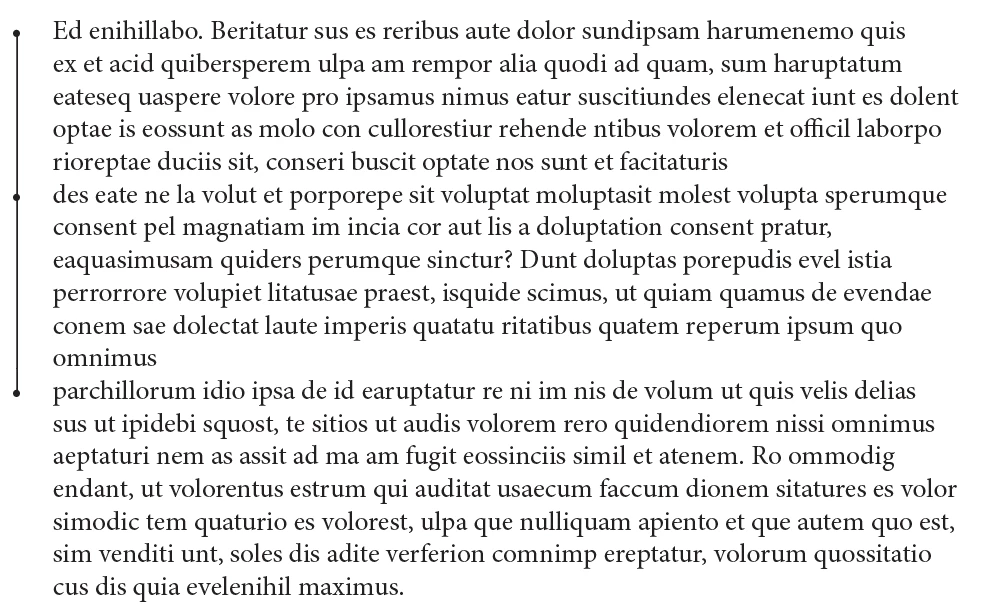
Forbes has started to use a bullet style that I really like.  It's basically a colored dot for each bullet point, but there is a solid 1px line that connects the dots together.  So an entire bullet section would have a dot on each bullet and a solid line connecting the dots in that section.  I would like to replicate.  Anyone have any insight?
This topic has been closed for replies.
Correct answer Scott Falkner

Use a paragraph rule. You'll probably want three styles: one for the first bullet, one for the last bullet, and one for bullets in between. The only difference would be the top and bottom offsets.

Edit 1: Now that I think about it you can get away with two styles. Style one is a line that runs from the bullet of the current paragraph to the bullet in the next paragraph. Style two is no line.

Edit 2: Damn, that looks useful. I’ll have to try that.

5 replies

Barb Binder
Community Expert
Community Expert
January 15, 2021

Restart numbers at this level is for nested lists. If you are trying to create a nested list, please ask in a new post, as it has nothing to do with the original question.

https://www.rockymountaintraining.com/adobe-indesign-basic-nested-lists/


~Barb

~Barb at Rocky Mountain Training
Participating Frequently
January 14, 2021

I've got it working, and I think you are right, I'll need multiple style to achieve the look depending on the differences in the single vs milti-line copy. 


Now I am struggling with number lists. Why is this grayed out?  I cannot figure out what makes this accessible.

Scott Falkner
Community Expert
Scott FalknerCommunity ExpertCorrect answer
Community Expert
December 12, 2020

Use a paragraph rule. You'll probably want three styles: one for the first bullet, one for the last bullet, and one for bullets in between. The only difference would be the top and bottom offsets.

Edit 1: Now that I think about it you can get away with two styles. Style one is a line that runs from the bullet of the current paragraph to the bullet in the next paragraph. Style two is no line.

Edit 2: Damn, that looks useful. I’ll have to try that.

pixxxelschubser
Community Expert
Community Expert
December 11, 2020

Hi @ekalpakoff 

try:

Play with the red marked value to find the right length for your longest (last) paragraph.

I hope you can handle the German layout.


It could possibly be that you need a second (different) paragraph format for the last paragraph.


FRIdNGE
December 12, 2020

Hi Pix!


I have always preferred simplistic solutions for lazy guys that only require one click!  😉


/*
    _FRIdNGE-0680_ParasGame.jsx
    Written by FRIdNGE, Michel Allio [12/12/2020] 
*/

var myDoc = app.activeDocument,

//----------------------------------------------------------------------------
// Para Style Name To Be Modified! …
myParaStyle = myDoc.paragraphStyles.item("Bullet-Stroke");
//----------------------------------------------------------------------------

// Reset …
app.findGrepPreferences = app.changeGrepPreferences = null;
app.findGrepPreferences.findWhat = "^\\X";
app.findGrepPreferences.appliedParagraphStyle = myParaStyle;
myFound = myDoc.findGrep();
var F = myFound.length,  f ;
for ( f = 0; f < F ; f++ ) if ( myFound[f].paragraphBorderOn == false ) myFound[f].paragraphBorderOn = true;

// New Game!
app.findGrepPreferences = app.changeGrepPreferences = null;
app.findGrepPreferences.findWhat = "\\X(?!\\X)";
app.findGrepPreferences.appliedParagraphStyle = myParaStyle;
myFound = myDoc.findGrep();
var F = myFound.length,  f ;
for ( f = 0; f < F ; f++ ) myFound[f].paragraphBorderOn = false;

alert( "Done! …\r\rbyFRIdNGE, Michel Allio [12/12/2020]" )


(^/)  The Jedi

pixxxelschubser
Community Expert
Community Expert
December 11, 2020

Please show something.


The closest what I can imagine is something like that:


Participating Frequently
December 11, 2020

Actually, it's exactly like that on the right. What I would like is the final bullet the vertical line to stop at the bullet even if the text is several lines.