
Inspiring
January 19, 2023
Answered

How to pass variable content to VBscript from indesign javascript

  • January 19, 2023
  • 2 replies
  • 556 views

Actually i want to pass folderpath variable from Javascript to vbscript:  getFolder () , how to pass it


var folderPath = "D:/ excelfolder/Exportfiles";   //need to pass this folderpath into below vbscript
//vb script starts here:
 var vbscript = '';
vbscript += 'Set objFSO = CreateObject("Scripting.FileSystemObject")\r';
vbscript += 'Set objFolder = objFSO.GetFolder(folderpath)\r';    // here need to pass the folderpath content into vbscript
vbscript += 'Set objExcel = CreateObject("Excel.Application")\r';
vbscript += 'For Each objFile In objFolder.Files\r';
vbscript += '    If objFSO.GetExtensionName(objFile.Name) = "html" Then\r';
vbscript += '        Set objWorkbook = objExcel.Workbooks.Open(objFile.Path)\r';
vbscript += 'newFilename = Replace(objFile.Path, ".html", "")\r';
vbscript += 'objWorkbook.SaveAs newFilename & "_converted.xlsx", 51 \r';
vbscript += '    End If\r';
vbscript += 'Next\r';
vbscript += 'objExcel.Quit\r';
 app.doScript(vbscript, ScriptLanguage.visualBasic);
// vb script ends here.
alert("Process completed");
exit();

 

This topic has been closed for replies.
Correct answer Kasyan Servetsky

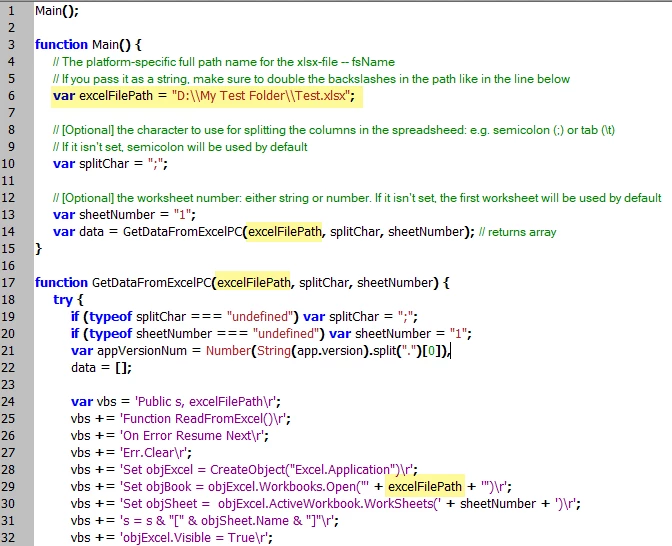
See the example here (function for Windows):

And finally, run the VB Script:

2 replies

Inspiring
January 20, 2023

Sending parameters to DoScript in Using the DoScript Method in Scripting Features in the VBScript Guide of the InDesign Scripting SDK
And Returning values ​​from DoScript are listed, so please read them.

Kasyan Servetsky
Kasyan ServetskyCorrect answer
Legend
January 19, 2023

See the example here (function for Windows):

And finally, run the VB Script:

Inspiring
January 20, 2023
var folderPath = "D:/excelfolder/Exportfiles";   //need to pass this folderpath into below vbscript
//vb script starts here:
 var vbscript = '';
vbscript += 'Set objFSO = CreateObject("Scripting.FileSystemObject")\r';
vbscript += 'Set objFolder = objFSO.GetFolder('"folderpath"')\r';    // here need to pass the folderpath content into vbscript
vbscript += 'Set objExcel = CreateObject("Excel.Application")\r';
vbscript += 'For Each objFile In objFolder.Files\r';
vbscript += '    If objFSO.GetExtensionName(objFile.Name) = "html" Then\r';
vbscript += '        Set objWorkbook = objExcel.Workbooks.Open(objFile.Path)\r';
vbscript += 'newFilename = Replace(objFile.Path, ".html", "")\r';
vbscript += 'objWorkbook.SaveAs newFilename & "_converted.xlsx", 51 \r';
vbscript += '    End If\r';
vbscript += 'Next\r';
vbscript += 'objExcel.Quit\r';
 app.doScript(vbscript, ScriptLanguage.visualBasic);
// vb script ends here.
alert("Process completed");
exit();