Participant
August 22, 2018
Answered

How to prevent last word on page from breaking?

  • August 22, 2018
  • 2 replies
  • 2537 views

Hi,

Is there any solution to automatically apply No Break only on last word on page?

    This topic has been closed for replies.
    Correct answer jane-e

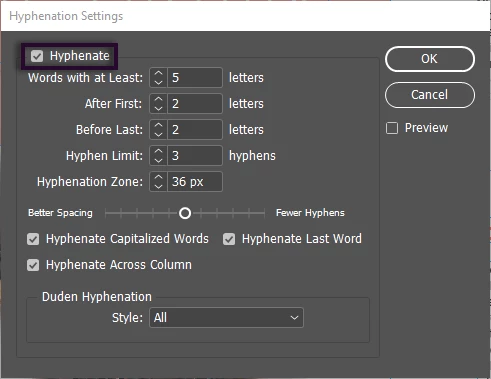
    In the Hyphenation panel, you can uncheck (untick) Hyphenate Last Word and Hyphenate Across Column and make this part of your Paragraph style.

    Across Column includes Across Page. Would this work for you?
    2 replies

    jane-e
    Community Expert
    jane-eCommunity ExpertCorrect answer
    Community Expert
    August 22, 2018

    In the Hyphenation panel, you can uncheck (untick) Hyphenate Last Word and Hyphenate Across Column and make this part of your Paragraph style.

    Across Column includes Across Page. Would this work for you?

    Erica Gamet
    Inspiring
    August 22, 2018

    I think that may actually solve their problem...I was so focused on the "use GREP to find the last word on a page" part that I didn't step back and think about what was really needed.

    Erica Gamet
    Inspiring
    August 22, 2018

    No, you can't find the last word on a page...unless it is also the last word in a story each time. You might be able to script that, though...you might check the scripting forums.

    FRIdNGE
    August 22, 2018

    Hmm! …

    Not really sure the problem is to know if "you can [or not] find the last word on a page… [blabla]"

    … But can InDesign do it? … and I should add: "basically!".

    Best,

    Michel, for FRIdNGE

    FRIdNGE
    August 23, 2018

    Applying "No Break" as character formatting with GREP for the last word on the page is what the OP asked for, Michel. That's the feature that isn't there.

    What if (hypothetically), you have three columns and want the last word to break across columns 1-2 and 2-3 but not column 3 to the next page? Can that be done with a script? Only the last word on the page and not the first two columns?

    Again, hypothetical.


    Jane,

    The question was:

    "How to prevent last word on page from breaking?"

    … that means:

    How to prevent last word on page from breaking … "when this word runs across 2 pages"?

    ID can avoid it as said!

    … But [to answer to your second comment] ID does it "globally"! … For all the columns covered by the para!

    Btw, this approach seems to me a reading "good" approach!

    But [hypothecally and simplistically but precisely] to answer you if Javascript could skirt this setting, I'ld say yes of course with some code lines like these ones:

    // From FRIdNGE [August 2018]

    var myParas = app.activeDocument.stories.everyItem().paragraphs.everyItem().getElements(),

    P = myParas.length,  p;

    for ( p = 0; p < P; p++ ) {

        //if ( myParas

    .insertionPoints[-1].textColumns[0] != myParas

    .insertionPoints[0].textColumns[0] ) {

        if ( myParas

    .insertionPoints[-1].parentTextFrames[0] != myParas

    .insertionPoints[0].parentTextFrames[0] ) {

            myParas

    .select();

            alert( "Gotcha! … ;-)" )

        }

    }

    Best,

    Michel