


- Home
- InDesign
- Discussions
- Re: How to print A4 brochure in A3 spreads.
- Re: How to print A4 brochure in A3 spreads.

Copy link to clipboard
Copied
Hello All,
I am just new to Adobe Indesign.
I am given a task of designing a brochure in A4 size.
The first page is the cover page, and the last page is the contact us page (So no problem in designing)
The pages 2-3, 3-4,4-5 have a different theme respectively. So I had to use the whole spread to describe the theme.
Now the problem is that, The document is superb in Pdf format.
But we need to print it. and bind it by stiches or staples.
So for printing each spread should contain different pages (Hope you got)..
How do I do it??
Is there any option or I have to swap the pages?


 1 Correct answer


Then it's the printer's job to do the imposition unless he explicitly asked you to do it (in which case you really should find another printer or get a huge discount). You should export the file to PDF as single pages and he'll take it from there.

 9
Replies
9
9
Replies
9

Copy link to clipboard
Copied
Are you printing yourself in house, or sending it out?
Copy link to clipboard
Copied
We are giving it out to print.
Copy link to clipboard
Copied
Then it's the printer's job to do the imposition unless he explicitly asked you to do it (in which case you really should find another printer or get a huge discount). You should export the file to PDF as single pages and he'll take it from there.

Copy link to clipboard
Copied
Exactly, the printer has special imposition software for this (at least he should), that is why he is the printer and you are the designer 😉
Copy link to clipboard
Copied
I am just confirming once again..
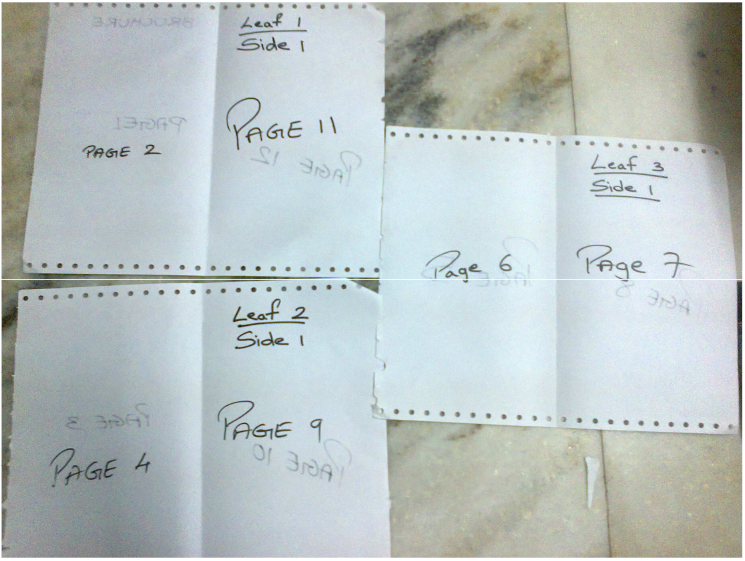
My spread will contain different pages like the brochure is of 12 pages so the order will be so
As shown in the figures below.
Consider the pages as the A3 pages which will be folded to make the A4 pages.

Copy link to clipboard
Copied
You should be set up as and A4 facing pages document. Do your layout in the order and position that your readers will see (don't even think about how to arrange for printing). Exprt to PDF being sure you DON'T check the spreads bos so your PDF has the same number of pages as the document, in this example 12, and send that to the printer.
In ID your pages panel should look like this:

Copy link to clipboard
Copied
Yes, for printing Your method helped @Peter Spier.
I had checked the export spreads option due to which I could not get the pages.
Thanks for help..
Copy link to clipboard
Copied
You also may take a look at this, it is free for a limited time:
Copy link to clipboard
Copied
It's essential that you don't export spreads unless they are already imposed (there are scripts and plugins that will let you do that if you need to print in house), but because the printer is going to impose to fit his equipment and the paper he prints on you actually make the job harder if you do anything but send single pages.


Find more inspiration, events, and resources on the new Adobe Community
Explore Now
 AdChoices