

infomamun
Inspiring
July 28, 2023
Answered

How to remove a thin border shade from last row and side of a table

  • July 28, 2023
  • 2 replies
  • 803 views

Hi There,

I am very new to Indesign and learning on different tools and elements. I need to create a table with alternating row colors with no borders. I can create and turn off the borders, no problem. But I can see a very thin shade of border (it is actually not a border as I have turned it off) appears at the bottom of the last row and left side of the table. I can't figure out from where it can be turned off completely. Please note that I have set table border color to "None" as well. Please see the screenshot below:
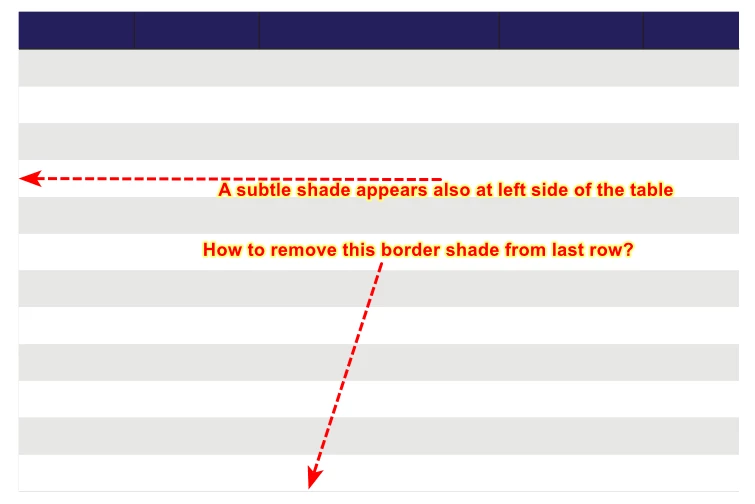
Do you have an idea how to remove border like appearance from the indesign table?


This topic has been closed for replies.
Correct answer D. Schulte

Even in PDF with 150% zoom, those thin borders can be seen. Attached image is the screenshot from the PDF. Please note that I have added dotted border for rows in this version.


Can you try to create a new table and see if the issue is still there without copying that contents of the old table? I just created a table with similar settings as you did and did not have this issue. If you don't have the issue with a fresh table I guess there are some settings wrong in your current table.


2 replies

D. Schulte
Participating Frequently
July 28, 2023

Are you sure it's not a display error? When you zoom in, does the border get bigger? If not, it's a display error.

infomamun
infomamunAuthor
Inspiring
July 28, 2023

Thanks for your response. Even if I save it as Adobe PDF, the PDF has this thin border like structure.

D. Schulte
D. SchulteCorrect answer
Participating Frequently
July 28, 2023

Even in PDF with 150% zoom, those thin borders can be seen. Attached image is the screenshot from the PDF. Please note that I have added dotted border for rows in this version.


Can you try to create a new table and see if the issue is still there without copying that contents of the old table? I just created a table with similar settings as you did and did not have this issue. If you don't have the issue with a fresh table I guess there are some settings wrong in your current table.


Inspiring
July 28, 2023

Too basic question.. you should google more.


google for changing the table cell border and you should find all  the answers.


Refer -

https://helpx.adobe.com/in/indesign/using/table-strokes-fills.html#:~:text=Change%20the%20table%20border,%2C%20tint%2C%20and%20gap%20settings.