
New Participant
June 9, 2021
Answered

How to remove Blue box around text

  • June 9, 2021
  • 3 replies
  • 21028 views

Hi,


I'm new to using Indesign, I'm creating a document with some text, however there is a blue box around the text boxes, how do i turn this feature off?


Thank you.


Moved from Using the Community (which is about the forums) to the correct forum... Mod
To ask in the forum for your program please start at https://community.adobe.com/
Correct answer J E L

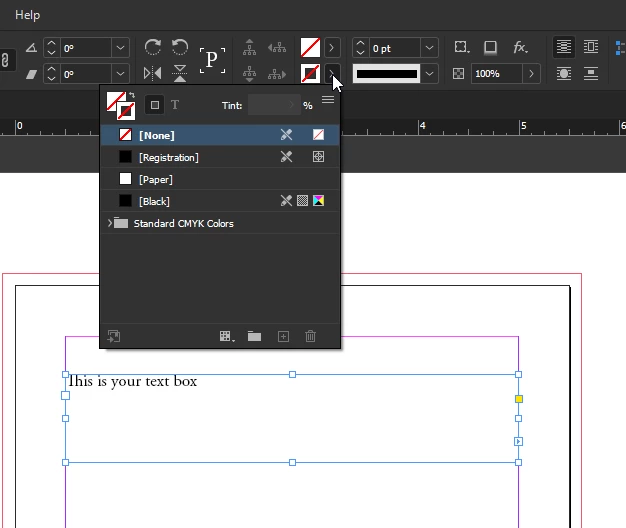
It looks like you have a stroke color applied to your text box. Check that first by making sure the color is set to none. Also, check your master to see if there is a text box applied there with a stroke. Let us know if you fix the issue!


3 replies

Inspiring
June 15, 2023

Turn this little guy called frame edges off

New Participant
February 22, 2024

yuhhh thank you


J E L
J E LCorrect answer
Community Expert
June 9, 2021

It looks like you have a stroke color applied to your text box. Check that first by making sure the color is set to none. Also, check your master to see if there is a text box applied there with a stroke. Let us know if you fix the issue!


jmlevy
Community Expert
June 9, 2021

Each text frame is displayed with a thin stroke and its color changes with the layer color, but in your case, it could be because there is an actual stroke. First check if this is still visible when you switch to preview mode with the W shortcut (not with the text tool…). If you still see it, check the stroke panel. Select the frame and remove the stroke.

BobLevine
Community Expert
June 9, 2021

That looks more like a stroke than the frame outline. Could be a default stroke or it could be in an object style.