
Hosun
Inspiring
May 11, 2018
Question

how to remove border of excel chart?
  • May 11, 2018
  • 1 reply
  • 5080 views

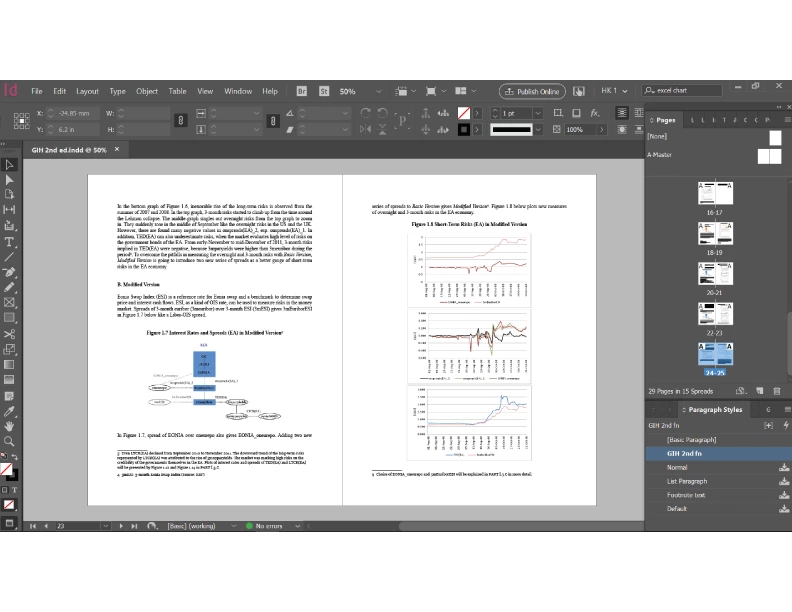
I placed a MS Word file on Id.

On the right-hand page, there are grey borders around the excel charts.

How can I remove them?

No borders in the chart on the left-hand page.

This topic has been closed for replies.

1 reply

Barb Binder
Community Expert
May 11, 2018

Those borders originate in Excel (or Word). Either open the original file and remove them there or gently crop the image on all four sides in InDesign by slightly reducing the size of the graphic frame they are each sitting in.

~Barb

~Barb at Rocky Mountain Training
jane-e
Community Expert
May 12, 2018

The "chart" on the left was probably not created as an Excel chart. It was drawn in Word, PowerPoint. Excel, or Illustrator, but it was not done with the Chart feature. That's why there is no border as a default. You can add a border to any picture using Word.

  1. Excel borders in Excel:
    Change the Chart Border from the default of Automatic to No line.
  2. Excel borders in Word:
    After the chart is in Word, you can still remove the border from the Excel chart
    This is easiest since you have several
  3. Excel borders in InDesign
    Crop as Barb said.
Hosun
HosunAuthor
Inspiring
May 15, 2018

Thank you very much.

It was helpful.

Hosun Kang