Participant
December 16, 2021
Answered

How to remove

  • December 16, 2021
  • 2 replies
  • 568 views

Hello everyone,

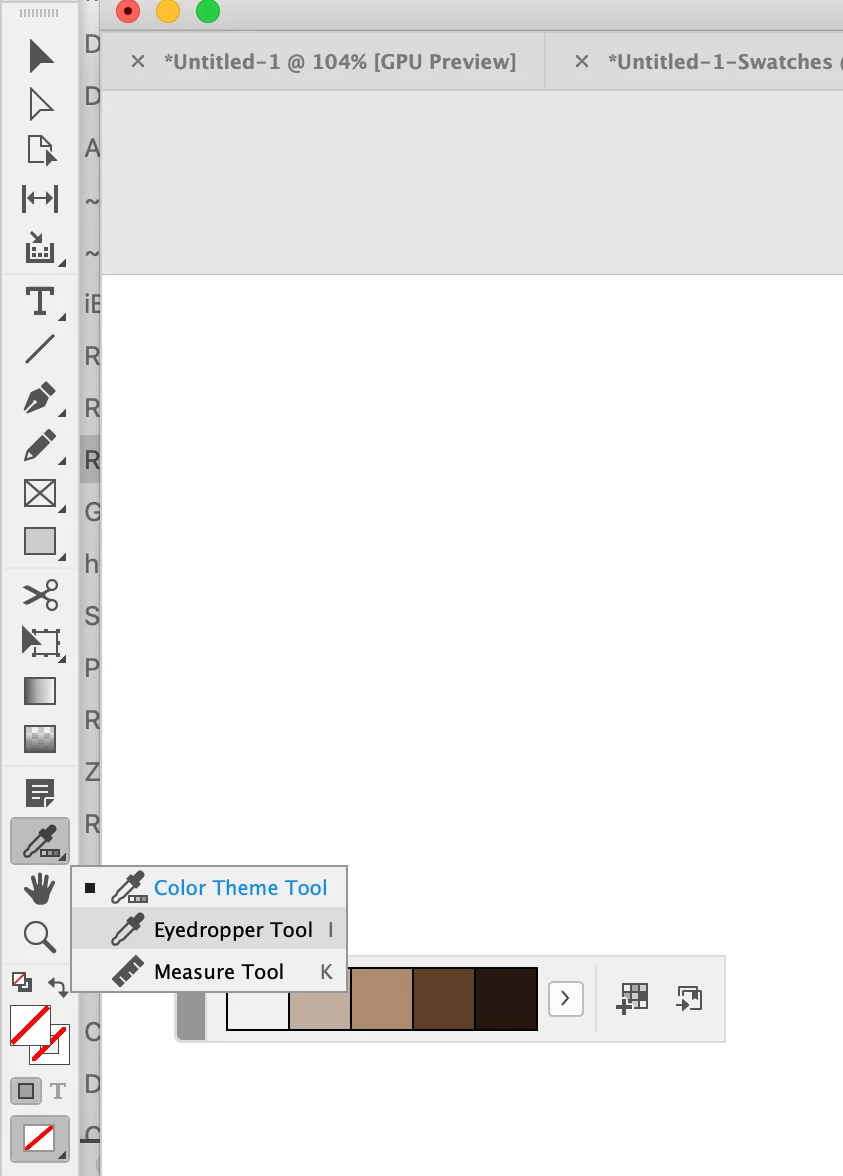
I am new in Adobe Indesign, looking for help......... how do I remove this toolbar from my document?

This topic has been closed for replies.
Correct answer rob day

Either press escape or switch from the Color Theme Tool to the Eyedropper Tool or Measure Tool


2 replies

rob day
Community Expert
rob dayCommunity ExpertCorrect answer
Community Expert
December 16, 2021

Either press escape or switch from the Color Theme Tool to the Eyedropper Tool or Measure Tool


SG83Author
Participant
December 17, 2021

Hey,

Esc worked. Thanks

Randy Hagan
Community Expert
Community Expert
December 16, 2021

Select the Window>Color menu command and you should see a check mark by the Adobe Color Themes sub-menu command.


Click on that sub-menu command and the errant floating menu should disappear.


Hope this helps,


Randy

SG83Author
Participant
December 17, 2021

Hey 

I tried.. there is no check mark On Adobe Color themes. I don't have sub-menu command.
