magikct
Known Participant
August 9, 2019
Answered

How to reset Scale percentage using script

  • August 9, 2019
  • 4 replies
  • 2873 views

Hi all,

I have following question: How can I reset horizontally and vertically scale of current selected image to 100% while maintaining current image dimensions (90x127.284mm)?
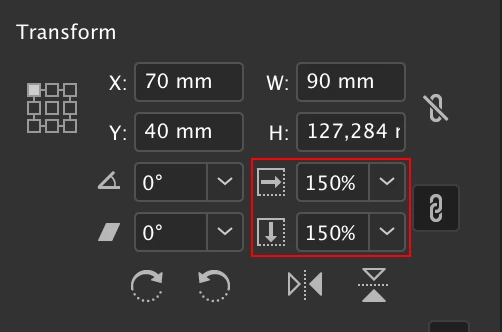
Thanks in advance!

This topic has been closed for replies.
Correct answer TᴀW

app.selection[0].redefineScaling();

Have I misunderstood the question?

Ariel

4 replies

TᴀW
TᴀWCorrect answer
Legend
August 11, 2019

app.selection[0].redefineScaling();

Have I misunderstood the question?

Ariel

Marc Autret
Legend
August 12, 2019

Hi Ariel,

I'm afraid you have perfectly understood the question …and we just weren't aware of the redefineScaling() method

As we say in French, “le ridicule ne tue pas !”

Marc

uniqued_tol
Inspiring
August 9, 2019

var mySel=app.selection[0]; 

        if (mySel.constructor.name != "Rectangle") {

mySel=mySel.parent;

    }

mySel.graphics[0].horizontalScale = 100; 

mySel.graphics[0].verticalScale = 100; 

mySel.fit(FitOptions.FRAME_TO_CONTENT); 

Loic.Aigon
Legend
August 9, 2019

Hello,

Just use InDesign feature :

var menuAction = app.menuActions.itemByName("$ID/RedefineScalingMenuString");

  menuAction.enabled && menuAction.invoke()

If needed in InDesign Server, then you will need to do some maths and call resize function.

FWIW

Loic

Marc Autret
Legend
August 10, 2019

Hi Loïc,

That's probably one of the best examples of invoking a MenuAction!

In terms of transformations, “Redefine Scaling as 100%” is much more complex than I imagined. There are probably good solutions using resize() and/or (horizontal/vertical)Scale properties. But from an educational standpoint it's interesting to implement that function strictly using the transformation and coordinate space API.

What is required here is:

(0) backup the original scaling factors,

(1) apply a 100% scaling with ajustScalingPercentage turned on,

(2) restore the original scaling factors with applyToContent turned on.

Surprisingly complicated! I did not manage to emulate the command in a more compact way:

function redefineScalingAs100(/*Image|<ImageContainer>*/sel,  img,p,orig,mx,pf,t)

//----------------------------------

// Emulate the "Redefine Scaling as 100%" menu action through

// detailed transform steps. As shown by Loic Aigon, invoking

// `app.menuActions.itemByName("$ID/RedefineScalingMenuString")`

// does the entire job in one single command. The present snippet

// attempts to reach the same outcome from pure transformations.

{

    // Checkpoint.

    // ---

    if( !sel ){ alert("Select an image."); return; }

    // ---

    ( sel instanceof Image )

    ? ( p=(img=sel).parent )

    : ( img=(p=sel).hasOwnProperty('images') && p.images[0] );

    // ---

    if( !img.isValid ){ alert("No image found."); return; }

    // Constants.

    // ---

    const CS_REF = +CoordinateSpaces.parentCoordinates;

    const CS_INN = +CoordinateSpaces.innerCoordinates;

    const CS_PBD = +CoordinateSpaces.pasteboardCoordinates;

    // ---

    const BB_VIS = +BoundingBoxLimits.OUTER_STROKE_BOUNDS;

    // ---

    const WS_SCA = +WhenScalingOptions.adjustScalingPercentage;

    const WS_RSZ = +WhenScalingOptions.applyToContent;

    // ---

    const MC_SCA = +MatrixContent.scaleValues;

    // Visible box center in *pasteboard* coordinates (because

    // we want that location to remain invariant.)

    // ---

    orig = p.resolve([AnchorPoint.centerAnchor, BB_VIS, CS_INN], CS_PBD)[0];


    // Matrix of `p` relative to its parent space--i.e, affine map.

    // (The whole purpose of `mx` is to backup scaling factors.)

    // ---

    mx = p.transformValuesOf(CS_REF)[0];

    if( 1==mx.horizontalScaleFactor && 1==mx.verticalScaleFactor ) return;

    // 1. Reset `p` scaling to 100% relative to its parent space.

    //    (`adjustScalingPercentage` is temporarily required.)

    // ---

    t = +(pf=app.transformPreferences).whenScaling;

    t==WS_SCA ? ( t=0 ) : ( pf.whenScaling=WS_SCA );

    p.transform( CS_REF, orig, [1,0,0,1,0,0], MC_SCA );

    t && (pf.whenScaling=t);


    // 2. Recover the original size by applying `mx` scale values.

    //    (`applyToContent` is temporarily required.)

    // ---

    t ? (t=0) : ( pf.whenScaling=t=WS_RSZ );

    p.transform( CS_REF, orig, mx, MC_SCA );

    t && (pf.whenScaling=t);

}

// Test.

// ---

redefineScalingAs100(app.selection[0]);

Best,

Marc

uniqued_tol
Inspiring
August 9, 2019

sorry line 1 edit; var mySel=app.selection[0]; 

magikct
magikctAuthor
Known Participant
August 9, 2019

Nope. Scale is still unchanged.

uniqued_tol
Inspiring
August 9, 2019

        var mySel=app.selection;

           mySel.graphics[0].horizontalScale = 100;

   mySel.graphics[0].verticalScale = 100;

   mySel.fit(FitOptions.FRAME_TO_CONTENT);

magikct
magikctAuthor
Known Participant
August 9, 2019

Unfortunetly it doesn't work.