
Inspiring
May 30, 2022
Answered

How to safely ignore or deal with an error in extendscript?

  • May 30, 2022
  • 2 replies
  • 491 views

Hi all,

I'm working on a script that looks to see if the selected frame in InDesign has particular coordinates, dimensions and object style. If it finds a match it gives it a name (e.g. 1C7). At the moment it gives me an alert to show the result but eventually I'll turn the alert off and use the result as a variable in Keyboard Maestro to do more exciting things.

One small issue I have is that when the script DOESN'T find any match, I get this error.
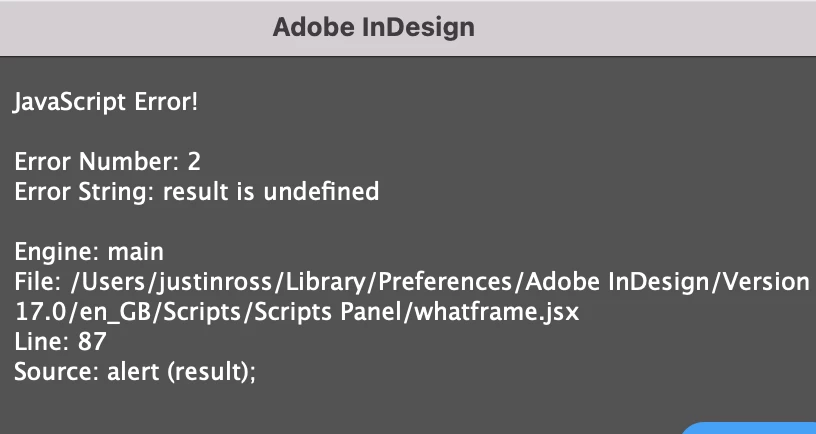
Is there a way to ignore the error or circumvent it in the first place?

var myDoc = app.activeDocument;

//SELECTED OBJECT
mySelection = myDoc.selection[0];

//SELECTED OBJECT'S STYLE
frameObjectStyle = mySelection.appliedObjectStyle.name;

//OBJECT STYLES TO FIND
objStyle1 = "Text Frame Inset 4mm";
objStyle2 = "Text Frame Inset 4mm 2 column";

//FIX THE GEOMETRIC BOUNDS
var gb = app.activeDocument.selection[0].geometricBounds;
var xcoord = gb[1].toFixed(2);
var ycoord = gb[0].toFixed(2);
var width  = gb[3].toFixed(2) - gb[1].toFixed(2);
var height = gb[2].toFixed(2) - gb[0].toFixed(2);

//NOW FIND THE TYPE AND POSITION OF THE SELECTED FRAME
//RETURN A POSITIVE HIT AS TEXT

//2 COLUMN TEXT FRAMES

//2C1 top of left page
if (xcoord == 11 && ycoord == 11 && 
width == 148 && height == 107 && frameObjectStyle === objStyle2) 
{result = "2C1"};

//2C2 bottom of left page
if (xcoord == 11 && ycoord == 122 && 
width == 148 && height == 107 && frameObjectStyle === objStyle2) 
{result = "2C2"};

//2C3 top of right page
if (xcoord == 181 && ycoord == 11 && 
width == 148 && height == 107 && frameObjectStyle === objStyle2) 
{result = "2C3"};

//2C4 bottom of right page
if (xcoord == 181 && ycoord == 122 && 
width == 148 && height == 107 && frameObjectStyle === objStyle2) 
{result = "2C4"}; 

//1 COLUMN TEXT FRAMES

//1C1 top left of left page
if (xcoord == 11 && ycoord == 11 && 
width == 72 && height == 107 && frameObjectStyle == objStyle1)
{result = "1C1"};

//1C2 top right of left page
if (xcoord == 87 && ycoord == 11 
&& width == 72 && height == 107 && frameObjectStyle == objStyle1)
{result = "1C2"};

//1C3 bottom left of left page
if (xcoord == 11 && ycoord == 122 
&& width == 72 && height == 107 && frameObjectStyle == objStyle1)
{result = "1C3"};

//1C4 bottom right of left page
if (xcoord == 87 && ycoord == 122 
&& width == 72 && height == 107 && frameObjectStyle == objStyle1)
{result = "1C4"};

//1C5 top left of right page
if (xcoord == 181 && ycoord == 11 
&& width == 72 && height == 107 && frameObjectStyle == objStyle1)
{result = "1C5"};

//1C6 top right of right page
if (xcoord == 257 && ycoord == 11 
&& width == 72 && height == 107 && frameObjectStyle == objStyle1)
{result = "1C6"};

//1C7 bottom left of right page
if (xcoord == 181 && ycoord == 122 
&& width == 72 && height == 107 && frameObjectStyle == objStyle1)
{result = "1C7"};

//1C8 bottom right of right page
if (xcoord == 257 && ycoord == 122 
&& width == 72 && height == 107 && frameObjectStyle == objStyle1)
{result = "1C8"};

alert (result);

 Many thanks if anyone can help.

This topic has been closed for replies.
Correct answer m1b

Hi @JustyR, you're on the right track but here's some notes:

First, declare your variables using var, even if they are undefined... so:

//SELECTED OBJECT
var mySelection = myDoc.selection[0];

//SELECTED OBJECT'S STYLE
var frameObjectStyle = mySelection.appliedObjectStyle.name;

//OBJECT STYLES TO FIND
var objStyle1 = "Text Frame Inset 4mm";
var objStyle2 = "Text Frame Inset 4mm 2 column";

// Will supply result later (or maybe not)
var result;


Then check to see if result is undefined before using it. For example:

if (result != undefined) {
   alert (result);
}

That's a start, but I have some other ideas that I'll post in a bit.

- Mark

2 replies

m1b
Community Expert
Community Expert
May 30, 2022

Hi again, I've re-written part of your script to show you another approach. It's just for your learning—you will be fine to keep going with your script as it is, but this explores another way.


The idea here is to separate the 'configuration' type information from the 'actual work'. So I've made an array call frameProperties which contains an object for each frame that you want to identify including the label you want to apply later.


Then, rather than a lot of if statements, we loop over the frameProperties objects and check them against the selection properties object.


To check them, I made a little function called isNearEnough which just checks if one number n is within tolerance of another number m. Using the .toFixed(2) method works, but isn't ideal because it returns a string which then is coerced back into a number. You could have used something like (Math.round(n*100)/100).


See what you think.

- Mark


var myDoc = app.activeDocument;

//SELECTED OBJECT
mySelection = myDoc.selection[0];

//SELECTED OBJECT'S STYLE
frameObjectStyle = mySelection.appliedObjectStyle.name;

//OBJECT STYLES TO FIND
objStyle1 = "Text Frame Inset 4mm";
objStyle2 = "Text Frame Inset 4mm 2 column";

//SELECTED OBJECT PROPERTIES
var gb = mySelection.geometricBounds;
var selectionProperties = {
    x: gb[1],
    y: gb[0],
    w: gb[3] - gb[1],
    h: gb[2] - gb[0]
}

//FRAME PROPERTIES
var frameProperties = [
    {
        //2C1 top of left page
        label: "2C1",
        x: 11,
        y: 11,
        w: 148,
        h: 107,
        objectStyle: objStyle2,
    },
    {
        //2C2 bottom of left page
        label: "2C2",
        x: 11,
        y: 122,
        w: 148,
        h: 107,
        objectStyle: objStyle2,
    },
    {
        //2C3 top of right page
        label: "2C3",
        x: 181,
        y: 11,
        w: 148,
        h: 107,
        objectStyle: objStyle2,
    },
    {
        //2C4 bottom of right page
        label: "2C4",
        x: 181,
        y: 122,
        w: 148,
        h: 107,
        objectStyle: objStyle2,
    },
    {
        //1C1 top left of left page
        label: "1C1",
        x: 11,
        y: 11,
        w: 72,
        h: 107,
        objectStyle: objStyle1,
    },
    {
        //1C2 top right of left page
        label: "1C2",
        x: 87,
        y: 11,
        w: 72,
        h: 107,
        objectStyle: objStyle1,
    },
    {
        //1C3 bottom left of left page
        label: "1C3",
        x: 11,
        y: 122,
        w: 72,
        h: 107,
        objectStyle: objStyle1,
    },
    {
        //1C4 bottom right of left page
        label: "1C4",
        x: 87,
        y: 122,
        w: 72,
        h: 107,
        objectStyle: objStyle1,
    },
    {
        //1C5 top left of right page
        label: "1C5",
        x: 181,
        y: 11,
        w: 72,
        h: 107,
        objectStyle: objStyle1,
    },
    {
        //1C6 top right of right page
        label: "1C6",
        x: 257,
        y: 11,
        w: 72,
        h: 107,
        objectStyle: objStyle1,
    },
    {
        //1C7 bottom left of right page
        label: "1C7",
        x: 181,
        y: 122,
        w: 72,
        h: 107,
        objectStyle: objStyle1,
    },
    {
        //1C8 bottom right of right page
        label: "1C8",
        x: 257,
        y: 122,
        w: 72,
        h: 107,
        objectStyle: objStyle1,
    }
];

// now check selected frame against all our frame properties
var sp = selectionProperties,
    fp,
    tolerance = 0.1;
for (var i = 0; i < frameProperties.length; i++) {
    fp = frameProperties[i];
    if (
        isNearEnough(sp.x, fp.x, tolerance)
        && isNearEnough(sp.y, fp.y, tolerance)
        && isNearEnough(sp.w, fp.w, tolerance)
        && isNearEnough(sp.h, fp.h, tolerance)
    ) {
        // sp matches fp
        break;
    }
}

if (fp != undefined) {
    alert(fp.label);
}


// returns true if n is near enough to m
// 'near enough' is defined by tolerance
function isNearEnough(n, m, tolerance) {
    return Math.abs(n - m) < tolerance;
}


JustyRAuthor
Inspiring
May 30, 2022

Holy moly! That's going to take some time to understand. Many thanks for your expertise and guidance, Mark. 

m1b
Community Expert
Community Expert
May 30, 2022

Haha, yeah sorry it was a lot to drop on you all at once. But don't worry—you can put my version aside until the future (or never!). You have made a really good start already with your script and you will add to your understanding bit by bit. Good on you for making the effort!

- Mark

m1b
Community Expert
m1bCommunity ExpertCorrect answer
Community Expert
May 30, 2022

Hi @JustyR, you're on the right track but here's some notes:

First, declare your variables using var, even if they are undefined... so:

//SELECTED OBJECT
var mySelection = myDoc.selection[0];

//SELECTED OBJECT'S STYLE
var frameObjectStyle = mySelection.appliedObjectStyle.name;

//OBJECT STYLES TO FIND
var objStyle1 = "Text Frame Inset 4mm";
var objStyle2 = "Text Frame Inset 4mm 2 column";

// Will supply result later (or maybe not)
var result;


Then check to see if result is undefined before using it. For example:

if (result != undefined) {
   alert (result);
}

That's a start, but I have some other ideas that I'll post in a bit.

- Mark