Inspiring
December 28, 2023
Answered

How to save a long table of contents that the Object/Captions/Menu has created inappropriately?

  • December 28, 2023
  • 3 replies
  • 2209 views

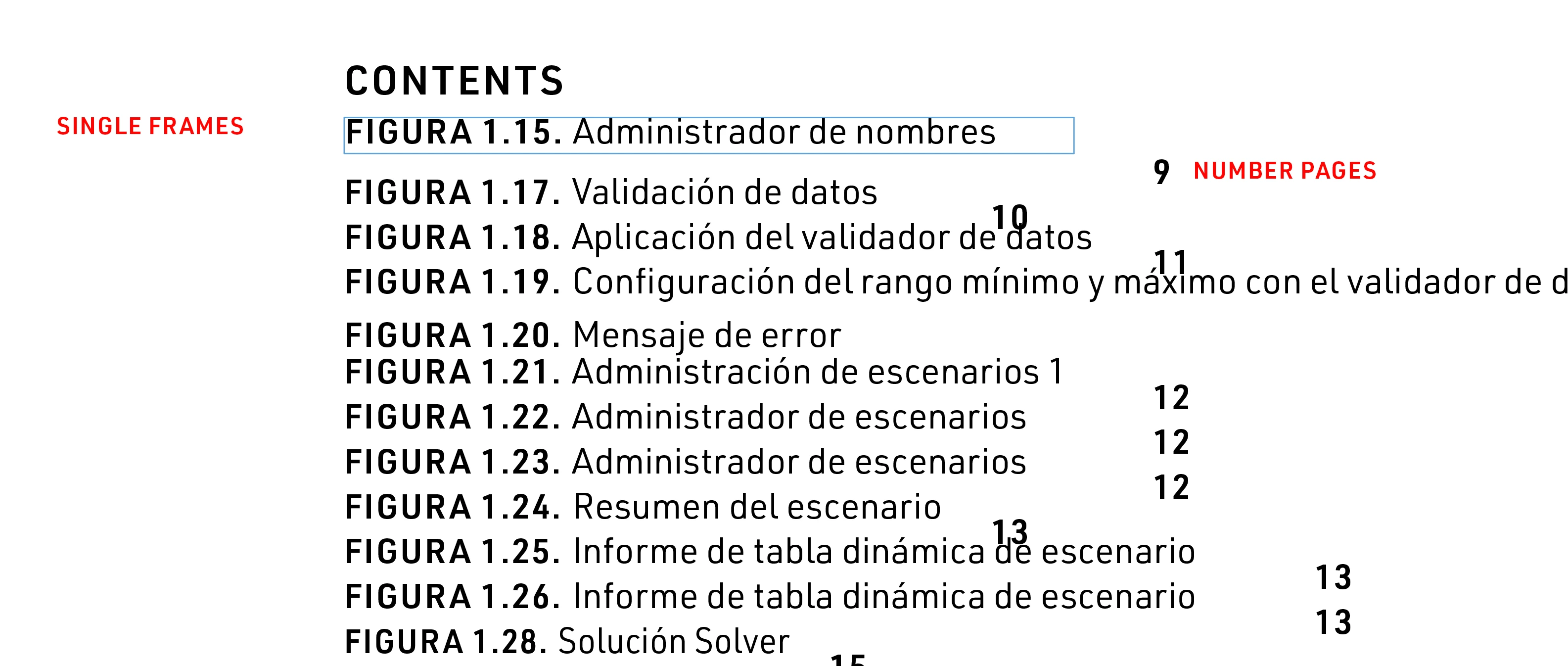
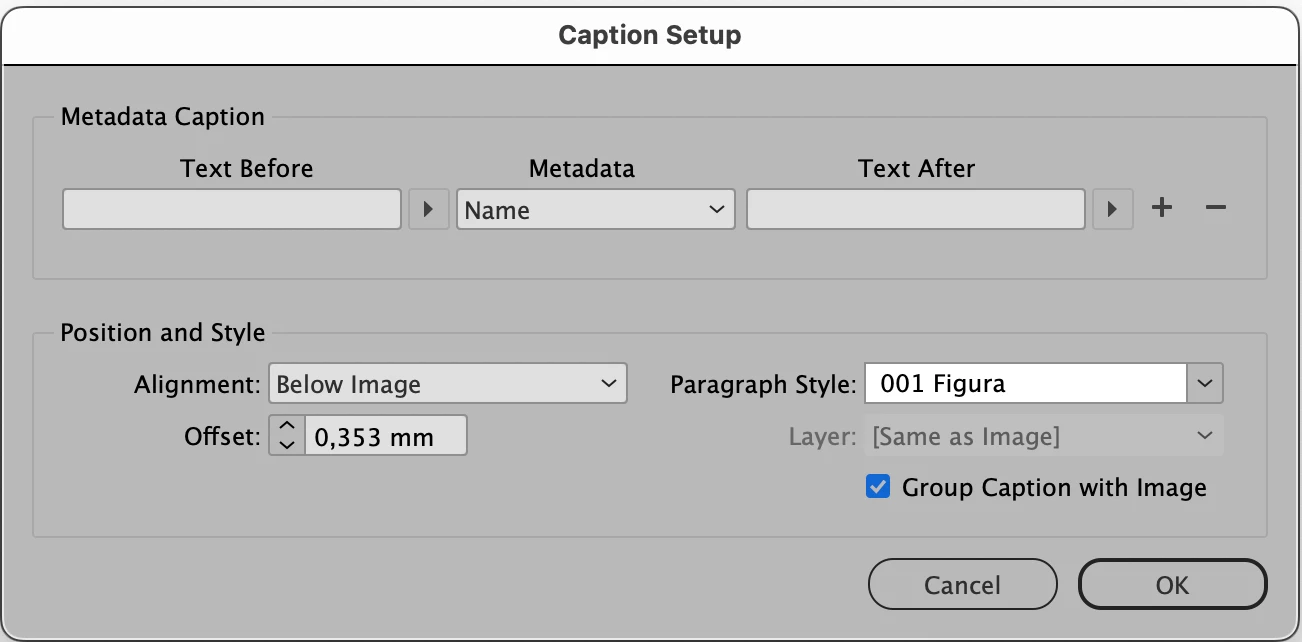
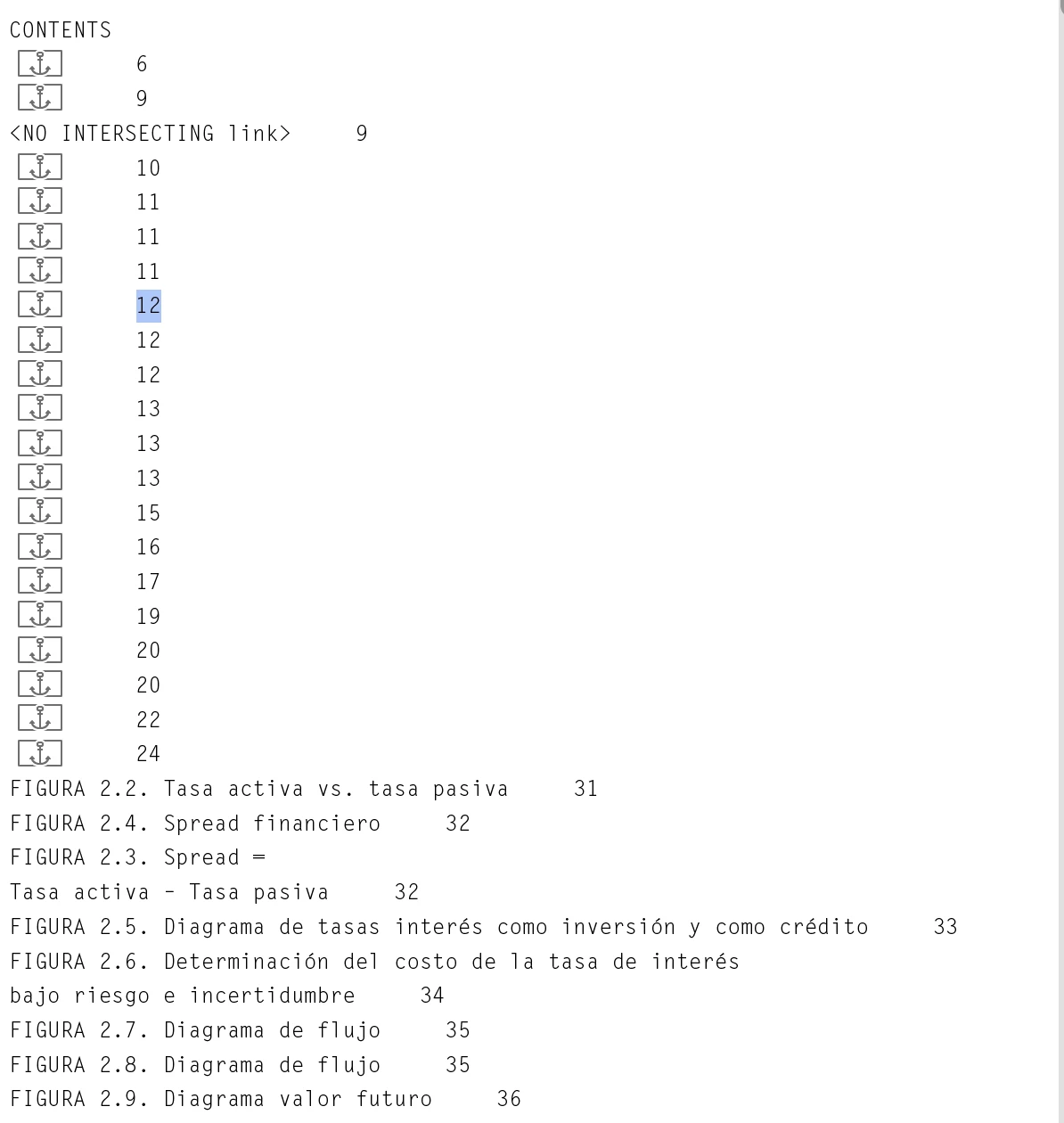
When using these specifications for captions and making a table of contents the result is a mass of unthread frames with their page numbers isolated and converted into anchored items:


I ask for help in order to:

Plan a: how to save this result (below) so as not to lose work and achieve a TOC from this imput?


or


Plan b: avoid a solution that consists of ungrouping the caption in each figure, which forces to execute a lot of manual operation and to lose what has been done. It seems group is the worst solution.

The problem is that using the group caption option in the caption menu creates an unusable result.  Perhaps a bug that I didn't count on.

Thanks
  

This topic has been closed for replies.
Correct answer Barb Binder

Hi @palala fog:


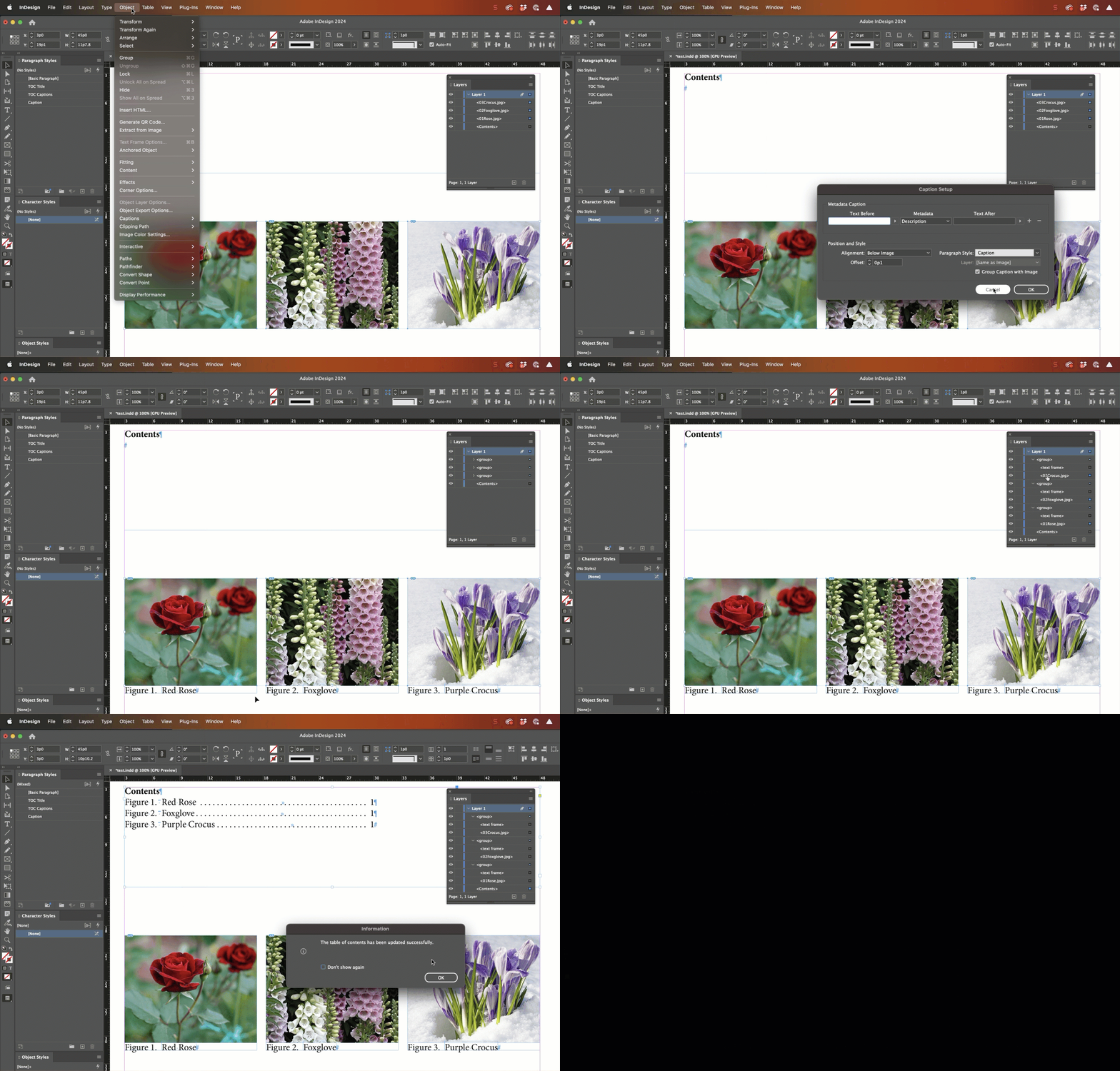
What version of InDesign are you using? I'm trying to recreate this (though collecting description and not name metadata). This is from 19.0.1 and I'm enabling Group Caption with Image in the Caption Setup dialog box before generating live captions and not seeing the issue. Are you on a different version? Or am I missing a step?


~Barb


3 replies

Barb Binder
Community Expert
Community Expert
December 31, 2023

Thank you @palala fogThat is the role of an Adobe Community Expert—we volunteer here in our spare time to help users figure out various Adobe applications. Keystroking a situation that we've never directly experienced and discussing the outcome is a great way for the user and the expert to continue their learning.


That said, I didn't run into any issue with generating a TOC from the generated, grouped, live captions so I'm still unclear what is going on for you. Can you tell me about the role of hyperlinks in your doc? Are you adding hyperlinks to the generated live captions? How are those getting into the TOC?


~Barb

~Barb at Rocky Mountain Training
Inspiring
January 3, 2024

Barb,

very nice your reply. Thanks.

I definitely think there was a style problem. It's instinct. This is not new but it's not very common. I remember once when applying a colour to a style caused dramatic changes and damage.


When you use a lot of character styles (coloured underline, for example) to check groups of words and sometimes delete or replace used ones, there is usually a certain "corruption" (they don't let you delete or modify them and show erratic behaviour) that forces you to leave them alone and not try to delete them because of the imminent danger of total damage.

Hyperlinks appeared in a warning notice explaining the non-execution of a table of contents. The file only had half a dozen of them in footer references. And in the that menu there were almost hundreds of them in red. That had already happened with another file without explanation that I sent to the forum without success. Indigestible cables from the engineers, probably.


The handling of TOCs is very dangerous because if they are duplicated in the pasteboard to remember or save a change they always abort. This behaviour probably has to do with what happens in captions: they are pieces of text with imbrications linked to pagination or information layout and they are very fragile.

Indesign reminds us of the end of a Faulkner's roman: «Given the choice between the experience of pain and nothing, I would choose pain».

Inspiring
January 4, 2024

Robert, quoting you:

R: I think the problem with your 1st screenshot - text examples - is that you are not using align to grid for the text?

Me: Absolutely. I ‘m talking about two things: text wrap and images. No grids. My observation (accompanied by the photo) does not point at all to design or appearance problems. We are talking about how to drive, not the cosmetic of the vehicle.  I’m describing how text wrap should beyond its simple use. And how it can be a great option for large-breath book assembly. But it is now unusable because it absurdly overlays the image with the galley. A real mess as seen in the example.


Barb Binder
Community Expert
Barb BinderCommunity ExpertCorrect answer
Community Expert
December 28, 2023

Hi @palala fog:


What version of InDesign are you using? I'm trying to recreate this (though collecting description and not name metadata). This is from 19.0.1 and I'm enabling Group Caption with Image in the Caption Setup dialog box before generating live captions and not seeing the issue. Are you on a different version? Or am I missing a step?


~Barb


~Barb at Rocky Mountain Training
Inspiring
December 29, 2023

Barbie, hi.

Ventura 13.6
ID 19.0.1

I feel It is a deep damage and assume it comes from using the "group" function because once you remove its use in the "captions" menu the problem begins to disappear. an the solution: remove the caption that was associated to the image. Manually placed the new caption and it was solved with an unpleasant investment of time and energy.

I suspect there was a style conflict that caused problems. Also,  sometimes during the experiments to fix the mess I got a warning that the hyperlinks didn't have a destination when generating bthe TOC. This is the second time this has happened in three months on a different file. I put the post in the Forum a few weeks ago but there was no response. It seems as an obscure topic that has no information on the web.


And in the case of this thread also generating an idml copy was problematic. It forced to re-start the machine which is a resource that works here when the files are annoying.

The generated TOC galley behaves strangely. It comes fragmented in unthreaded lines of text. It is selectable but does not make a copy and is clearly a badly damaged galley.

PS. Something that is a disgrace that happens for years on every computer and in every version is when a table of contents is deleted because ID aborts many times.


James Gifford—NitroPress
Legend
December 29, 2023

It seems a paradox that an Adobe expert suggests that we must accept ID as it is. ID is more and more. And less and less.

The deidification of this app does not blind us to the disgrace of being subjected to a precarious option. Using ID I feel like I'm back in the days of linotype, moveable print,  laboriously and heavily embroidering a fabric that eats up intelligent time.

And of course, around ID there are a lot of really wonderful and generous people who help us and give their time. That calms us down a lot. But those who ask us to keep quiet are not the best advisors and opinion leaders.


You are welcome to pause your project until Adobe fixes the issue to resolve your problem.


But most experienced users, up to 'expert,' would recognize that ID has limits and outright faults, and find methods to work around those limits rather than simply complain that it doesn't do exactly what is wanted (or, sometimes, even what it promises).


I'm not sure what other answer you are seeking, expert or not. Robert T. has already acknowledged that you're right, as a user who expects features to work as designed. But the fact is the Caption feature is poorly conceived, implemented with undue complexity and "works" only in a very narrow sense... when it isn't actually faulty.


So you can wait for Adobe to fix it, or move around the problem. I suggest the company is not in any mad scramble to implement that fix because of your complaints, which add on to a long, long list of them. 🙂


And ID is nothing if not enormously flexible, with a dozen ways to achieve most objectives. A built-in feature is rarely more than one, quick, limited alternative to others. I can't think of one that is "the only way" and can't think of many that are the absolute best approach — most are just the most efficient and "good enough" method.

James Gifford—NitroPress
Legend
December 28, 2023

I'm not quite grasping what's happened here, or why, but there should never be a problem "saving" a TOC if the TOC style (schema) has been saved. The actual TOC can be re-generated at any time, and indeed, that's the whole purpose — being able to regenerate it as each change to the content is made. (I note this seems to be more a TOF — table of figures — but that shouldn't make any difference.)


What is preventing you from deleting all this unwanted mess, checking your TOC schema to make sure you have the right paragraph styles selected, and re-generating the TOC into a newly dragged or placed text frame?


It looks to me as if you have a poorly selected Paragraph Style for the captions. I also don't remember if I've ever tried to generate TOC entries from paragraphs with anchors in them, but I sure must have, and I've never seen the complications you're showing.


Start by creating a fresh TOC schema, under a defined name (don't use 'default') and make sure you have tagged the caption style correctly.

Inspiring
December 28, 2023

James,

this post clearly stated that generating a table of contents from paragraphs that have been created under the menu Object/Captions only works properly if you do not group the image with the caption, as the menu supplies it. This positive result eliminates that the steps or styles for creating the table of contents are not correct. They are fine if the group option is not used.

Assuming that a table of contents is «poorly» generated when its output has turned into a jumble of loose parts and anchored elements does not seem adequate. It cannot be logically inferred. There is deep structural damage here as can be seen in the photos. Never seen.

Obviously tests have been tried in several ways and the result is the same. Using the "group" function in the captions menu is a disaster. Not using it gives a normal result. The problem is that we need to use this option and now we are faced with repeating what we have already done.

Thanks.

James Gifford—NitroPress
Legend
December 28, 2023

InDesign's caption feature is... idiosyncratic. It is of limited overall use except to shops that meticulously manage their image data, and it has many complicated aspects that are not of much use to, say, the average book or magazine author/designer.


I am not surprised it does not work well with other elements like TOC generation. But the only solution I (and others) have found is not to use the Caption feature at all. Create your own Caption text styles and use Object Styles to manage the images in conjunction with the following text, while trying to avoid creating grouped image/caption text box elements, which can cause other structural and cross-reference issues.


No, it's not a good situation. But there's no sign that the overall model is going to change, so our choice is to master the feature exactly as it exists, and work within its (fairly convoluted) limits... or just not use it at all.