Copy link to clipboard
Copied
Some years ago I used to work with InDesign. Now I am trying the updated program for free. I want to save my new files on the computer, I am not at all interesed to store it in the Cloud. Why does the system force me to save it in the cloud?
This is a macOS screen shot so will look different if on Windows, but you will have two save locations:
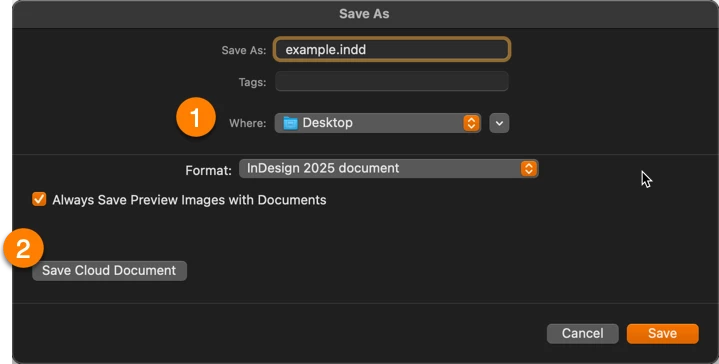
1. Save locally in the location of your choice (I'm showing my desktop)
2. Save on Adobe's cloud drive as a Cloud Document
However, the first time you save you will see a different dialog box, prompting you to save as a Cloud Document (and encouraging it, truthfully) which may be the source of your confusion. And then InDesign remembers how you saved or opened your
...Copy link to clipboard
Copied
There are no free updates to InDesign. It has been a subscription based application for more than 10 years and prior versions haven't had updates since then.
No version has forced you to save anywhere. That is your option to make. Unless you provide some real information nobody is going to be able to help you.
Copy link to clipboard
Copied
There are no free updates to InDesign. It has been a subscription based application for more than 10 years and prior versions haven't had updates since then.
By @BobLevine
Are there not still free trials for the new versions, though?
Copy link to clipboard
Copied
super rude comment. for your info, we are ONLY seeing an option to save to the cloud. The "On your computer" button is missing from the save as dialog, and the options in "preferences/file handling" are different from all the posts i'm finding about this issue. -- there is no option to change from cloud to my computer. i know this conversation is old, but i am not finding the answer to this issue anywhere and your rude ass comment really stood out. until i somehow find where this setting actually is, we ARE being forced to save in the cloud. 😛
Copy link to clipboard
Copied
Can you tell us the verion of InDesign and your OS? Show us a screen shot of the Save dialog?
Copy link to clipboard
Copied
thank you for following up. we reset all preferences and the "on your computer" option came back when doing a save as. we're all set. it was just so strange that all of the articles/posts/videos were directing to one check box (in preferences/file handling) and the options were different and we didn't have that one. (21.01 is the version btw) thanks again.
Copy link to clipboard
Copied
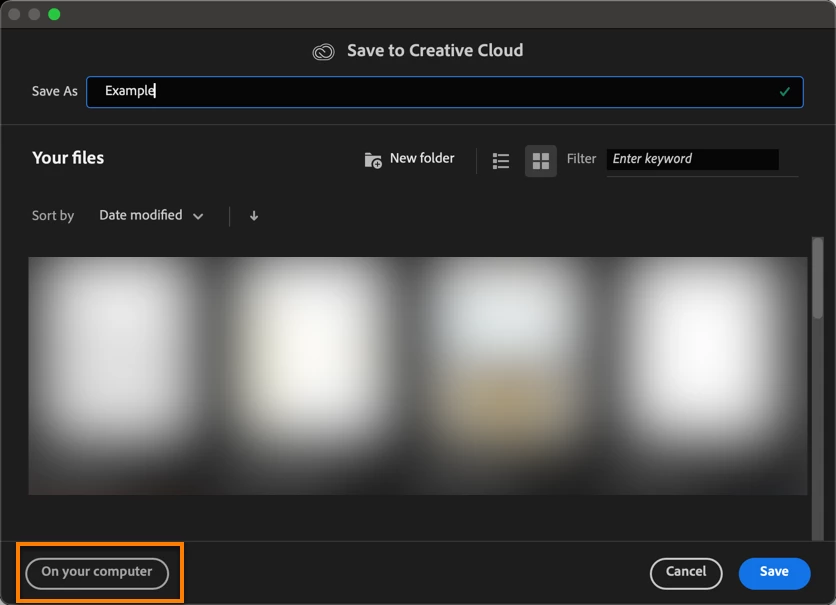
If the "On your computer" only came back when doing a "save as", it probably means the document was already saved to the cloud.
This is what you see when doing a save-as with a document already on the cloud:
This is what you should see when you first save the file:
Copy link to clipboard
Copied
that makes sense. not sure how it got saved in the cloud because they don't use that workflow, but who knows. users do weird sh*t. I don't use this software so it makes it harder to figure stuff like that out. however, it's still strange that our file handling preferences don't include the option that most people were suggesting; the drop down for Default File Location. is that just a version thing?
Copy link to clipboard
Copied
oh, and yes, that black dialog box is what they were seeing, but there wasn't a "on your computer" option. that only showed up after we reset all of the preferences.
Copy link to clipboard
Copied
it's windows 11 btw. and hopefully it was obvious that i wasn't referring to your comment as being rude. 🙂
Copy link to clipboard
Copied
No worries.
Copy link to clipboard
Copied
@BobLevine's comment was strictly factual. It might seem rude but it was just the basic info.
Copy link to clipboard
Copied
iCloud is from Apple - nothing to do with Adobe.
@rigmor_anna_6020 wrote:
[...] Why does the system force me to save it in the cloud?
Copy link to clipboard
Copied
This is a macOS screen shot so will look different if on Windows, but you will have two save locations:
1. Save locally in the location of your choice (I'm showing my desktop)
2. Save on Adobe's cloud drive as a Cloud Document
However, the first time you save you will see a different dialog box, prompting you to save as a Cloud Document (and encouraging it, truthfully) which may be the source of your confusion. And then InDesign remembers how you saved or opened your most recently accessed document and will continue to present you with the same experience until you select otherwise. Choose On Your Computer to get the options shown in my screen shot, above.
~Barb

Copy link to clipboard
Copied
Copy link to clipboard
Copied
Kids are the best! Come back if you have more questions (that he can't answer). 😉
~Barb
Copy link to clipboard
Copied
Copy link to clipboard
Copied
You are most likely installing version 2025 - which is very buggy - try installing previous version - 2024.
https://helpx.adobe.com/uk/download-install/using/install-previous-version.html
Copy link to clipboard
Copied
Copy link to clipboard
Copied
Hi Anna:
I am sorry you are going through this, and I fully understand your frustration.
To be clear, you should not need to uninstall/reinstall InDesign to get it to change where you save your files, nor are you obligated to use Adobe servers. Encouraged, as I mentioned earlier, but it's an option, not a requirement.
I think Robert's advice to use 2024 for now is a good one (I'm not doing real work on 2025 yet either), but I want to leave you with another option the next time you want to uninstall/reinstall any version of InDesign.
When you uninstall an Adobe application, it leaves remnants behind on your computer. These are preference & cache files and if they're corrupt, they are going to continue to cause issues, even after the reinstall because InDesign still accesses them.
The easiest way to remove them is to open up the InDesign menu > Preferences > General > Reset Preferences on
Quit. Then quit and restart InDesign. This is not the most thorough way but it works in most cases and I wouldn't expect much corruption after a few days on the trial. InDesign will be reset to its defaults and should go back to working normally. The first time you save a file, pay attention to saving on your computer and it will remember that moving forward.
If you install 2024 and it is is working for you, and it should allow you to pick up where you left off on your CS6 book.
When you are tempted to try 2025 again, you might ask your son to work through this post: https://www.rockymountaintraining.com/adobe-indesign-rebuilding-preferences-cache/. If he gets to the bottom, he will have removed all remnants of the previous InDesign installation, just in case that was part of the issue.
If you have additional questions on other topics (your book layout, for example). Come back and see us. It's best to keep each thread to one topic, so just start new post. If you have further questions on this topic, of course, just come back here.
~Barb
Copy link to clipboard
Copied
Get ready! An upgraded Adobe Community experience is coming in January.
Learn more