Inspiring
June 26, 2017
Answered

how to set default color mode in indesign?

  • June 26, 2017
  • 2 replies
  • 44995 views

Hi

I cant for the life of me find where (if you can) to set the default"color mode". This is the area under "Swatches" "New Swatch"

where you define PANTONE+ Solid Uncoated, CMYK,  etc etc, it seems to be defaulted to RGB, does any one have an idea how to do this please?

cheers

Kev

Mac OSX 10.12.4

Indesign CC 2017

This topic has been closed for replies.
Correct answer rob day

cheers Steve

I can write the script, oh well ill sort some thing, have a great day

cheers

Kev


InDesign doesn't have a document color mode. The New Document and Document Setup dialogs have the intent option, which will convert the existing swatches and colors to the intended color space, but any document allows you to have a mix color spaces—CMYK, RGB, Lab, Mixed Ink.

as id like it to always show PANTONE+ Solid Uncoated.

The initial color mode you get when you choose New Swatch from the Swatches panel depends on the current mode you have set in the Color panel. The Color panel's initial application default setting can be set with no documents open. So here my New Swatch dialog is defaulting to Lab because my Colors panel is set to Lab.
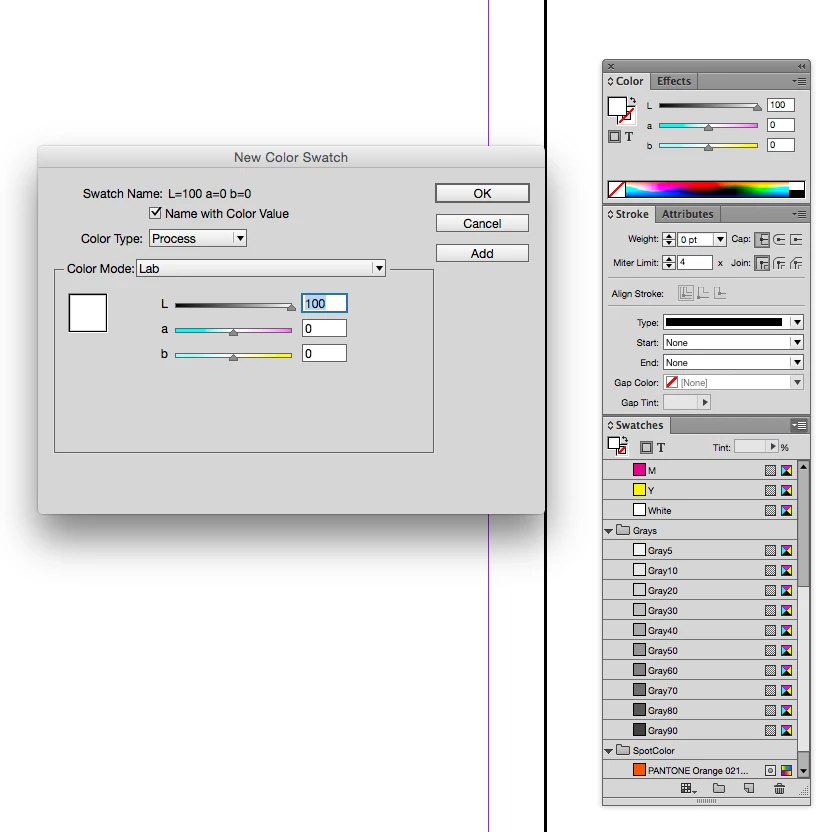
You can't set the default New Color Swatch to a Pantone book color, if the Color panel is set to a book Pantone color the New dialog will usually give you a Lab color, which is the color mode of Pantone's solid libraries.

Unfortunately I don't think you can script the addition of book swatches. Here are the Color API options:

InDesign ExtendScript API (10.0)

2 replies

Steve Werner
Community Expert
June 27, 2017

The default color mode is established when you create the document. It depends on the Intent in the New Document dialog (shown below):

For a Print document, the default is CMYK which is appropriate. For Web or Mobile document which is to be viewed on-screen, the default is RGB.

It's possible to mix color modes in your Swatches panel, but generally this isn't a good idea.

Inspiring
June 27, 2017

Thanks for the replies, appreciated,

my documents are all set to "Print" upon creation,  it's more trying to set a default Color Mode under the New Color Swatch area,

as id like it to always show PANTONE+ Solid Uncoated.

Steve Werner
Community Expert
June 27, 2017

It's not possible in the user interface.

Perhaps you can get someone to write a script for you to add PANTONE colors to your swatches. You might ask in the InDesign Scripting forum:

InDesign Scripting

Barb Binder
Community Expert
June 27, 2017

In the new document dialog box, if the Intent is set to Print, the color space will automatically be set to CMYK. If the intent is Web or Mobile, it will be RGB. A document can also be converted from CMYK to RGB by going to the Color panel menu.

~Barb at Rocky Mountain Training