
TypoMan23
Known Participant
September 6, 2022
Answered

How to stop new files opening in same window?

  • September 6, 2022
  • 3 replies
  • 2483 views

New to CC... whenever I open a new ID file it opens just in a new tab which is part of the existing window.
I dislike this, and keep having to separate them.

How can I just have the file open in a separate window, and not joined on to the already opened window/file?
Many thanks for any help.

 

Correct answer John Mensinger

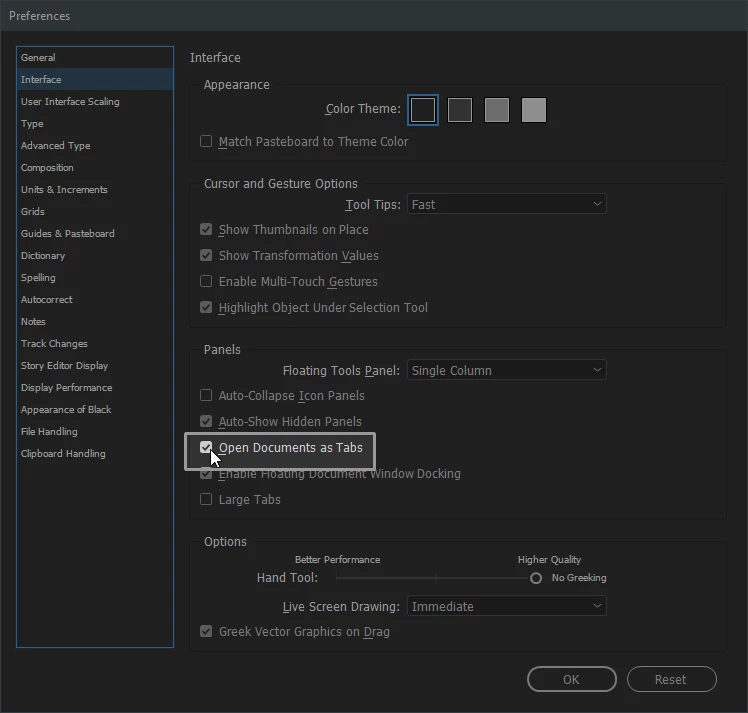
Preferences > Interface > Panels > [disable] Open Documents as Tabs


3 replies

Peter Spier
Community Expert
Community Expert
September 6, 2022

Funny. Tabs was a long requested feature by many users, and one of my favorites.

Different strokes, as they say.

James Gifford—NitroPress
Legend
September 6, 2022

Agree. Even with acres of screen space, I find it easier to manage a row of tabs than a stack/spread of windows. But I do occasionally break them out for side-by-side work.


(And over on the other side, the move by MS to make every Office document open a complete new instance of the user frame has driven me nuts for years now.)


John Mensinger
Community Expert
John MensingerCommunity ExpertCorrect answer
Community Expert
September 6, 2022

Preferences > Interface > Panels > [disable] Open Documents as Tabs


TypoMan23
TypoMan23Author
Known Participant
September 6, 2022

That's it! Thanks so much, really appreciate it.

Rishabh_Tiwari
Community Manager
Community Manager
September 6, 2022

Glad to hear that! Feel free to reach out if you have any other questions or issues.

BobLevine
Community Expert
Community Expert
September 6, 2022

Turn it off in your preferences. It's under interface.

elle s
Participant
March 4, 2024

hi... even though I have unchecked the box, the software still opens docs as tabs...

Any other ideas? 

elle s
Participant
March 5, 2024

Have you closed and restarted InDesign? Some settings with the UI only take effect on restart.


Unfortunately, no... 

What's more bizarre is this: I open a file and size it at 75%, then when I open another file, it connects as a tab to the first file, fills the monitor, and dips below, so I cannot see the bottom right corner to resize the window.

Often I need to have 2 files open like this and it drives me crazy that I can't change the preference.

Is there something under the WINDOW command that could help? Arrange... Workspace...