Copy link to clipboard
Copied
Hello, does anyone know how to uncheck the "Show 'Start' Workspace when no documents are open" item in General preferences (InDesign 11.3 (2015.3 Release) via script or command? :
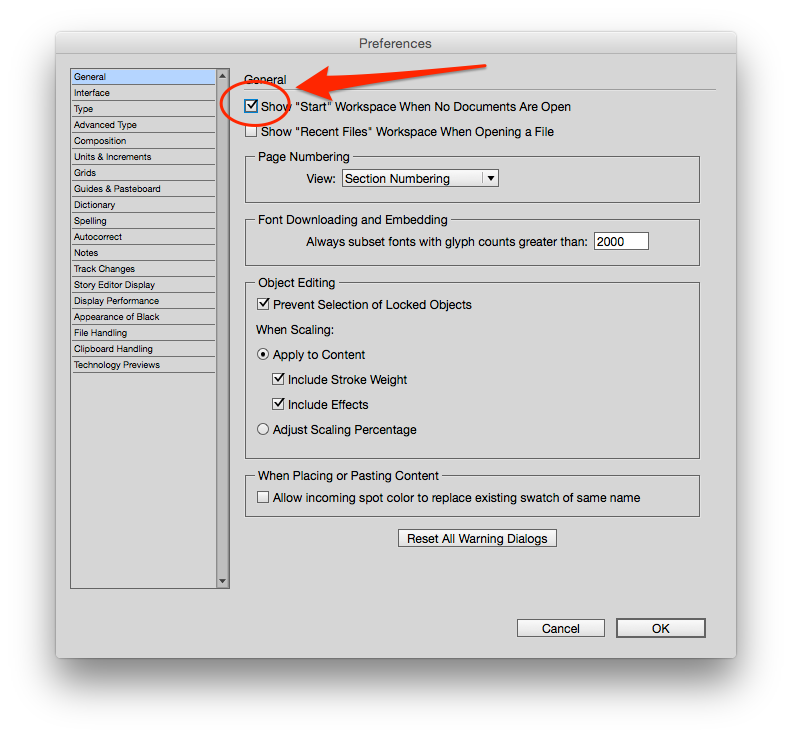
I am preparing to deploy several other settings with CC2015 via .jsx scripts in the startup scripts folder; one setting I was doing was turning off the Application frame (app.generalPreferences.useApplicationFrame = false;)
I figured this setting would hide the Start workspace but when the startup script runs that command, instead I see more buggy behavior, a random window pops up with info from the start workspace, and then InDesign freezes completely.
See attached screenshot3.

I can deploy a Defaults file with this setting but have really been trying to get away from that and would love to figure out how to uncheck that box with a command or script... I've searched around the object model and can't find it.
Much obliged for any assistance!

app.generalPreferences.showStartWorkspace
Copy link to clipboard
Copied
app.generalPreferences.showStartWorkspace
Copy link to clipboard
Copied
Thank you so much! That works!
Out of curiosity, how did you find it?
Unfortunately even with that I get the buggy behavior on first launch if I disable the Application frame via .jsx.. and it still shows the Start Workspace on first run regardless too
(buggy Adobe!)
But I really appreciate the help, thank you Loic.Aigon!
Copy link to clipboard
Copied
mattrhorn wrote:
…
Out of curiosity, how did you find it?
Hi Matt,
if you looked up this DOM documentation:
InDesign ExtendScript API (11.0)
you would not have found it.
As you can see, this is for InDesign v11.0 and the property was added in a later version. v11.2 or v11.3 I think.
Cannot tell exactly.
How would one look after such a thing?
Connect InDesign CC 2015.3 to the ESTK and use the "Object Model Viewer" under menu "Help" of the ESTK.
There you could look for it.
Or traverse the generalPreferences of the app object directly by script and read out the property/value pairs to find a hint.
var myObject = app.generalPreferences;
var x;
for(x in myObject)
{
$.writeln(x+"\t"+myObject
.toString() ); }
Uwe
Copy link to clipboard
Copied
Out of curiosity, how did you find it?
Obviously was in generalpreferences object then
Then
Obj.reflect.properties'
VoilÃ
Loic
Get ready! An upgraded Adobe Community experience is coming in January.
Learn more
