Participating Frequently
February 11, 2020
Answered

How to use arabic in InDesign CC2020

  • February 11, 2020
  • 2 replies
  • 12028 views

dear community,

i want to create an ad with arabic copy but i cant get my head around it.

i am using adobe indesign cc 2019 on a mac (macos catalina, 10.15.1).  


thanks for reply.

best beovita


{Renamed by MOD}
This topic has been closed for replies.
Correct answer Zaid Al Hilali

thank you for your great reply.


I've now two version like you said. in my latest indesign program, I've set it English arabic and I also have the ME Type Tool. I am behaving a bit supid I guess. But how do I use it now? 


Please continue to ask, there is no wrong question here.


This is a video I made earlier that simplify 4 tasks you ought to take in order to type Arabic properly. Same 4 steps apply in your case when you will copy text from MS. Word then paste into InDesign.

2 replies

Zaid Al Hilali
Community Expert
Community Expert
February 12, 2020

Let us know more about your requirements so we can assist you, as I'm not sure your concern is technical or language?

beovitaAuthor
Participating Frequently
February 13, 2020

thanks for your reply.


well, i am not able to manage in my indesign program to create an ad in arabic. do you know what i mean?

Zaid Al Hilali
Community Expert
Community Expert
February 13, 2020

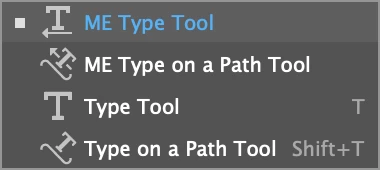
You may need to either remove your existing InDesign copy and reinstall another copy that supports Arabic, or you may have another copy of InDesign alongside the existing one. I believe that your copy of InDesign doesn't support Arabic yet, to verify this, just check whether you have a "ME Type tool" as shown below, if not then your InDesign lacks proper Arabic support.

_________________________________

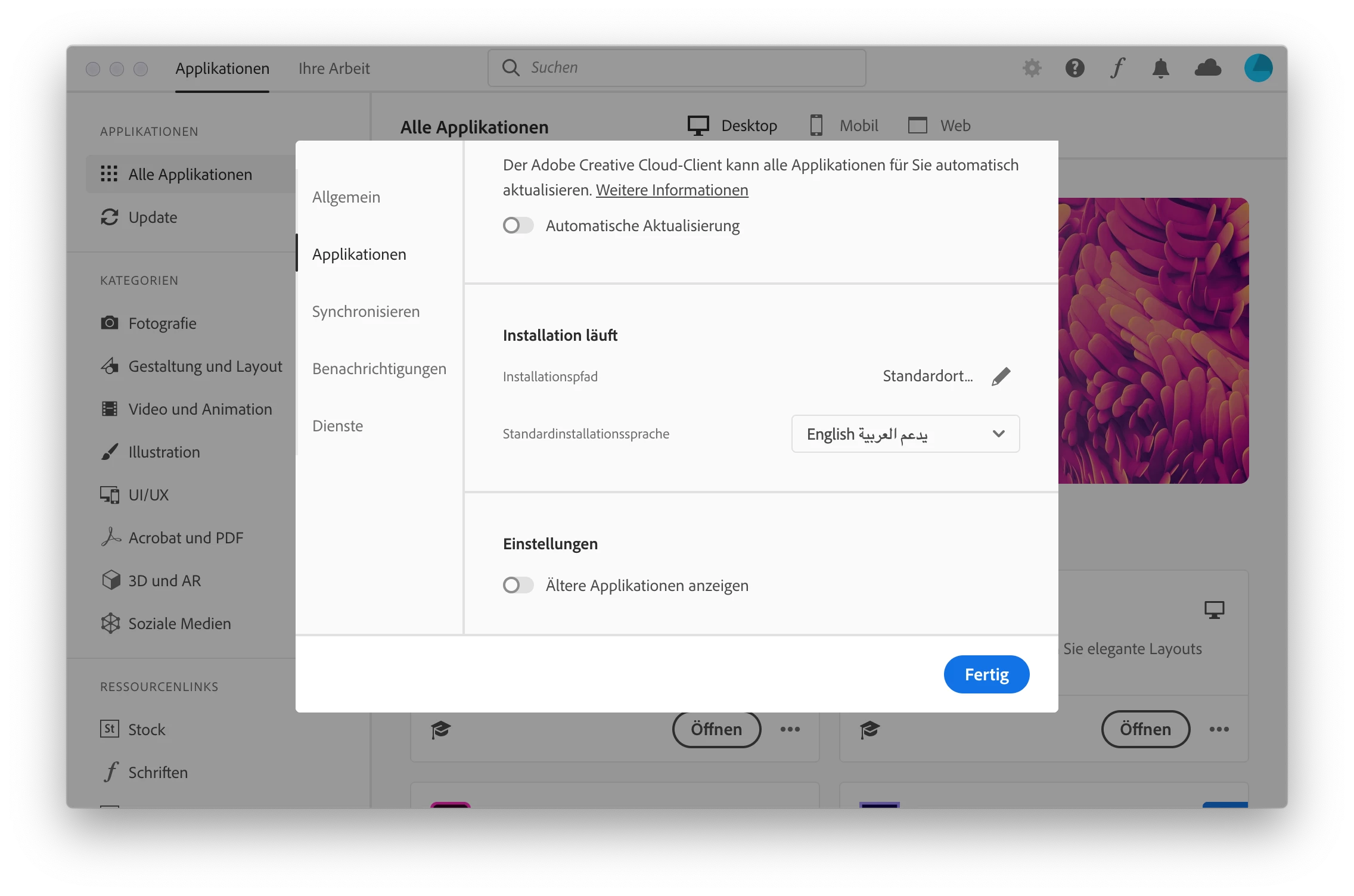
Here is the way to add another version of InDesign so you end up with two copies, one of which supports Arabic…

Open your Adobe CC desktop application

1- Click on the Preferences gear shape icon on top right

2- Click on Apps in left pane

3- Choose English يدعم العربية then click "Done" button

4- Click on the three ellipses at the bottom right corner of InDesign icon, choose "Other versions", select an older version from the list and start downloading.

Eventually, you will end up with two InDesign copies, an old copy that supports Arabic, and the latest copy that you use for daily non-Arabic jobs.

Ashutosh_Mishra
Inspiring
February 11, 2020

Hi Beovita,


Thanks for reaching out. I'd recommend checking out help article https://helpx.adobe.com/indesign/kb/access-install-hebrew-arabic-indesign-illustrator-CC.html to know how you can use the MENA (Middle east and North African languages) editions.

Hope it helps.


Regards,

Ashutosh

beovitaAuthor
Participating Frequently
February 13, 2020

thanks for your reply.


i followed your instruction. is there anything els i have to do? because its still wrong in my opinion. i am copying a copy from word (in arabic) and paste it to the file. but it shows it diffently (pls take a look to the screenshot).