
How to use scripting in InDesign from spreadsheet datamerge
Hi there
I've been working on a project for a while (some of it successfully and some of it not) to figure out what scripting I would need to use in Indesign (conditional text or js) and what I would need to clarify in the spreadsheet before completing a datamerge in Indesign.
Here's my analysis and what I currently have to work with:
Scenario:
- I have a listing for a hostel (300+ actually) and in each record we display the room types for each hostel. They are single, double, twin, dorm and share.
- Each room type may offer a variety of up to 4 different prices. For example, hostel A may have a single room type offering 4 beds @ $32 & 3 beds @ $42 and 2 beds @ $45. This can also be the same scenario for the other room types.
- Each room type price will show in a different colour: green for madup beds, blue for ensuite rooms, pink for madeup and ensuite (together) and black for none of the above.
- The prices will need to range from lowest to highest for each room type configuration.
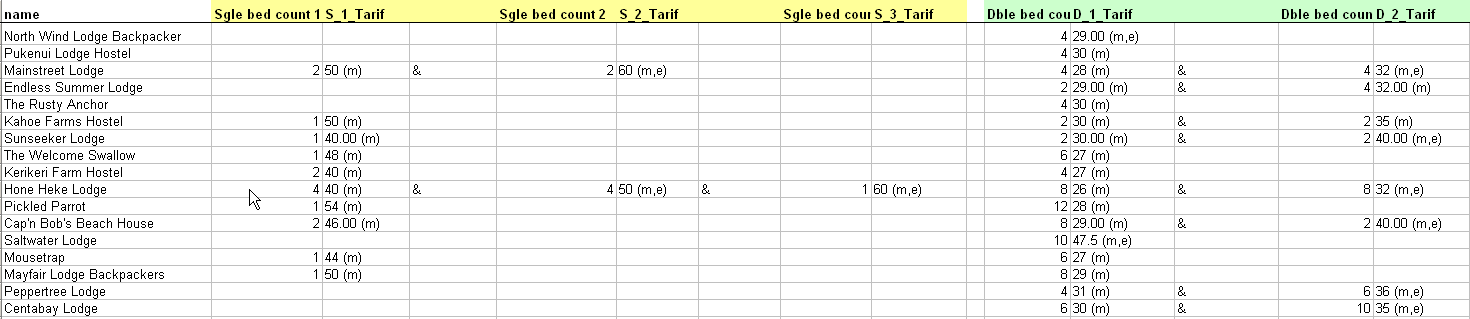
I have a large spreadsheet that displays the bed count, price and room configuration.
What knowledge I do have is that I can create character styles in InDesign, complete a datamerge and layout the template. I intend to use the character styles for the colour coding on the room type configurations.
My problem is I don't know how to identify the different price colours and range by the fields given to me in the spreadsheet without having to manually place each room type, bed count, price and colour ID in separate columns. This would be too manual a process.
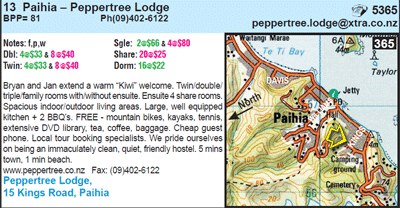
Here is an example of what I have to work with in the spreadsheet including a hostel record for a visual. Please note that the room config types are showing by using (m) madeup (m,e) madeup ensuite (e) ensuite. And for those room types ie Single, dorm etc that have no beds at all to offer then I need to insert a hyphen "-" only.
I'm wondering whether someone can assist me with some logic that I may need to create in Indesign for Indesign to identify the colours and the price ranking of each room type configuration.
I hope this makes sense.
I'd be happy to pay someone for their time to assist me with this but would need to do this off the forum of course. I also have a very tight budget.
Thanks very much in advance.
 AdChoices