
Participant
February 23, 2018
Answered

How to view "text direction" and "table direction" buttons in InDesign

  • February 23, 2018
  • 5 replies
  • 2387 views

HI all,

am trying to insert Arabic text in a document and wanted to also modify the tables  (changing columns orders). However, I cannot find in Character panel and Table panel the "change direction" buttons. Have Indesign CC 2017.

Any help? thank you

Elisa
    This topic has been closed for replies.
    Correct answer Zaid Al Hilali

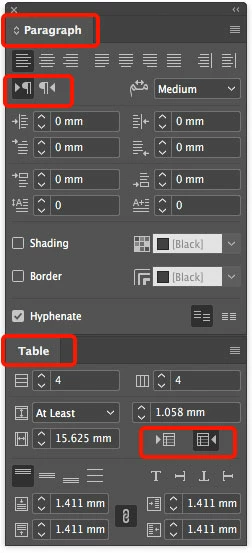
    Below marked options will be visible ONLY when you download the right version "English يدعم العربية" the supports Arabic. Here is a discussion of how to get this version.

    5 replies

    edominoAuthor
    Participant
    February 24, 2018

    This is actually the only way to get the issue sorted out

    regards

    Zaid Al Hilali
    Community Expert
    Zaid Al HilaliCommunity ExpertCorrect answer
    Community Expert
    February 23, 2018

    Below marked options will be visible ONLY when you download the right version "English يدعم العربية" the supports Arabic. Here is a discussion of how to get this version.

    KingOfControl97
    Participating Frequently
    February 23, 2018

    Hi,

    You can do it at the top of the InDesign window when you're selecting the text tool, please see the attached image

    Please, be sure that you've selected the text tool to be able to move it

    jane-e
    Community Expert
    Community Expert
    February 23, 2018

    Discussion moved from Adobe Creative Cloud to InDesign

    arij2010
    Inspiring
    February 23, 2018