
Participating Frequently
September 25, 2024
Question

How to Work Efficiently Between Photoshop, InDesign, and Illustrator

  • September 25, 2024
  • 1 reply
  • 1904 views

How do you work efficently between Ps, Id and Ai?

I'm trying to design a brochure with text , vectors and photos.

I can't design the text without the backround and vice versa, but it seems like you need a different program for each  part of the  brochure.

I have tried libraries but you can only put in a single element not an entire document, and you have to either have it perfect from the start or edit without being  able to see the rest uf the design.


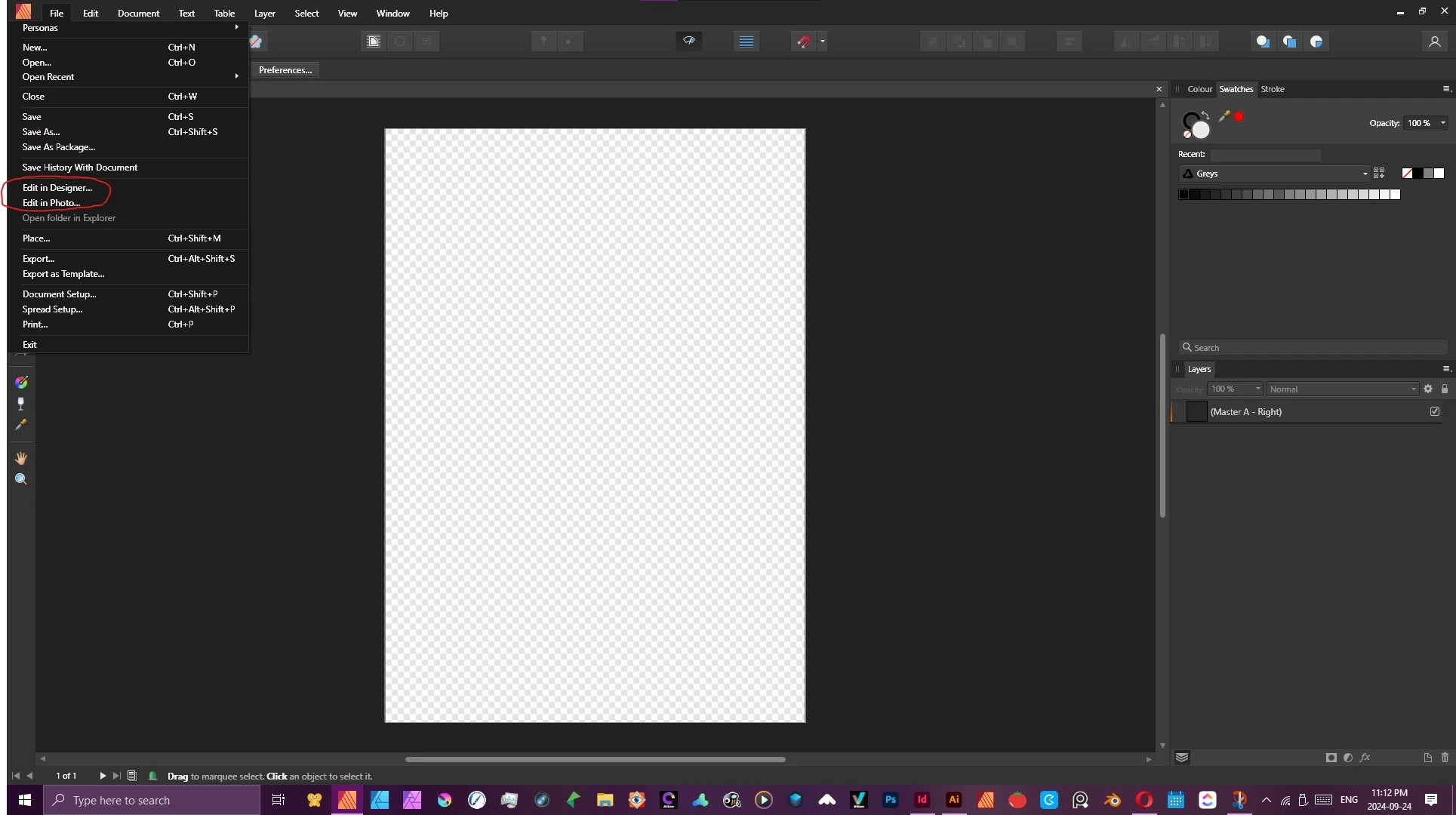
In Affinity; which I was using until now, you simply click edit with and you can edit your entire document in any of the thre design apps (see  photo below). 

Is there away to do something similair in Adobe?


<Title renamed by MOD>

This topic has been closed for replies.

1 reply

Derek Cross
Community Expert
Community Expert
September 25, 2024

Briefly, you optimise your raster images in Photoshop and then Place them as native PSDs in InDesign where you add your text and background colours. You can "round trip" between InDesign and Photoshop to make further changes to the images. And similarly with native Illustrator documents for vectors.


This book and accompanying website explains all: https://www.peachpit.com/store/adobe-photoshop-illustrator-and-indesign-collaboration-9780137908325

Participating Frequently
September 25, 2024

Is there a way to create a document in In Design add text then edit the entire document in Illustrator or  Photoshop? By placing images or vectors from  the other two programs I can edit them but I can't see the indesign text while  editing them. This makes it next to impossable to create a good layout, since the text vectors and images all rely on each other. I'm making a small two page document not an entire book.


James Gifford—NitroPress
Legend
September 25, 2024

No, not really. Derek touched on the basic approach: use Photoshop to create and manage raster-based images and save them as PSD. Use Illustrator to create and manage vector images, and save them as AI. Import (by Placing) both of those in InDesign. And, my bias is to do as little text work in either of the 'art' apps as you can. Labels and art type are okay, but if a diagram needs a block of text... add that in InDesign for easier management. (Opinions vary on the balance of text between ID and AI, but in general, body text etc. should be avoided in PS.)


The rest of the question is, really, how to do the overall job/skill set using this triad of tools. There's no one answer and no one workflow for either every user or every project. It would certainly be hard to get past the above brief sketch in a forum. The recommended resource sounds like a good comprehensive introduction to the process, though — and you can always ask questions here!