michellec70509878
Participant
November 16, 2018
Question

Hyperlink color in PDF

  • November 16, 2018
  • 2 replies
  • 7796 views

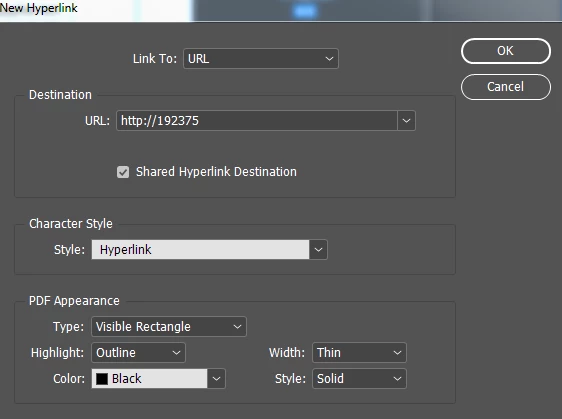
Is there a way to set the default PDF Appearance of the outline color of the visible rectangle to blue? I'm trying to be more efficient so I don't have to change it from black to blue each time.

Thanks!
    This topic has been closed for replies.

    2 replies

    hammer0909
    Community Expert
    Community Expert
    November 16, 2018

    There's no way to set the defaults for a new hyperlink that I can see. Normally you can set the defaults by defining the properties with nothing selected, but since you need to have an object selected to create a hyperlink, you can't do it that way. My guess is that it could probably be accomplished via scripting? Maybe a script could set the rectangle color for all hyperlinks in a document?

    Community Expert
    November 16, 2018

    Hi Chad,

    good idea, but I fear there is no preference for hyperlinks in the application or a document you can reach by scripting.

    Of course the appearance of all hyperlinks can be changed by scripting after creation.

    Example ExtendScript (JavaScript) code snippet for the active document that will change property borderColor for all hyperlinks in the document to blue:

    app.documents[0].hyperlinks.everyItem().borderColor = UIColors.BLUE ;

    List of UI-Colors here:

    https://www.indesignjs.de/extendscriptAPI/indesign-latest/#UIColors.html#d1e87356

    Regards,
    Uwe

    vinny38
    Legend
    November 16, 2018

    Hi Uwe

    I don't think you have to use a script to change the appearance of all hyperlinks.

    You can select them all in the Hyperlinks panel and change the color through the Hyperlink options:

    Sjaani
    Community Expert
    Community Expert
    November 16, 2018

    You can create a new Character Style and set the Style in New Hyperlink to use your alternative Style.
