
Known Participant
November 22, 2022
Answered

Hyperlink Text Source

  • November 22, 2022
  • 2 replies
  • 660 views

Hi, I am creating a function that uses find/change to locate URLs/Email Addresses in the document and convert them to Hyperlinks. I have tested it and works as intended. It works fine in the first run but if you run it again in the same document, the script will find the same found contents and it will apply the same process except it throws an error saying that the found content is already a hyperlink which is true. So my next move is to create an if-else statement:
if (found content is not a hyperlink)
{make it a hyperlink};
else {do nothing};
I already know how to make it a hyperlink, im just blocked on what to write in the "if" statement. Any help I will be grateful. Thanks. Im on javascript.
-Martin
This topic has been closed for replies.
Correct answer Kasyan Servetsky

Here I described my way of making hyperlinks by script.

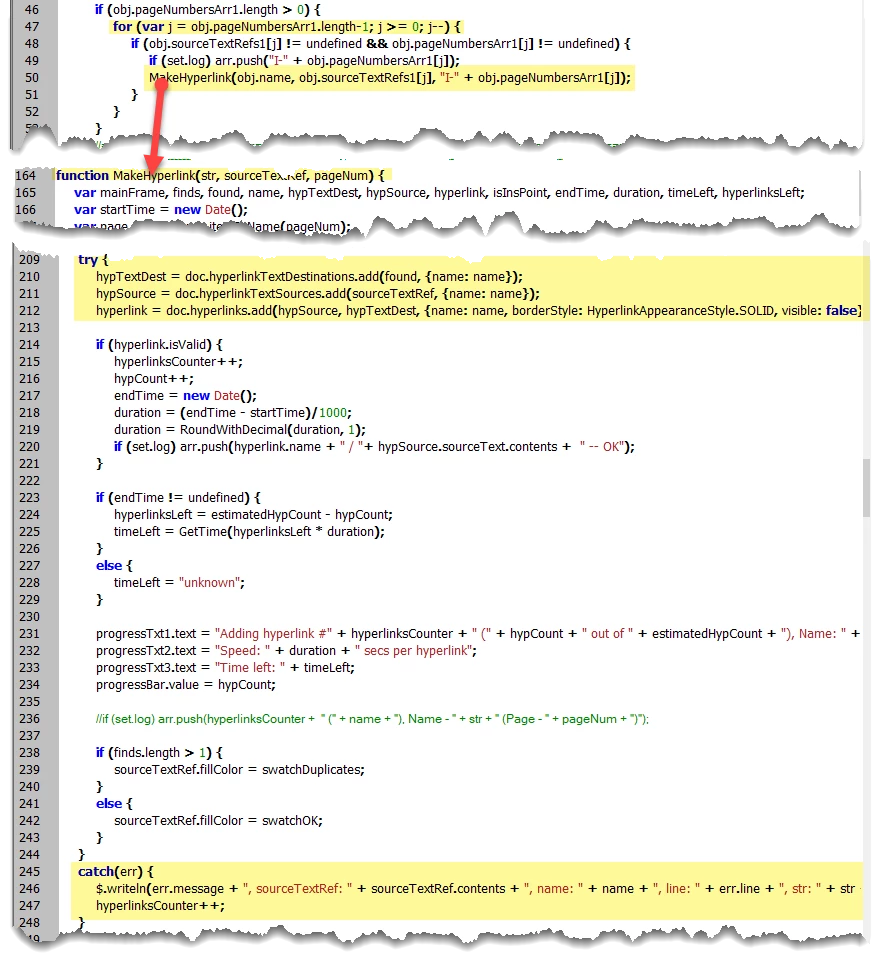
You can enclose the add destination / source / hyperlink command with a try-catch block, like so:

In my example, the MakeHyperlink function is called from a for-loop. If something goes wrong, the script silently writes a message to the console and continues with the next item in the loop.
Note that when the source text is already taken by a hyperlink, you can't create another one manually in InDesign: the button is grayed out. That is scripting reflects what you can/can't do in UI.


2 replies

Kasyan Servetsky
Kasyan ServetskyCorrect answer
Legend
November 22, 2022

Here I described my way of making hyperlinks by script.

You can enclose the add destination / source / hyperlink command with a try-catch block, like so:

In my example, the MakeHyperlink function is called from a for-loop. If something goes wrong, the script silently writes a message to the console and continues with the next item in the loop.
Note that when the source text is already taken by a hyperlink, you can't create another one manually in InDesign: the button is grayed out. That is scripting reflects what you can/can't do in UI.


Martin PHAuthor
Known Participant
November 22, 2022

Hi Kasyan! 
I used try-catch instead. It worked! Thanks a lot!
- Martin

Community Expert
November 22, 2022

Can you share your script here? 

Martin PHAuthor
Known Participant
November 22, 2022

Hi, here's the script


app.findGrepPreferences = app.changeGrepPreferences = null;
app.findGrepPreferences.findWhat = "XXXX";
var found = app.activeDocument.findGrep();
for (var n = 0; n<found.length; n++)
{
alert(String(found[n].contents));
var found2 = String(found[n].contents);

if (found2 is not a hyperlink)
{
var source = app.documents[0].hyperlinkTextSources.add(found[n]);
var dest = app.documents[0].hyperlinkURLDestinations.add(URL);}

app.documents[0].hyperlinks.add(source,dest, {visible:false, hidden:false, name: "HLINK" + n});}
}
else {alert(found[n] + " is already a Hyperlink")};
}
app.findGrepPreferences = app.changeGrepPreferences = null;