
Participant
January 3, 2017
Answered

Hyperlink to an email is not working

  • January 3, 2017
  • 3 replies
  • 10537 views

Hi, I've used hyperlinks in InDesign before with no problem. But since I've upgraded to the latest version on the cloud, when I test the inserted hyperlink from within Indesign the computer just opens up my web browser rather than my default email application. It goes without saying that even after I export the pdf whether as an interactive pdf or print pdf the link goes to the same web browser.

I'm using a PC.

So what I notice is that in the hyperlink panel the "mail to:" address includes a "%40" . I've gone to the Hyperlink Destination Options panel and removed all the unwanted text and symbols (see pic below) but it still wont change the destination address in the panel.
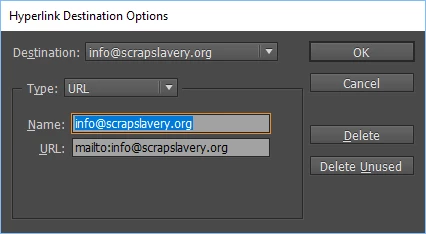
I've read every forum I can and still can't get an answer. Can anyone help?

    This topic has been closed for replies.
    Correct answer Eternal Warrior

    First off try changing type of "link to" to email rather than URL as in original screenshot - This is what Derek was suggesting I believe

    Otherwise try using actual HTML code to make the link manually

    Either by pasting it in the edit hyperlink page or putting it in the InDesign document.

    If you're going to use the edit hyperlink option the code would probably want to look something like:

    <a href="mailto:info@scrapslavery.org?" target="_blank">

    Or if that doesn't work try just having it as code in the page of the document... (I haven't tested this theory) but in a website page you would have something like:

    call us now on bla bla bla or email:<a href="mailto:info@scrapslavery.org?" target="_blank">info@scrapslavery.org</a>

    -------

    On a side note it may also be opening your browser rather than default mail programme as either your mail programme isn't the default for "mailto:" links or opening mail generally. Go check your default programme settings to make sure both are correct.

    3 replies

    schroef
    Inspiring
    September 2, 2021

    Im replying to this because it was/is a old bug. You need to actually use url in this case. The issue is that during the convertion to PDF, the @ character is transformed to %40 this is a ASCII html code, but it doesnt work in other apps.


    However when you use URL instead of Email it does work. But there is another issue, you cant not edit it anymore, once edit it again. It will open as Email hyperlink and will be broken again.


    so you use it like this

    mailto:ouremail@address.com?subject=This%20a%title%20as%example


    I kinda forgot about thius issue and bumped into it again yesterday.  Once i read it i remembered the trick again.

    you cam read more about it here

    JohnGoodmanSCCEHCCA
    Participant
    May 12, 2023

    THIS. THIS RIGHT HERE is the correct answer.

    Eternal Warrior
    Eternal WarriorCorrect answer
    Inspiring
    January 5, 2017

    First off try changing type of "link to" to email rather than URL as in original screenshot - This is what Derek was suggesting I believe

    Otherwise try using actual HTML code to make the link manually

    Either by pasting it in the edit hyperlink page or putting it in the InDesign document.

    If you're going to use the edit hyperlink option the code would probably want to look something like:

    <a href="mailto:info@scrapslavery.org?" target="_blank">

    Or if that doesn't work try just having it as code in the page of the document... (I haven't tested this theory) but in a website page you would have something like:

    call us now on bla bla bla or email:<a href="mailto:info@scrapslavery.org?" target="_blank">info@scrapslavery.org</a>

    -------

    On a side note it may also be opening your browser rather than default mail programme as either your mail programme isn't the default for "mailto:" links or opening mail generally. Go check your default programme settings to make sure both are correct.

    CalmenAuthor
    Participant
    January 6, 2017

    Firstly I want to apologise to you Derek - I simply didn't understand that you had changed the URL to "email". I did actually have it set as "email" in the Edit Hyperlink box like you suggested, but didn't get that option in the"Hyperlink Destinations" box. Please accept my apologies.

    And Jaguar1991 - a big thank you - the problem was my default email programme. I have just got a brand new computer and didn't realise it had been set up to default to my web browser.

    You guys have been very patient and helpful! Thank You!!

    Eternal Warrior
    Inspiring
    January 6, 2017

    No problem. Glad to be of help!

    Derek Cross
    Community Expert
    Community Expert
    January 3, 2017

    Try this:

    CalmenAuthor
    Participant
    January 5, 2017

    I'm not sure why you would change my email address? That won't help at all.  I run a volunteer organisation called 'Scrap Slavery' and our website is scrapslavery.org with a corresponding email address info@scrapslavery.org

    Is this a joke because my question is legitimate.

    Derek Cross
    Community Expert
    Community Expert
    January 5, 2017

    No joke, I set this as an example. Did you try it (with your own data) and did it not work?