Sumit_KGL
Inspiring
January 2, 2024
Answered

HyperlinkPageDestination with viewBounds

  • January 2, 2024
  • 2 replies
  • 512 views

Hi,


Can anyone guide me how to use "HyperlinkPageDestination" with viewBounds property?

Here is my code snippet.


var text = textArray[i];
var parent = text.parentTextFrames[0];
var bounds = parent.geometricBounds;
var id = text.contents;
var page = parent.parentPage;
try {
	var ref = xrefs[id];
	if (ref == undefined) continue;
	var idDestination = myDoc.hyperlinkPageDestinations.add(page);
	idDestination.viewSetting = HyperlinkDestinationPageSetting.FIT_WIDTH;
	idDestination.viewBounds = bounds;
	for (var j = 0; j < ref.length; j++) {
		var sourceText = ref[j];
		if (sourceText.index != text.index)
			createHyperlink(myDoc, sourceText, idDestination, hyperlinkColor);
	}

}
catch (e) {
}


Sumit

This topic has been closed for replies.
Correct answer Peter Kahrel

but these options will work inside indesign. Need to update zoom option inside Acrobat.


They work in InDesign and in Acrobat.


I don't think that the viewBounds property does very much. To see that you need to do some troubleshooting. Use the following script to create a test document:


app.scriptPreferences.measurementUnit = MeasurementUnits.POINTS;

d = app.documents.add();

views = {
  width: HyperlinkDestinationPageSetting.FIT_WIDTH,
  height: HyperlinkDestinationPageSetting.FIT_HEIGHT,
  window: HyperlinkDestinationPageSetting.FIT_WINDOW,
  view: HyperlinkDestinationPageSetting.FIT_VIEW,
}

gb = [300, 200, 320, 360];

for (i in views) {
  gb[0] += 40;
  gb[2] += 40;
  frame = d.textFrames.add ({
    geometricBounds: gb,
    contents: i,
  });
  dest = d.hyperlinkPageDestinations.add (d.pages[0], {name: i});
    dest.viewSetting = views[i];
  source = d.hyperlinkTextSources.add (frame.words[0]);
  d.hyperlinks.add(source, dest, {name: i});
}


The script creates a new document, places four text frames, adds the name of a zoom setting, and creates a page destination for each setting to the first page and a hyperlink for each setting. That produces this:
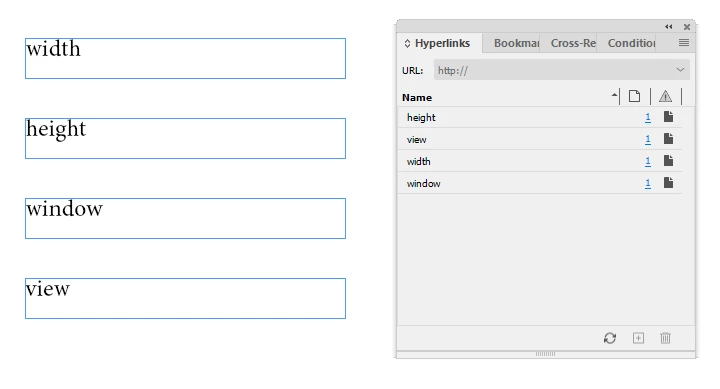
 

Click each hyperlink to check that they work. Then export the document to PDF. In there, you see the same behaviour. Naturally, sometimes height and view are the same (depending on the page size), but width should always show a different view. You can zoom in or out manually and click a link to see that (and howw) it works.


Now in InDesign change the document size to A3 (or bigger) and move the four frames to the centre of the page. Click the hyperlinks again, then export to PDF again and check the behaiour of each link. A bit laborious but it's instructive.


Now to viewBounds. First check what their current values are. Run this script:


p = app.documents[0].hyperlinkPageDestinations;
for (i = 0; i < p.length; i++) {
  $.writeln (p[i].name);
  $.writeln (p[i].viewBounds.join('\r'));
}


which produces unexpected result: all viewbounds are the same:


width
-301.069518716577
-298.930481283422
301.069518716577
718.716577540107
height
-301.069518716577
-298.930481283422
301.069518716577
718.716577540107
window
-301.069518716577
-298.930481283422
301.069518716577
718.716577540107
view
-301.069518716577
-298.930481283422
301.069518716577
718.716577540107


Now change the viewBounds of e.g. the view hyperlink:


app.documents[0].hyperlinkPageDestinations.item('view').
   viewBounds = [100,100,300,300];


And click the iew hyperlink in the Hyperlinks panel. Nothing much happens. Then export to PDF. No difference.

My conclusion would be that the viewBounds property doesn't do anything and if it does, it can't be changed with any visible effect.


2 replies

Peter Kahrel
Community Expert
Peter KahrelCommunity ExpertCorrect answer
Community Expert
January 3, 2024

but these options will work inside indesign. Need to update zoom option inside Acrobat.


They work in InDesign and in Acrobat.


I don't think that the viewBounds property does very much. To see that you need to do some troubleshooting. Use the following script to create a test document:


app.scriptPreferences.measurementUnit = MeasurementUnits.POINTS;

d = app.documents.add();

views = {
  width: HyperlinkDestinationPageSetting.FIT_WIDTH,
  height: HyperlinkDestinationPageSetting.FIT_HEIGHT,
  window: HyperlinkDestinationPageSetting.FIT_WINDOW,
  view: HyperlinkDestinationPageSetting.FIT_VIEW,
}

gb = [300, 200, 320, 360];

for (i in views) {
  gb[0] += 40;
  gb[2] += 40;
  frame = d.textFrames.add ({
    geometricBounds: gb,
    contents: i,
  });
  dest = d.hyperlinkPageDestinations.add (d.pages[0], {name: i});
    dest.viewSetting = views[i];
  source = d.hyperlinkTextSources.add (frame.words[0]);
  d.hyperlinks.add(source, dest, {name: i});
}


The script creates a new document, places four text frames, adds the name of a zoom setting, and creates a page destination for each setting to the first page and a hyperlink for each setting. That produces this:


Click each hyperlink to check that they work. Then export the document to PDF. In there, you see the same behaviour. Naturally, sometimes height and view are the same (depending on the page size), but width should always show a different view. You can zoom in or out manually and click a link to see that (and howw) it works.


Now in InDesign change the document size to A3 (or bigger) and move the four frames to the centre of the page. Click the hyperlinks again, then export to PDF again and check the behaiour of each link. A bit laborious but it's instructive.


Now to viewBounds. First check what their current values are. Run this script:


p = app.documents[0].hyperlinkPageDestinations;
for (i = 0; i < p.length; i++) {
  $.writeln (p[i].name);
  $.writeln (p[i].viewBounds.join('\r'));
}


which produces unexpected result: all viewbounds are the same:


width
-301.069518716577
-298.930481283422
301.069518716577
718.716577540107
height
-301.069518716577
-298.930481283422
301.069518716577
718.716577540107
window
-301.069518716577
-298.930481283422
301.069518716577
718.716577540107
view
-301.069518716577
-298.930481283422
301.069518716577
718.716577540107


Now change the viewBounds of e.g. the view hyperlink:


app.documents[0].hyperlinkPageDestinations.item('view').
   viewBounds = [100,100,300,300];


And click the iew hyperlink in the Hyperlinks panel. Nothing much happens. Then export to PDF. No difference.

My conclusion would be that the viewBounds property doesn't do anything and if it does, it can't be changed with any visible effect.

Sumit_KGL
Sumit_KGLAuthor
Inspiring
January 4, 2024

Yes! You are right, viewBounds property does not do anything. I am surprised why they given this property.

Also, I find the sample script provided by the Adobe and there is no sample for viewBounds.


Community Expert
January 3, 2024
Sumit_KGL
Sumit_KGLAuthor
Inspiring
January 3, 2024

Thank you @Eugene Tyson, but these options will work inside indesign. Need to update zoom option inside Acrobat.


-Sumit

Community Expert
January 3, 2024

Oh I thought it was related to InDesign as you posted in the InDesign forum. 
I don't know how to do it in Acrobat...