

Exit
  • Global community
    • Language:
      • Deutsch
      • English
      • Español
      • Français
      • Português
  • 日本語コミュニティ
  • 한국 커뮤니티
0

Hyperlinks grouping in Hyperlinks Panel

Guide ,
Nov 30, 2024 Nov 30, 2024

Hi All,


I have 2 documents called "A" and "G" and 4 hyperlinks in "A".


The 2 first hyperlinks named "_A 2 [1]" and "_A 2 [2]" are internal hyperlinks (their destination are in "A").


The 2 other hyperlinks namd "_G 2 (1)" and  "_G 2 (2)" are external hyperlinks (their destination are in "G").
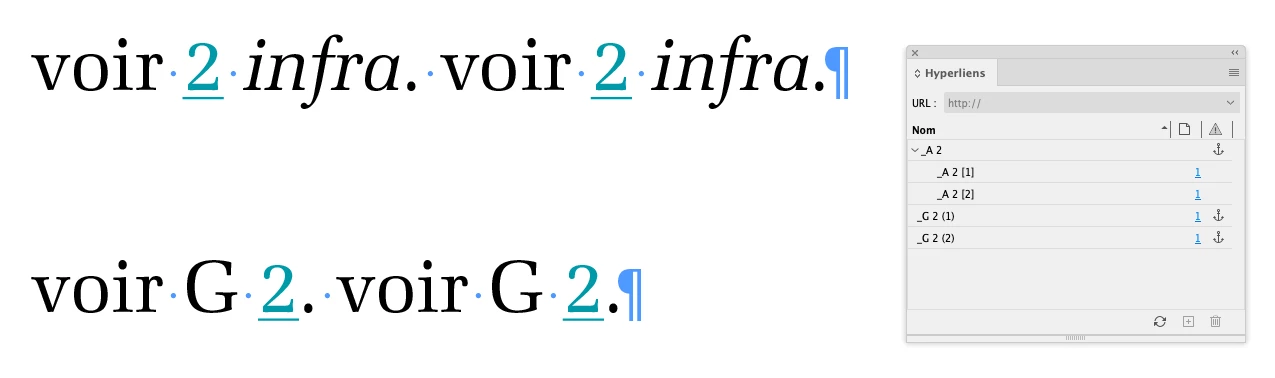
 

Q1.png


Can someone explain me why we have a "grouping" for the 2 first (based on the "_A 2" Destination-Anchor name and not the 2 others?

Could it be fixed to have these last hyperlinks visualized inside a "_G 2" grouping?


Best,

(^/)  The Jedi

TOPICS
Scripting
644
Translate
Report
Community guidelines
Be kind and respectful, give credit to the original source of content, and search for duplicates before posting. Learn more
community guidelines
Community Beginner ,
Nov 30, 2024 Nov 30, 2024

The grouped ones are using "shared hyperlink destination". They're pointing to the same think and are being treated as the same link. If you change one, you change both (which may or may not want). Doubleclick on the hyperlink to edit it and you'll see the option right in the center of the popup window.

Translate
Report
Community guidelines
Be kind and respectful, give credit to the original source of content, and search for duplicates before posting. Learn more
community guidelines
Guide ,
Nov 30, 2024 Nov 30, 2024

Hi Luis,


Not truly sure it's something to see with the "shared hyperlink destination". No relevant effect for me.


best,

(^/)

Translate
Report
Community guidelines
Be kind and respectful, give credit to the original source of content, and search for duplicates before posting. Learn more
community guidelines
LEGEND ,
Nov 30, 2024 Nov 30, 2024

@FRIdNGE


Can you share your document? 


Translate
Report
Community guidelines
Be kind and respectful, give credit to the original source of content, and search for duplicates before posting. Learn more
community guidelines
Community Beginner ,
Nov 30, 2024 Nov 30, 2024

luis_guimaraes_0-1732969339176.png

Are you positive that you change it and the group remains?

Translate
Report
Community guidelines
Be kind and respectful, give credit to the original source of content, and search for duplicates before posting. Learn more
community guidelines
Guide ,
Nov 30, 2024 Nov 30, 2024

I don't play with an "URL" but an "Anchor Text".


(^/)

Translate
Report
Community guidelines
Be kind and respectful, give credit to the original source of content, and search for duplicates before posting. Learn more
community guidelines
Guide ,
Nov 30, 2024 Nov 30, 2024

See this old thread [june 2017]:


https://community.adobe.com/t5/indesign-discussions/hyperlink-groups/m-p/9181968#M55993


… and what Peter Kahrel answered:


"Hyperlinks don't have groups. What looks like a group is simply two or more text sources pointing to the same destination. It's vaguely comparable with what you see in the Links panel when you place two or more pages from the same PDF."


In other terms, would it be another "bug" of InDesign that only recognizes text anchors grouping only in a current document?  😉


(^/)

Translate
Report
Community guidelines
Be kind and respectful, give credit to the original source of content, and search for duplicates before posting. Learn more
community guidelines
Community Expert ,
Dec 01, 2024 Dec 01, 2024
LATEST

would it be another "bug" of InDesign that only recognizes text anchors grouping only in a current document?


Looksm like it.

Translate
Report
Community guidelines
Be kind and respectful, give credit to the original source of content, and search for duplicates before posting. Learn more
community guidelines