Participating Frequently
September 17, 2018
Answered

Hyperlinks not working on Interactive PDF.[Renamed]

  • September 17, 2018
  • 3 replies
  • 29457 views

I have 5 lists of hyperlinks that I'm trying use on an interactive pdf.   The lists are in a text box with a white background.  Once I export it as an interactive pdf the hyper links do not work.  The buttons are and work fine, you just cant click on tye URL

    Correct answer dinavekaria

    Barb,

    I have tried them all.  The hyperlinks are not shared.  I was thinking it my be something in the Indesign or Adobe settings.

    I was using text frames with lists of URL's.  I thought that making the pdf interactive would reduce the amount of clutter and keep it as a one page document.  It looks like it's going to have to be a multiple page document.

    Thank you for all of your help.


    Hi,


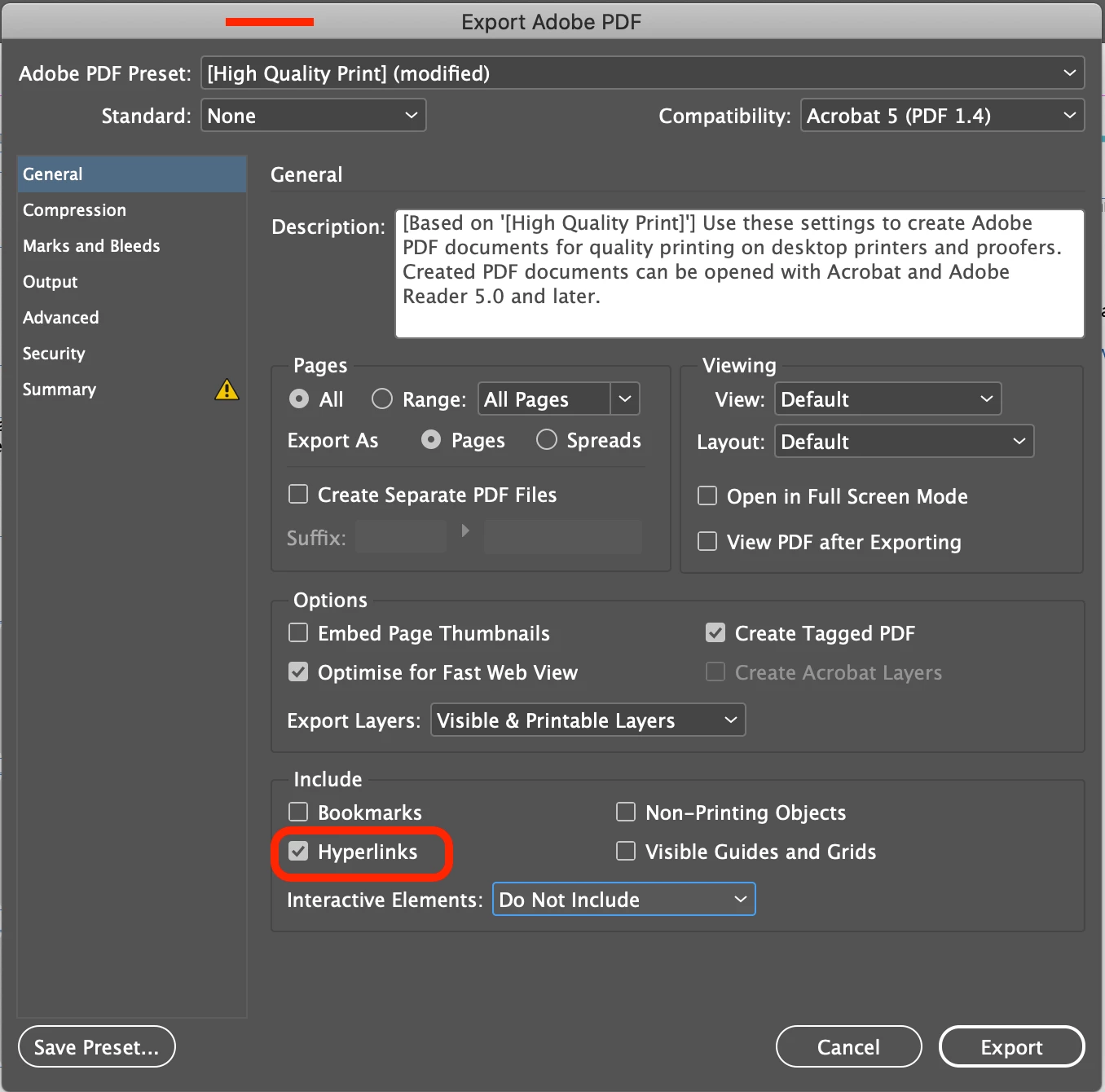
    I realise this is two years after your issue and you probably figured it out by now. But I also came across the same issue. It was an un-checked box when I exported as PDF. The Hyperlinks box wasn't checked, once I checked it, all my links worked when viewing as an interactive PDF.


    Thought I would post the fix for anyone else who comes across this problem. I wrongly assumed all links added would export automatically.

     

    3 replies

    Adobe Expert
    September 17, 2018

    Did you test them in InDesign? Use Windows > Interactive > EPUB Interactivity Preview panel.

    Could there be a frame on top of them?

    ~Barb

    BobLevine
    Adobe Expert
    September 17, 2018

    Just to be sure…Is this PDF being testing in Acrobat or Reader?

    dinavekaria
    dinavekariaCorrect answer
    New Participant
    June 30, 2020

    Barb,

    I have tried them all.  The hyperlinks are not shared.  I was thinking it my be something in the Indesign or Adobe settings.

    I was using text frames with lists of URL's.  I thought that making the pdf interactive would reduce the amount of clutter and keep it as a one page document.  It looks like it's going to have to be a multiple page document.

    Thank you for all of your help.


    Hi,


    I realise this is two years after your issue and you probably figured it out by now. But I also came across the same issue. It was an un-checked box when I exported as PDF. The Hyperlinks box wasn't checked, once I checked it, all my links worked when viewing as an interactive PDF.


    Thought I would post the fix for anyone else who comes across this problem. I wrongly assumed all links added would export automatically.


    Eric Dumas
    Brainiac
    September 17, 2018

    Please confirm your software and OS version with some screenshots to illustrate your issue so we can help better and faster.

    more details on your issue at Learn how to create, manage, and edit hyperlinks in InDesign

    Thanks

    Participating Frequently
    September 17, 2018

    I cannot include screen shots, because the information is Company Confidential

    Participating Frequently
    September 17, 2018

    macOS High Sierra and Adobe Indesign CC2018

    Adobe Expert
    September 17, 2018

    Hi Carolyn:

    Did you activate the hyperlinks on each of the text strings using the Hyperlinks panel? Are they listed in the panel? Is the status button green or red?

    ~Barb

    Participating Frequently
    September 17, 2018

    The status is green on all  of the Hyperlinks

    Eric Dumas
    Brainiac
    September 17, 2018

    can you replicate the issue on a new page with random hyperlinks like Adobe.com, facebook, google... to share a screenshot?