
Participant
April 18, 2025
Question

Hyperlinks to Text Anchors with new document name

  • April 18, 2025
  • 2 replies
  • 551 views

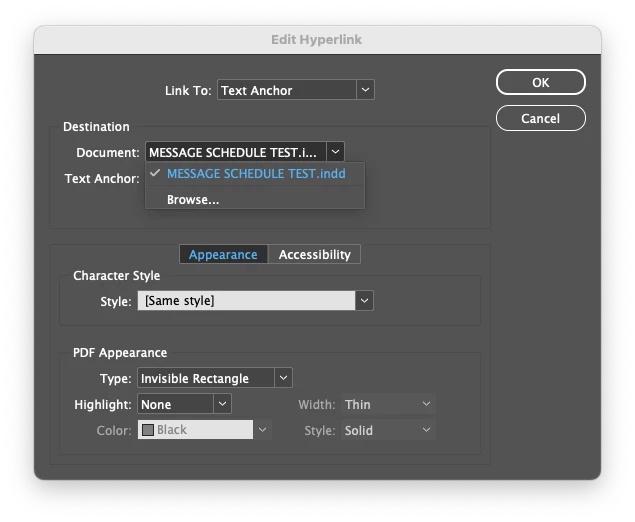
Hello, I am working on a set of construction documents with a table that has a ton of hyperlinks set to text anchors throughout the document. 
We need to be able to create new versions of the document with the file name updated. Each time I do this, it breaks the destination link because it still points to the old document name. Is there a way to set it up differently so the hyperlink is always pointing to the current document rather than a specific file name? Or am I stuck manually changing hundreds of text anchor destinations every time we rename the file? 
Thank you!
2 replies

Robert at ID-Tasker
Legend
April 18, 2025

OR - how do you create a new version? 


Copy&paste in the folder - or Save As with a new name - from within InDesign? 


Participant
April 18, 2025

I've been doing a save-as and saving with the new name. Which means then I have to go into each hyperlink and point it to the new file. Yikes!

Joel Cherney
Community Expert
Community Expert
April 18, 2025

If I have my INDD file open full of hyperlinks pointing at text anchors within the same INDD, and I do a save-as with a new name, then when I am back in Edit Hyperlink, the file name is automatically updated. I tested this in the most recent update to InDesign 2025, and also in 2023 as I happened to have it open.


So either something's wrong with your install of InDesign, or there's something about how these documents or links are created that I'm not successfully recreating in my tests. To address the former, resetting your preferences is a normal first troubleshooting step for potentially damaged InDesign installations. If you think that this is more likely related to your workflow, either a more thorough description or a sample document could help us figure out why your hyperlinks don't update without user intervention. (Edit: Actually, I think that Robert's suggestion to export to IDML or move pages to a fresh document are probably a better first step.)

Robert at ID-Tasker
Legend
April 18, 2025

A long shot - "thinking outside the box" 😉 - try exporting as IDML and edit one of the files inside? 


IDML is just a ZIPed archive full of XML files.