
Participant
April 1, 2019
Answered

I don't manage to anchor an image.

  • April 1, 2019
  • 4 replies
  • 946 views

Hi folks,

I looked evrywhere but didn't find the corresponding anwer. I position photos in my indisgn document. Sometimes I manage to anchor it (via object>anchred object>options and than I put to the custom function and it lockes. But mostly the "options" are greyed out and I can't proceed. What todo? Please help!

many thanks
This topic has been closed for replies.
Correct answer John Mensinger

yeshek65916727  wrote

there's a sign on top left which locks it probably in the position of that page, so it isn't anchored in the text.

That's not a lock, it signifies the placed image is linked.

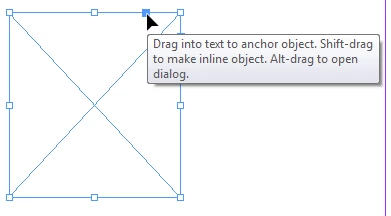
To anchor the frame, you can either cut/paste as I described earlier, or, select the image (frame) with the Select tool (black arrow), then drag the little blue square into the text:

4 replies

Participant
April 1, 2019

I have opened it in a modern version of indisign (I'm used to the old one) and there's a sign on top left which locks it probably in the position of that page, so it isn't anchored in the text. Can I unlock this? How ? Many thanks to all of you for the kind support! (its now German but it means the same (verankert=anchored)

John Mensinger
Community Expert
John MensingerCommunity ExpertCorrect answer
Community Expert
April 1, 2019

yeshek65916727  wrote

there's a sign on top left which locks it probably in the position of that page, so it isn't anchored in the text.

That's not a lock, it signifies the placed image is linked.

To anchor the frame, you can either cut/paste as I described earlier, or, select the image (frame) with the Select tool (black arrow), then drag the little blue square into the text:

Participant
April 1, 2019

wow this is miraculous (as all what one doesn't understand). Thanks so much. I think that should do it. I really looked everywhere and found nowhere the response needed. So your help is highly appreciated!!! Great!

Derek Cross
Community Expert
Community Expert
April 1, 2019

The blue anchor square  and how it looks after the image is anchored:

Participant
April 1, 2019

Thanks for replying. Here it is, the greyed options etc

John Mensinger
Community Expert
Community Expert
April 1, 2019

Your image isn't anchored. You'll have to Edit > Cut it, then set an insertion point in the text where you want it anchored and Edit > Paste.

BobLevine
Community Expert
Community Expert
April 1, 2019

Or, upgrade to a modern version of InDesign that will let you know this in a snap by dragging a frame icon right into the text.

maxwithdax
Community Expert
Community Expert
April 1, 2019

Can you post a screenshot so we can get a better idea of what you are trying to accomplish?

-Dax