

dublove
Legend
March 15, 2025
Question

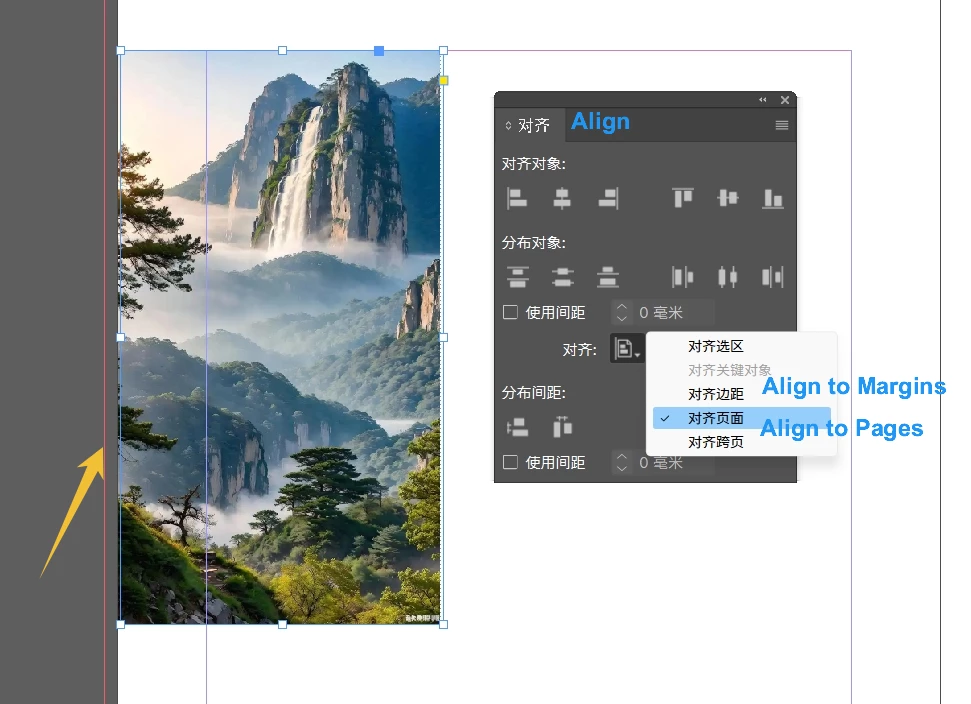
I just realized a boring alignment: alignment to the page does not include bleed 3mm?

  • March 15, 2025
  • 2 replies
  • 930 views

Sudden realization:

Align to page, align across pages are only aligned to the position that does not contain the bleed (you call it margin?). 


I'm speechless. What kind of special hobby is this?
Alignment to this position shouldn't be the primary need.


What's the point of aligning to this? 

Who makes books without bleed? 

What was Adobe thinking?


How do you align to the bleed (far left or far right)?

Could it be that you have to enter -3mm coordinates to do this?
 

2 replies

Frans v.d. Geest
Community Expert
Community Expert
March 16, 2025

Simply use an Object Style fot position, works perfectly. For an example look here:

https://creativepro.com/how-to-align-objects-in-indesign-using-object-styles/

Community Expert
March 16, 2025

I didn't get how this resolved the issue 

Frans v.d. Geest
Community Expert
Community Expert
March 17, 2025

You set the alignment, you set it to page margins, you include bleed. If the bleed changes, so does the alignment. Aplly that Object style to all the objects that need the same alignment. I understood it as what to OP needs to do.

Community Expert
March 15, 2025

You're shocked that Align to Page aligns to the page? 


Granted, align to bleed could be useful - but you can adjust for bleed anyway. 

And so could align to slug. 


I don't really know how to help you here - it's not a wonderment about how a feature, it's just a reaction to something that's expected behaviour. 


If you want to make a difference and suggest improvement the correct channel is here

https://indesign.uservoice.com/forums/601021-adobe-indesign-feature-requests


You'll already find others there
https://indesign.uservoice.com/forums/601021-adobe-indesign-feature-requests/suggestions/31242319-new-alignment-option-to-bleed


https://indesign.uservoice.com/forums/601021-adobe-indesign-feature-requests/suggestions/42751931-add-an-align-to-bleed-in-the-align-panel-options


It's already in request - add your vote and your voice. 


It could probably be scripted.


Something like this

function alignToBleed() {
    var doc = app.activeDocument;
    if (!doc) {
        alert("No document is open.");
        return;
    }
    
    var sel = app.selection;
    if (!sel.length) {
        alert("No objects selected.");
        return;
    }
    
    var dp = doc.documentPreferences;
    var bleedBounds = {
        left: -dp.documentBleedInsideOrLeftOffset,
        top: -dp.documentBleedTopOffset,
        right: dp.pageWidth + dp.documentBleedOutsideOrRightOffset,
        bottom: dp.pageHeight + dp.documentBleedBottomOffset
    };
    
    var dialog = app.dialogs.add({name: "Align to Bleed"});
    with (dialog.dialogColumns.add()) {
        var alignLeft = checkboxControls.add({staticLabel: "Align Left", checkedState: false});
        var alignTop = checkboxControls.add({staticLabel: "Align Top", checkedState: false});
        var alignRight = checkboxControls.add({staticLabel: "Align Right", checkedState: false});
        var alignBottom = checkboxControls.add({staticLabel: "Align Bottom", checkedState: false});
    }
    
    if (dialog.show() == true) {
        for (var i = 0; i < sel.length; i++) {
            var obj = sel[i];
            var gb = obj.geometricBounds; // [top, left, bottom, right]
            
            if (alignLeft.checkedState) {
                obj.move(undefined, [bleedBounds.left - gb[1], 0]);
            }
            if (alignTop.checkedState) {
                obj.move(undefined, [0, bleedBounds.top - gb[0]]);
            }
            if (alignRight.checkedState) {
                obj.move(undefined, [bleedBounds.right - gb[3], 0]);
            }
            if (alignBottom.checkedState) {
                obj.move(undefined, [0, bleedBounds.bottom - gb[2]]);
            }
        }
        dialog.destroy();
    } else {
        dialog.destroy();
    }
}

alignToBleed();


dublove
dubloveAuthor
Legend
March 16, 2025

Voted This should be an omission caused by a major mistake

There's something wrong with this script. It's not ideal.
It doesn't recognize left or right.
Some judgments are still misrecognized.

Community Expert
March 16, 2025

It was a different feeling then than it is now.
Back then it was a bit of laziness and thinking how nice it would be if a model could be implemented.
Now it's a pain in the ass and it doesn't matter, only to realize that the feature isn't there at all.


Also aligning the object to the reference line is something I'm looking forward to.
Adobe is probably too busy working on Ai Big Data to bother with these basic ones.


Anchored objects does what you need.


Putting your ideas to the feature request is your best chance.


You have to realize every software has limitations, and learning to work within these limitations is normal. 


Post your ideas to the right channels, feature requests.


You have to accept, like the rest of us, that's how to do it.


Scripting is cool, but better to work within the software limitations and features that exists.