

dublove
Legend
September 4, 2025
Answered

I'm completely confused by "app.documents[0].selection"and "app.activeDocument.selection[0]"

  • September 4, 2025
  • 3 replies
  • 1663 views
When I select a text box, both of the following are correct:
var sel = app.documents[0].selection;
alert(sel); // [object TextFrame]
alert(sel.length) // 1​


When my cursor is inside the text, I tried the code below and found both are [object TextFrame], but sel.length is invalid..
It should be noted that sel is undefined.

    item = app.activeDocument.selection[0];
    if (item.parent.textFrames[0].constructor.name == "TextFrame") {
        var sel = item.parent.textFrames[0];
    }
    alert(sel);//[object TextFrame]
    alert(sel.length)//undefined?????
Correct answer m1b

@m1b 

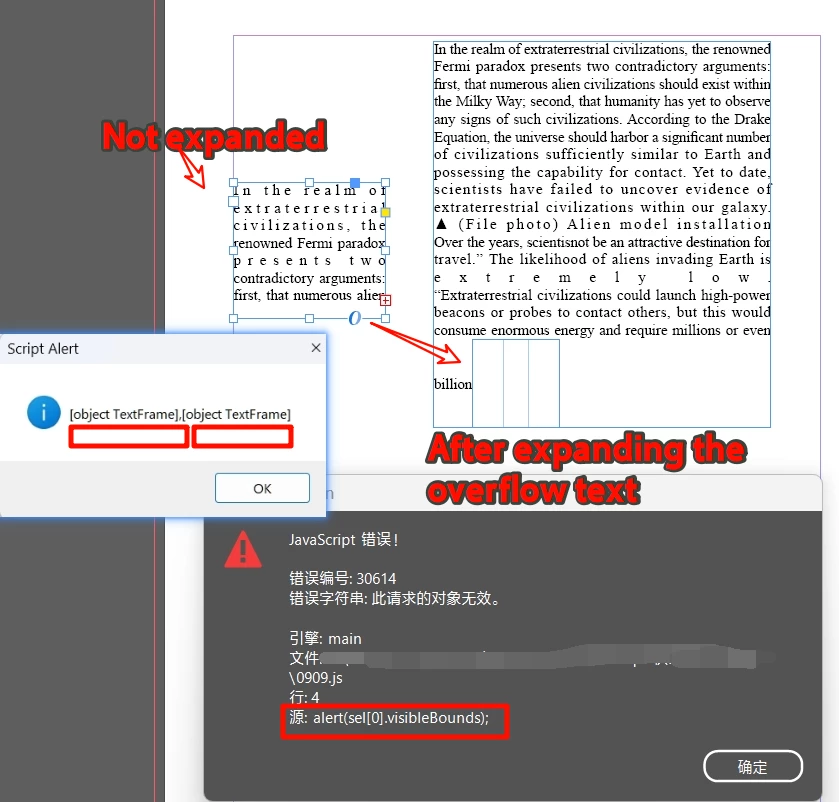
Because the actual text was longer than this, I ran the script without expanding the text.
It took me a long time to find this bug.


Another text box was hidden inside the text box.
This caused my code to fail due to an error in sel[0].visibleBounds.

Is there a way to get a warning or prompt?


My test code:

var doc = app.activeDocument;
sel = getTextFrames(doc.selection);
alert(sel)
alert(sel[0].visibleBounds);
function getTextFrames(items){
....
....
}


@dublove once you know what the problem is, you can check for it...

var doc = app.activeDocument;
var sel = getTextFrames(doc.selection);

for (var i = 0; i < sel.length; i++) {

    if (
        'Character' === sel[i].parent.constructor.name
        && 0 === sel[i].parent.parentTextFrames.length
    )
        // ignore overset anchored object
        continue;

    alert('sel[' + i + '] = ' + sel[i].visibleBounds);

}

3 replies

Community Expert
September 4, 2025

@m1b said: "there's usually no difference between app.activeDocument and app.documents[0]."


Hi @dublove ,

the difference between app.documents[0] and app.activeDocument is a subtle one.

It could be that the addressed document with app.documents[0] is a document without a layout window.

Not so with app.activeDocument. That is always one with a layout window.


Let's proof that; start InDesign with no document open and add two documents with a different parameter for showingWindow in method add():

// START InDesign WITH NO OPEN DOCUMENT:
// Add two documents:
var doc1 = app.documents.add(); // showingWindow parameter true is default
var doc2 = app.documents.add( false ); // showingWindow parameter set to false

alert( app.documents.length ) ; // returns 2

alert( app.activeDocument == doc1 ); // returns true


Regards,
Uwe Laubender
( Adobe Community Expert )

dublove
dubloveAuthor
Legend
September 4, 2025

Hi @m1b @Laubender 

In other words, the textFrame obtained through conversion is not a true selection object.
It is not a collection and does not have a length property.
Does it need to be converted into a collection?

sel = [item.parent.textFrames[0]];
 

This time sort(a,b) didn't trigger an alert.

But the subsequent alert(“A:” + sel[0].parentPage) is invalid.


@m1b Is it possible to have something similar to the image?
As long as the cursor is within the text box, always return the textFrame object.


    var doc = app.activeDocument,
        items = doc.selection;
var graphics = getGraphics(doc.selection);
function getGraphics(items) {
    var graphics = [];
    if ('Array' === items.constructor.name) {
        for (var i = 0; i < items.length; i++)
            graphics = graphics.concat(getGraphics(items[i]));
    }

    else if (
        items.hasOwnProperty('allGraphics')
        && items.allGraphics.length > 0
    )
        graphics = graphics.concat(items.allGraphics);
    else if (
        items.hasOwnProperty('allPageItems')
        && items.allPageItems.length > 0
    )
        graphics = graphics.concat(getGraphics(items.allGraphics));
    else if ('Image' === items.constructor.name) {
        graphics.push(items);
    }
    return graphics;
};


dublove
dubloveAuthor
Legend
September 5, 2025

@dublove yes definitely. That is the way I would code it. I had a quick search and I have already written a function (for you, back in 2022!). Here is an example usage:

/**
 * @author m1b
 */
function main() {

    var doc = app.activeDocument;
    var sel = getTextFrames(doc.selection);

    alert('sel = ' + sel + ' (length: ' + sel.length + ')');

};
app.doScript(main, ScriptLanguage.JAVASCRIPT, undefined, UndoModes.ENTIRE_SCRIPT, 'Test');

/**
 * Returns any text frames found in given `items`.
 * @author m1b
 * @version 2025-09-19
 * @param {Array<PageItem>} items - a DOM item or items to search in, eg. doc.selection.
 * @returns {Array<TextFrame>}
 */
function getTextFrames(items) {

    if (undefined == items)
        return [];

    var parentTextFrames = [];
    var found = [];
    var already = {};

    if (!items.hasOwnProperty('0'))
        items = [items];

    for (var i = 0, item; i < items.length; i++) {

        item = items[i];

        if (
            item.hasOwnProperty('pageItems')
            && item.pageItems.length > 0
        )
            found = found.concat(getTextFramesFromInside(item.pageItems.everyItem().getElements()));

        if (
            item.hasOwnProperty('parentTextFrames')
            && item.parentTextFrames.length > 0
        )
            // is contained by textFrame(s)
            found = found.concat(getTextFrames(item.parentTextFrames));

        if (item.hasOwnProperty('parentStory'))
            // is in a story, which may contain textFrames
            found = found.concat(getTextFrames([item.parentStory]));

        // has a parent which might be a textFrame
        if (item.hasOwnProperty('parent')) {

            while (
                item.hasOwnProperty('parent')
                && 'Document' !== item.constructor.name
            ) {

                if ('TextFrame' === item.constructor.name)
                    parentTextFrames.push(item);

                if (
                    item.hasOwnProperty('parentTextFrames')
                    && item.parentTextFrames.length > 0
                )
                    parentTextFrames = parentTextFrames.concat(item.parentTextFrames);

                item = item.parent;

            }

            if (parentTextFrames.length > 0)
                found = found.concat(parentTextFrames);

        }

    }

    // unique text frames only
    var uniqueFrames = [];

    for (var i = 0; i < found.length; i++) {
        if (!already[found[i].id]) {
            uniqueFrames.push(found[i]);
            already[found[i].id] = true;
        };
    }

    return uniqueFrames;

    /** Returns text frames from inside the `items` */
    function getTextFramesFromInside(items) {

        var found = [];

        if (!items.hasOwnProperty('0'))
            items = [items];

        for (var i = 0; i < items.length; i++) {

            var item = items[i];

            if (
                item.hasOwnProperty('pageItems')
                && item.pageItems.length > 0
            )
                found = found.concat(getTextFramesFromInside(item.pageItems.everyItem().getElements()));

            else if ('TextFrame' === item.constructor.name)
                found.push(item);

        }

        var textFrames = [];

        for (var i = 0; i < found.length; i++)
            if ('TextFrame' === found[i].constructor.name)
                textFrames.push(found[i]);

        return textFrames;

    };

};

Edit 2025-09-05: fixed bug in getTextFrames function that caused stack overrun.

Edit 2025-09-19: improvement to—hopefully!—get more text frames in more cases.


Hi @m1b 

Is there a table version?
Whether you select text within a cell, select a cell, or select a table, it always returns "Table".
When the cursor is inside a table, I don't want to get textFrame.

Participant
September 4, 2025

Really helpful breakdown — I’ve run into similar issues where features behave differently depending on device or context. It reminds me how important it is to double-check workflows across platforms, whether it’s Excel or even how a website displays on mobile vs desktop. Consistency really makes or breaks productivity.

m1b
Community Expert
Community Expert
September 4, 2025

@dublove there's usually no difference between app.activeDocument and app.documents[0].


Your problem is simply that sometimes the line

var sel = item.parent.textFrames[0];

doesn't get called, due to the predicate, so it will throw an error.


If you want to handle the error gracefully, do it like this:

var item = app.activeDocument.selection[0];

// must define sel outside the if/else
var sel;

if (item.parent.textFrames[0].constructor.name == "TextFrame") {
    sel = item.parent.textFrames[0];
}
else {
    sel = { length: 0 };
}

alert(sel);
alert(sel.length);
dublove
dubloveAuthor
Legend
September 4, 2025

Hi m1b.

As you mentioned, is the value of sel.length 0?
But sel is already an object [object TextFrame].
If that's the case, my sort(a,b) interaction below won't capture the objects and will throw an error.

Actually, I just want to automatically obtain the final TextFrame based on different selections.

 alert(item.constructor.name);
    var sel;
    item = app.activeDocument.selection[0];
    if (item.parent.textFrames[0].constructor.name == "TextFrame") {
        sel = item.parent.textFrames[0];
    }
    else if (
        item.constructor.name == "Image"
        || item.constructor.name == "TextFrame") {
        sel = app.documents[0].selection;
    }
        sel.sort(function (a, b) {
        var aBounds = a.visibleBounds;
        var bBounds = b.visibleBounds;
 
        if (aBounds[1] < bBounds[1]) {
            return -1;
        } else if (aBounds[1] > bBounds[1]) {
            return 1;
        }
        else {
            return bBounds[0] - aBounds[0];
        }
    });