Hi @lior12, okay this was fun. I've made a quick script that I hope you will find useful. I only tested with English text so far, but I think it will work, because a lot of the configurability comes from making a careful Object Style.
Select a text box, or a story and run script. See video below and attached .indd demo document. The indesign document might be handy for you to see the Object Style settings I used, as they are quite necesary. Let me know how it works for you.
- Mark
/**
 * @file Anchored Half-size Text.js
 *
 * Creates anchored text frames to insert
 * "half size text" whenever text contains
 * text [[enclosed in double brackets]].
 * Notes: you must specify an Object Style
 * for the small text frames, which must
 * include
 *   - frame height,
 *   - anchored object options,
 *   - left and right insets (space around box),
 *   - first baseline (to "Cap Height"),
 *   - paragraph style of half-size text,
 *   - anything else to make it look right.
 *
 * @author m1b
 * @version 2025-01-10
 * @discussion https://community.adobe.com/t5/indesign-discussions/i-m-looking-for-a-script-in-indesign-that-will-give-me-the-option-to-write-a-word-followed-by-the-tr/td-p/13757377
 */
function main() {

    var settings = {
        findWhat: '\\s*\\[\\[[^\\[\\]]*\\]\\]\\s*',
        trim: /(^\s*\[\[|\]\]\s*$)/g,
        smallTextFrameObjectStyleName: 'Small Text Frame',
    };

    app.scriptPreferences.measurementUnit = MeasurementUnits.POINTS;

    var doc = app.activeDocument,
        smallTextFrameObjectStyle = doc.objectStyles.itemByName(settings.smallTextFrameObjectStyleName);

    if (!smallTextFrameObjectStyle.isValid) {
        alert('Small Text Frame Object Style ("' + settings.smallTextFrameObjectStyleName + '")is invalid.')
        return;
    }

    if (
        doc.selection.length == 0
        || app.selection[0].findGrep == undefined
    ) {
        alert('Please make a selection and try again.')
        return;
    }

    app.findGrepPreferences = NothingEnum.NOTHING;
    app.changeGrepPreferences = NothingEnum.NOTHING;
    app.findGrepPreferences.findWhat = settings.findWhat;

    var found = doc.selection[0].findGrep();

    for (var i = found.length - 1; i >= 0; i--) {

        var story = found[i].parentStory,
            index = found[i].index;

            frame = doc.textFrames.add({
                contents: found[i].contents.replace(settings.trim, ''),
                geometricBounds: [0, 0, 1, found[i].baseline - found[i].ascent],
            });


        // empty the found contents
        found[i].contents = '\u200B'; // zero-width space

        var ip = story.insertionPoints[index + 1];

        // anchor the small text frame
        frame.anchoredObjectSettings.insertAnchoredObject(ip, AnchorPosition.ANCHORED);
        frame.applyObjectStyle(smallTextFrameObjectStyle);

        while (!frame.overflows)
            frame.resize(CoordinateSpaces.PARENT_COORDINATES, AnchorPoint.TOP_RIGHT_ANCHOR, ResizeMethods.ADDING_CURRENT_DIMENSIONS_TO, [-10, 0]);

        while (frame.overflows)
            frame.resize(CoordinateSpaces.PARENT_COORDINATES, AnchorPoint.TOP_RIGHT_ANCHOR, ResizeMethods.ADDING_CURRENT_DIMENSIONS_TO, [1, 0]);

    }
    return;

};

app.doScript(main, ScriptLanguage.JAVASCRIPT, undefined, UndoModes.ENTIRE_SCRIPT, 'Half Size Text');
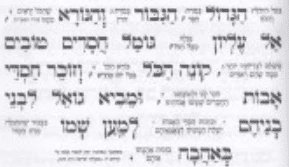
Edit 2025-01-10: small changes to handle OP's Hebrew text in demo document (plus attached Hebrew demo document).
I really thank you But I didn't understand how to activate it (I've never done it before, I just know it's called a script) I would appreciate an answer and thanks again
As far as the script goes, I have set it up so that it converts an text inside [[double-square-brackets]]. Would you prefer it to find this text by a character style? It will depend on which is easier for you to set up in your document.
I'm looking for a script in InDesign that will give me the option to write a word followed by the translation in a small font that creates two small lines on top of each other compared to the big word
Just as an example to get the ball rolling: let's say you entered your text like this:
The arctic fox \\vulpes lagopus// jumps over the lazy dog.
and the script would search for any text between \\ and //, for example, and move that text into an anchored text frame attached next to the word "fox". The script would set a paragraph style for the smaller text, and would set the width such that the text was fitting in 2 lines or less, prefering 2 lines.
Does that sound like a possibility? Or is there a better implementation?

 AdChoices