debbiea22675948
Known Participant
June 4, 2019
Answered

I need to know changing the size of a document and what the lines mean indesign

  • June 4, 2019
  • 7 replies
  • 2275 views

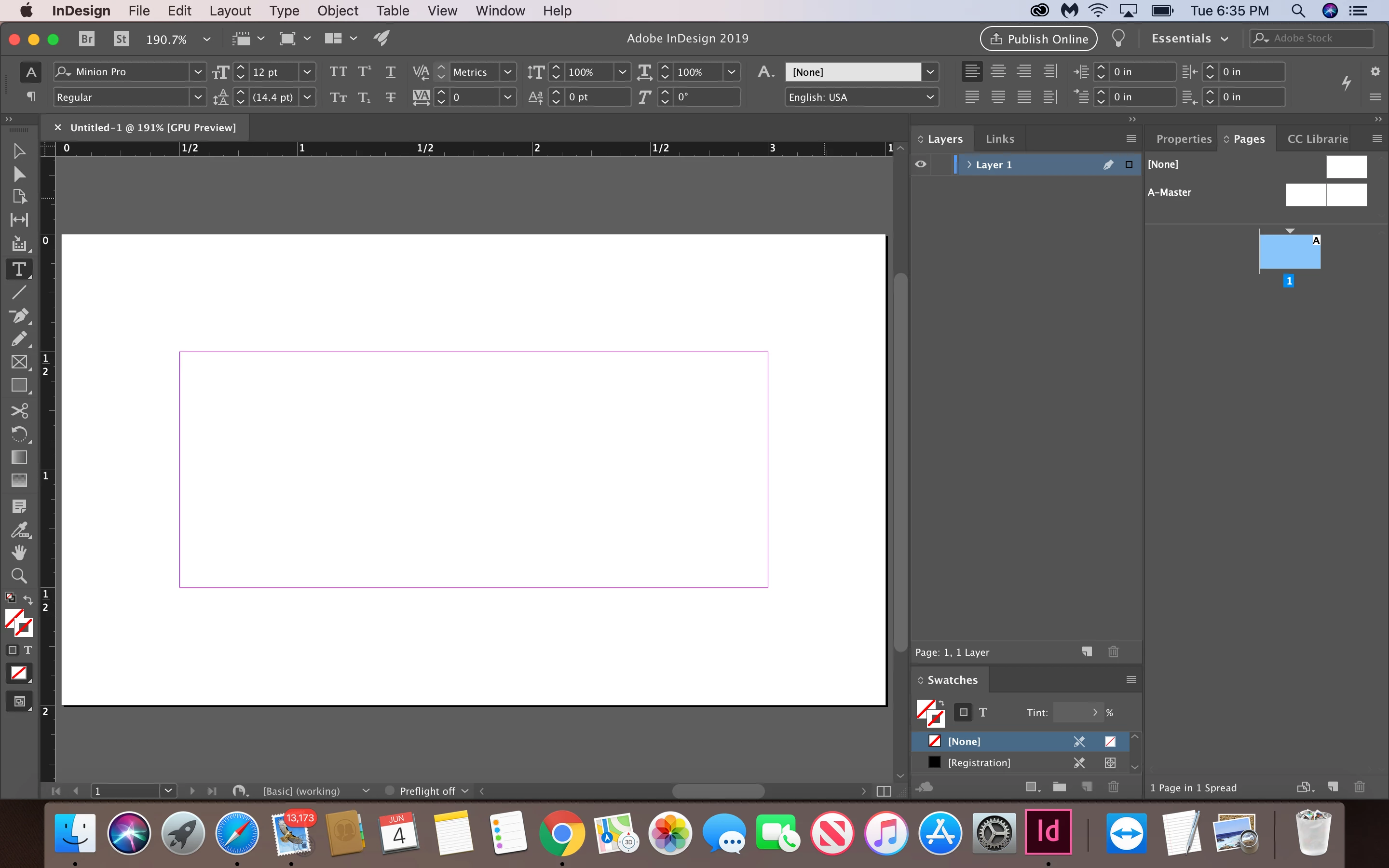
Hi I made a document with 3 pages, one for my letterhead, one for an envelope size and last one for a business card with measurements provide by my professor, I went ahead and put them in the window from file document setup, but my business card came out too big. I don't know if I am going too far with my design and maybe I am getting out of the space that I am supposed  to be working on. I don't know what the color lines mean.

can you tell me how to change the pages size without changing all them.
what I am doing wrong?

    This topic has been closed for replies.
    Correct answer Michael Bullo

    The white area represents the actual page. You can put anything you like, wherever you like. Those inner lines are just those margins (guides) to help if you wish.

    You want to make sure you don't have text right at the edge of a page (or business card) as it could potentially get trimmed during the printing process. This is where those margins can be helpful. You could, for example, set the margins to a specific number and then make sure no important elements of your design fall outside of those margins. Again, these margins are just a guide to help you layout the page.

    7 replies

    Barb Binder
    Community Expert
    Community Expert
    June 5, 2019

    Hi Debbie:

    Be sure the page you want to change is selected in the Pages panel, then use the Page tool in the toolbox.

    ~Barb

    ~Barb at Rocky Mountain Training
    Frans v.d. Geest
    Community Expert
    Community Expert
    June 5, 2019

    Don't mind me saying, but... as you have not even grasped the very basics of inDesign on an absolute beginner level, woud it not be a far better idea to let someone else, with knowledge, do this design...?

    Or if I misunderstood: get some better education?

    Barb Binder
    Community Expert
    Community Expert
    June 5, 2019

    Hi Frans:

    Debbie is taking a class on InDesign and is earnestly trying to figure out what the teacher assigns for homework, but doesn't appear to explain.

    ~Barb

    ~Barb at Rocky Mountain Training
    Steve Werner
    Community Expert
    Community Expert
    June 5, 2019

    Speaking as a long-time InDesign instructor, I'm a bit shocked by how much it appears that Debbie's teacher is NOT teaching her.

    The lesson about the InDesign interface and what the "colored lines" mean is in Session 1 of every InDesign class I've ever taught or heard about. And, I agree with Barb that including multiple page sizes in the same document isn't for a beginning/fundamentals class. It's definitely an intermediate-level feature.

    Legend
    June 5, 2019

    You said you used document setup. Don’t. Does the client want INDD or PDF?

    debbiea22675948
    Known Participant
    June 5, 2019

    Indd

    On Wed, Jun 5, 2019 at 4:39 PM Test Screen Name <forums_noreply@adobe.com>

    Barb Binder
    Community Expert
    Community Expert
    June 5, 2019

    Hi Debbie:

    I would advise a new user to do this in three separate files: one for the letterhead, one for the envelope and one for the business card because yes, Document Setup will update the page size for all pages in a single file.

    An intermediate to advanced user might decide to define each page size in a single file using the Page tool. This tutorial will walk you through it.

    https://indesignsecrets.com/making-indesign-work-illustrator-multiple-artboards-large-pasteboard.php

    Did your teacher tell you to put them all in single file? If he didn't, I wouldn't.

    ~Barb

    ~Barb at Rocky Mountain Training
    debbiea22675948
    Known Participant
    June 5, 2019

    he did he wants all of them in a single file, but when I change the size it

    changes my letterhead too.

    Barb Binder
    Community Expert
    Community Expert
    June 5, 2019

    Hi Debbie:

    In that case, use the Page tool to change each page independently.

    InDesign Help | Mixing page sizes with the new Page tool

    ~Barb

    ~Barb at Rocky Mountain Training
    Legend
    June 5, 2019

    Yes, Document Setup does the whole document. Are you trying to make a business card and something else a different size in the same document? If so, why?

    debbiea22675948
    Known Participant
    June 5, 2019

    we are making a stationary, with letterhead, envelope and business card

    On Wed, Jun 5, 2019 at 3:42 PM Test Screen Name <forums_noreply@adobe.com>

    Michael Bullo
    Community Expert
    Community Expert
    June 4, 2019

    The "color lines" you are referring to are margins. They are there as a guide to help you layout the content on your page. You can set them to whatever will serve you best for any given project. You can just ignore them if you don't need them.

    debbiea22675948
    Known Participant
    June 4, 2019

    Michael so for the business card do I stay inside the inner red ones?

    On Tue, Jun 4, 2019 at 7:04 PM Michael Bullo <forums_noreply@adobe.com>

    Michael Bullo
    Community Expert
    Michael BulloCommunity ExpertCorrect answer
    Community Expert
    June 4, 2019

    The white area represents the actual page. You can put anything you like, wherever you like. Those inner lines are just those margins (guides) to help if you wish.

    You want to make sure you don't have text right at the edge of a page (or business card) as it could potentially get trimmed during the printing process. This is where those margins can be helpful. You could, for example, set the margins to a specific number and then make sure no important elements of your design fall outside of those margins. Again, these margins are just a guide to help you layout the page.

    Michael Bullo
    Community Expert
    Community Expert
    June 4, 2019

    The Document Setup is a global dialog box for your whole document.

    If you want to change the size of individual pages, use the Page Tool. Select a page with this tool and you will be able to resize it from the Control panel running along the top of InDesign or from the Properties panel.

    debbiea22675948
    Known Participant
    June 5, 2019

    it tried to do it from file document setup but it changes all of the pages

    sizes, it wouldn't do it to just 1 page even when only the business card is

    highlighter

    I am not sure what I am doing wrong.....

    my business card is supposed to be 3.5" x 2" so I believe it should be 3.5"

    W X 2" H, right?

    On Tue, Jun 4, 2019 at 7:01 PM Michael Bullo <forums_noreply@adobe.com>