
Admiral Adama
Inspiring
May 6, 2021
Answered

I need to make a LINE with a rounded edge but the properties "Corners" > Rounded isn't working

  • May 6, 2021
  • 1 reply
  • 1273 views

Hi there, 


I can only find tutorials online for making rounded edges on a rectangle, and that works fine with corners in the property. 


I need to make a straight line with rounded edges on both ends and for that, the properties>corners>rounded does not work. I've tried 50px or 2px for a line that is 2px wide and literally nothing works, they stay sharp as a razor blade. 


Thanks for your help! 
This topic has been closed for replies.
Correct answer SJRiegel

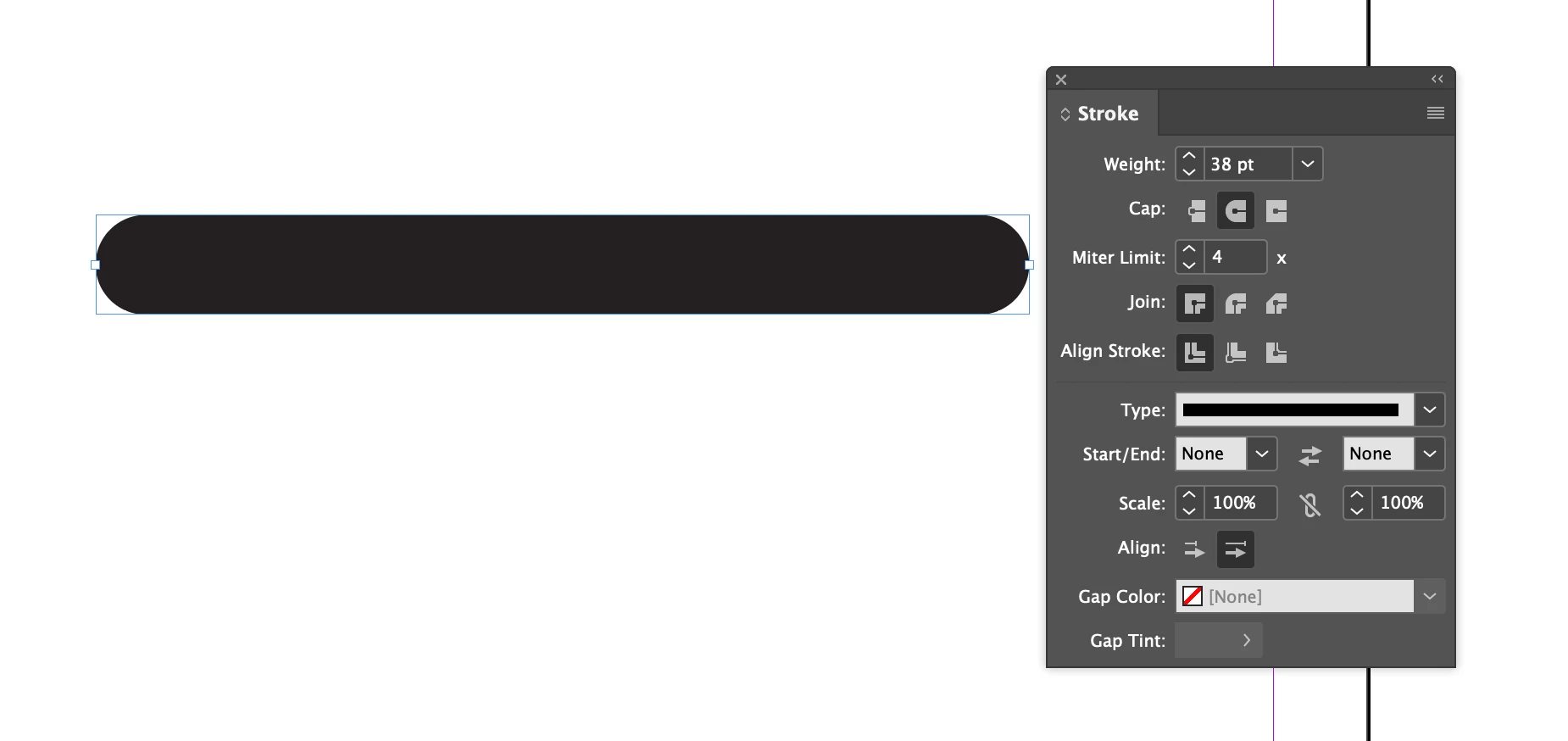
Go into the Stroke panel - you can choose rounded line ends there. 

1 reply

SJRiegelCorrect answer
Legend
May 6, 2021

Go into the Stroke panel - you can choose rounded line ends there. 

Admiral Adama
Inspiring
May 6, 2021

Thank you so much! I swear I'm not an idiot. I haven't been using InDesign long, and I just didn't know a line was called a Stroke. to be fair, I must have looked at the Windows list of panels a hundred times and I never even noticed Stroke. Thank you so much, friend!